
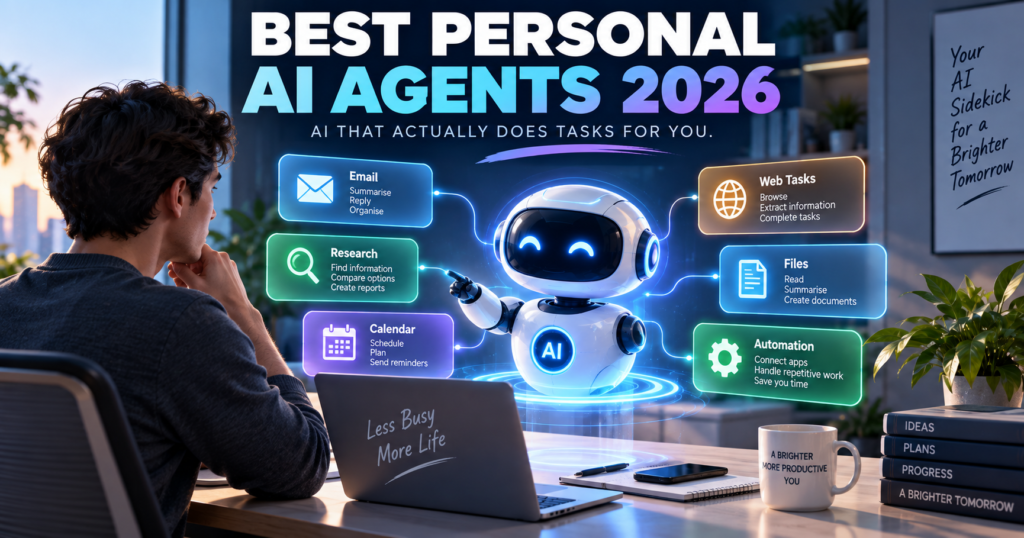
AI assistants used to wait for questions.
Personal AI agents are starting to do the work instead.
You can now ask an AI agent to research a product, organize information, browse websites, prepare reports, monitor topics, automate repetitive tasks, manage parts of your inbox, or complete multi-step online work.
That is a major difference.
A chatbot might tell you how to organize a trip.
A personal AI agent can potentially research flights, compare hotels, build an itinerary, and help you work through the booking process.
But not every product marketed as an “AI agent” is equally autonomous.
Some are powerful task executors. Others are closer to traditional AI assistants with a few agentic features.
In this Digital Discite guide, we compare 10 of the best personal AI agents in 2026, what they can actually do, their free or entry-level access, and which type of user each one suits.
If your main priority is spending nothing, start with our guide to the 10 Best Free AI Agents You Can Use in 2026.
Table of Contents
Best Personal AI Agents in 2026: Quick Comparison
| Personal AI Agent | Best For | Can Take Actions? | Free Access? | Technical Skill |
|---|---|---|---|---|
| Manus | General autonomous tasks | Yes | Yes | Beginner |
| Perplexity Comet | Web browsing and research | Yes | Browser is free; advanced agent usage varies | Beginner |
| Gemini | Google ecosystem and scheduled routines | Yes, depending on feature/access | Yes, with limits | Beginner |
| ChatGPT Work | Complex multi-step projects | Yes | No | Beginner |
| Zapier Agents | App automation | Yes | Yes | Beginner |
| Relevance AI | Custom personal/work agents | Yes | Yes | Beginner–Intermediate |
| Genspark | Research and content tasks | Yes | Yes | Beginner |
| Lindy | Email, meetings and daily work | Yes | Trial/paid access | Beginner |
| n8n | Advanced personal automation | Yes | Self-hosted | Intermediate |
| Claude | Knowledge work and computer-assisted tasks | Depending on environment/features | Yes for core Claude | Beginner–Intermediate |
Important: AI-agent features and limits are changing rapidly. A platform may offer a free chatbot while reserving its more autonomous features for paid plans.
What Is a Personal AI Agent?
A personal AI agent is an AI system that can work toward a goal and perform multiple steps on your behalf.
Instead of requiring a new prompt after every step, an agent can often determine what needs to happen next.
For example, imagine giving this instruction:
“Find five highly rated hotels near Central Park for my dates, compare their prices and amenities, and prepare a shortlist.”
A traditional chatbot might explain where to search.
A capable personal AI agent can potentially:
- Search the web.
- Visit relevant pages.
- Gather hotel information.
- Compare options.
- Organize the results.
- Present a shortlist.
Depending on the agent and permissions you provide, some can go further and interact with websites or connected applications.
That is what separates agentic AI from ordinary AI chat.
Personal AI Agent vs AI Assistant
These terms are often used interchangeably, but there is an important difference.
| Feature | AI Assistant | Personal AI Agent |
|---|---|---|
| Answers questions | Yes | Yes |
| Writes content | Yes | Yes |
| Researches information | Yes | Yes |
| Breaks goals into steps | Sometimes | Yes |
| Uses external tools | Sometimes | Often |
| Interacts with websites | Limited | Often |
| Performs actions | Limited | Yes |
| Handles multi-step jobs | Limited | Core capability |
| Can run scheduled work | Sometimes | Often |
| Requires constant prompting | Usually more | Usually less |
The distinction is becoming less clear because major AI assistants are steadily gaining agentic capabilities.
The better question in 2026 is therefore:
What can this AI actually do for me after I give it a goal?
Let’s look at the options.
1. Manus — Strong General-Purpose Personal AI Agent
Best for: Research, planning, reports, web tasks and multi-step work
Manus is one of the clearest examples of the shift from AI chatbot to AI agent.
Instead of simply answering a question, Manus can work through a multi-step assignment.
You can give it a goal and allow it to determine many of the intermediate steps.
For example:
“Research the best destinations in Europe for a seven-day trip in October, compare approximate costs and weather, and create an itinerary.”
That type of request combines research, comparison, reasoning and organization.
What Can Manus Do?
Manus can be useful for:
- Web research
- Travel planning
- Market research
- Product comparisons
- Data analysis
- Report creation
- Content research
- File processing
- Multi-step tasks
- Scheduled work
Free Access
Manus currently provides free users with an initial credit allocation plus 300 daily refresh credits.
Credits are consumed when the agent is actively processing tasks.
This makes the free version useful for testing the platform before deciding whether autonomous AI is valuable enough for your workflow.
Why It Stands Out
The biggest advantage is that you don’t have to build the agent yourself.
There is no visual automation canvas to configure.
You describe the outcome you want.
That makes Manus particularly accessible for people experiencing autonomous AI for the first time.
Limitations
Complex jobs consume more credits.
You should also review important results before using them because autonomous research does not guarantee that every source or conclusion will be correct.
Best for: Students, researchers, creators, freelancers and professionals who want a general-purpose agent.
2. Perplexity Comet — Excellent for Agentic Web Browsing
Best for: Research, browsing, online chores and working across websites
Perplexity’s Comet turns the browser itself into an AI-assisted workspace.
Instead of copying information from multiple tabs into an AI chatbot, Comet Assistant can work alongside your browsing.
Perplexity describes Comet Assistant as agentic AI that can handle increasingly complex jobs across websites.
Potential use cases include:
- Planning trips
- Researching purchases
- Job-search research
- Comparing information
- Working across multiple tabs
- Handling repetitive online chores
- Summarizing pages
- Finding information while browsing
This makes Comet particularly interesting because much of our daily digital life already happens inside a browser.
Is Comet Free?
The Comet browser itself is available free.
However, Perplexity’s current plan comparison distinguishes the free Standard plan from paid access to Browser Agent/Comet Assistant queries. In other words, don’t assume that downloading the browser gives you unlimited autonomous agent usage.
Why It Stands Out
Comet reduces the gap between asking an AI a question and letting AI work with the websites you are already using.
Best for: Heavy web users, researchers, shoppers, travelers and professionals who spend much of their day in a browser.
3. Google Gemini — Great for Personal Routines and Google Users
Best for: Gmail, Calendar, Google services and recurring information tasks
Gemini becomes especially useful as a personal agent when your digital life already revolves around Google’s ecosystem.
One particularly useful feature is Scheduled Actions.
You can ask Gemini to prepare recurring information automatically.
Examples include:
- Daily news digests
- Calendar summaries
- Email and task summaries
- Weekly learning updates
- Daily topic tracking
- Creative prompts
- Recurring research summaries
Google currently allows up to 10 active scheduled actions.
Gemini can also work with connected applications when appropriate permissions are provided.
Google has additionally been rolling out more advanced agentic capabilities, including browser-based task execution and its newer personal-agent experiences, although availability can depend on account, subscription and region.
Why It Stands Out
Gemini makes sense if the information needed to help you already lives in Google’s ecosystem.
You don’t necessarily need to create complicated workflows.
Limitations
Some of Google’s most advanced agent features are still being rolled out gradually and may be restricted by country, device or subscription.
Best for: Gmail, Google Calendar and Google Workspace users who want AI incorporated into everyday routines.
4. ChatGPT Work — Powerful for Longer Multi-Step Projects
Best for: Research, analysis, files and producing finished deliverables
ChatGPT’s agentic experience has evolved considerably.
OpenAI now positions ChatGPT Work for longer, more involved assignments.
It can research and analyze information, work across connected applications and files, navigate supported websites, and create finished outputs such as documents, spreadsheets, presentations and reports.
That changes the interaction from:
“Tell me how to make this report.”
to:
“Research this subject and produce the report.”
Examples of suitable tasks include:
- Researching competitors
- Analyzing files
- Working across connected information
- Preparing presentations
- Building spreadsheets
- Producing reports
- Handling multi-step browser workflows
- Running scheduled tasks
Is It Free?
No.
OpenAI’s current documentation says these longer-running agentic capabilities are rolling out on paid plans rather than the Free tier.
That is an important distinction if you’re comparing personal agents based on price.
For zero-cost options, see Digital Discite’s Best Free AI Agents in 2026.
Why It Stands Out
The biggest advantage is combining research, reasoning, files, applications and finished artifacts in one environment.
Limitations
Agentic features are plan-dependent, and users should still review important actions and outputs.
Best for: Professionals, researchers, creators and knowledge workers with complex multi-step assignments.
5. Zapier Agents — Best for Connecting Your Everyday Apps
Best for: Automating repetitive tasks across applications
Your personal work probably doesn’t happen in one application.
You may use:
- Gmail
- Google Sheets
- Slack
- Notion
- Calendar
- CRM software
- Project-management tools
- Cloud storage
Zapier Agents is designed for situations where AI needs to interact with this broader software ecosystem.
An agent can combine AI reasoning with connected data and automated actions.
For example, you might create an agent that helps research information, summarizes it and then uses another connected tool as part of the workflow.
Free Plan
Zapier currently provides an Agents Free plan with:
400 activities per month
It also includes web browsing, live data sources and Chrome-extension access.
Be careful with the word “activity.”
A single agent run can perform multiple activities, so 400 activities does not necessarily mean 400 complete jobs.
Why It Stands Out
Zapier’s strength is integrations.
If your personal agent needs to work across many apps, integrations can matter more than having the smartest chatbot.
Limitations
Complex workflows can consume your monthly activity allowance quickly.
Best for: Freelancers, marketers, creators and professionals who use multiple web applications.
6. Relevance AI — Best for Building Your Own Personal AI Workforce
Best for: Custom agents with specialized roles
What if you don’t want one general AI assistant?
You might want:
- One research agent
- One email agent
- One marketing agent
- One sales agent
- One reporting agent
Relevance AI is built around creating specialized AI agents and workforces.
Its free plan currently includes 200 actions per month, unlimited agents and tools, access to integrations, one workforce, one user and one project.
That makes it particularly interesting if you want to experiment with building multiple specialized agents without immediately paying for the platform.
Example
A creator could theoretically build separate agents for:
Agent 1: Research new content ideas.
Agent 2: Organize research.
Agent 3: Prepare briefs.
Agent 4: Monitor recurring information.
Instead of asking one chatbot to behave differently every time, each agent can have a defined job.
Pros
- Custom agents
- Large integration ecosystem
- Free entry tier
- Multi-agent/workforce concept
- No traditional programming required for many workflows
Limitations
The free plan’s 200 actions will not support unlimited automation.
Best for: Entrepreneurs, marketers, creators, agencies and people interested in building specialized AI workers.
7. Genspark — Useful All-in-One Agent Workspace
Best for: Research, content, information gathering and AI-created outputs
Genspark has expanded from AI search into a broader collection of AI agents and creation tools.
Its platform can help with research-oriented and content-oriented tasks, making it another interesting option for people who want more than simple conversational AI.
Depending on your plan and available features, Genspark includes tools around areas such as:
- AI chat
- Research
- Slides
- Content creation
- Coding
- Images
- Agentic workflows
Free Access
Genspark currently lists a Free Plan providing basic access with standard features.
More extensive agent and creation capabilities are available on paid tiers with larger credit allocations.
Why It Stands Out
Genspark tries to bring several AI tasks into one environment rather than requiring a separate application for every type of output.
Limitations
You need to pay attention to which agents and features are included with your current tier.
Best for: Researchers, students, content creators and users who want several AI creation capabilities in one platform.
8. Lindy — Strong for Email, Meetings and Daily Administrative Work
Best for: Inbox management, meetings, scheduling and work routines
Lindy takes a different approach.
Its goal is closer to providing an AI teammate that handles parts of your everyday work.
Current capabilities include areas such as:
- Inbox management
- Drafting email replies
- Meeting notes
- Meeting scheduling
- Meeting preparation
- Follow-ups
- Daily briefs
- Scheduled routines
- Connected tools
- Computer use
This makes Lindy particularly interesting for people whose biggest problem isn’t writing content.
It is administrative overload.
Free Access
Lindy’s current pricing is primarily paid.
Its Plus plan is listed at $29.99 per user per month with 3,000 credits.
The company currently offers a limited free-trial route for eligible new teammates joining through Slack rather than a normal permanent free personal tier.
Approval Controls
One useful feature is approval for actions with outside impact.
For example, Lindy says actions such as sending an email or publishing a document wait for approval.
That type of human control is important for personal agents.
Best For
Busy professionals, founders and people who spend significant time managing meetings and email.
9. n8n — Best for Advanced Personal Automation
Best for: People who want complete control over their automated workflows
n8n is not the easiest personal AI agent on this list.
But it may be one of the most flexible.
It allows you to create automated workflows that connect:
- AI models
- APIs
- Databases
- Web services
- Business applications
- Custom logic
With AI Agent nodes and integrations, technically inclined users can create powerful personal automation systems.
For example, you could build a workflow that:
- Receives information.
- Sends it to an AI model.
- Classifies it.
- Looks up additional data.
- Creates an output.
- Stores the result.
- Notifies you.
Is n8n Free?
n8n has a self-hosted Community Edition.
However, free software does not necessarily mean a zero-cost setup.
You may still pay for:
- Hosting
- AI API usage
- Servers
- External services
Why It Stands Out
Control.
Instead of accepting the restrictions of a closed AI assistant, technical users can design exactly how their automation should operate.
Limitations
It has a much steeper learning curve than Manus, Gemini or Comet.
Best for: Developers, automation enthusiasts, agencies and technically confident users.
10. Claude — Excellent for Knowledge Work With Growing Agentic Capabilities
Best for: Long documents, reasoning, coding and knowledge work
Claude remains particularly strong for tasks involving substantial amounts of information.
Anthropic has continued improving Claude’s abilities around:
- Long-context reasoning
- Coding
- Agent planning
- Computer use
- Knowledge work
- Complex documents
Claude’s computer-use technology is particularly important for agentic AI because it enables AI systems, in supported environments, to interact with graphical software more like a person.
Instead of requiring every service to provide a special API, an AI can potentially interpret what appears on a computer screen and interact with it.
Free Access
Claude provides a free consumer tier, although access to models, usage and specific agentic capabilities varies by plan and product.
Do not assume every computer-use or autonomous feature is included simply because basic Claude access is free.
Why It Stands Out
Claude is particularly compelling when the “task” involves understanding a large amount of information before taking the next step.
Limitations
Some agentic functionality depends on the environment and plan rather than being a universal one-click personal agent.
Best for: Writers, developers, researchers and knowledge workers.
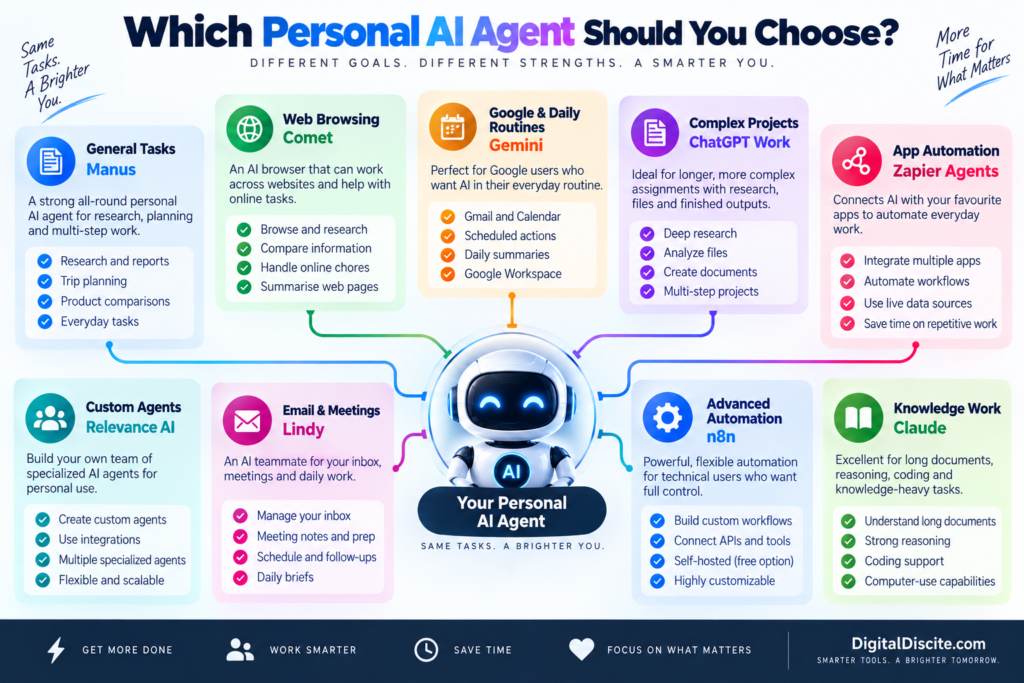
Which Personal AI Agent Should You Choose?
There isn’t one correct choice because these tools solve different problems.
Choose Manus if…
You want to give an AI a multi-step assignment and let it work through much of the process for you.
Choose Comet if…
Most of the tasks you want AI to help with happen on websites.
Choose Gemini if…
Your personal digital life revolves around Gmail, Calendar and Google’s ecosystem.
Choose ChatGPT Work if…
You want AI to research, analyze files and produce substantial finished deliverables from complex assignments.
Choose Zapier Agents if…
Your biggest goal is connecting AI with the applications you already use.
Choose Relevance AI if…
You want to create several specialized agents instead of relying on one general assistant.
Choose Genspark if…
You want research and AI creation capabilities in one environment.
Choose Lindy if…
Email, meetings and administrative work consume too much of your day.
Choose n8n if…
You want maximum automation control and don’t mind a technical learning curve.
Choose Claude if…
Your workflow revolves around documents, coding, reasoning and knowledge-heavy work.
7 Real Tasks a Personal AI Agent Can Help With
The best way to understand agents is through actual tasks.
1. Research a Purchase
Instead of opening 20 tabs yourself, ask an agent to compare products based on your requirements.
It can potentially gather:
- Prices
- Specifications
- Reviews
- Advantages
- Disadvantages
You still make the final buying decision.
2. Plan a Trip
An agent can research:
- Destinations
- Hotels
- Transportation
- Attractions
- Restaurants
- Estimated costs
It can then organize that information into an itinerary.
3. Prepare Your Morning Brief
A scheduled agent could gather:
- Calendar events
- Important emails
- Tasks
- News
- Project updates
and prepare one morning summary.
4. Research a Topic
Instead of manually searching dozens of sources, an agent can collect information and organize findings into a report.
5. Manage Repetitive Email Work
With appropriate permissions, agents can help classify emails, summarize messages and prepare draft replies.
For important communication, keep human approval enabled.
6. Monitor Something for You
Agents and scheduled AI workflows can monitor recurring information such as:
- Industry news
- Competitors
- Topics
- Project updates
- New content
and report meaningful changes.
7. Automate Repetitive Digital Work
The biggest opportunity may be boring work.
Copying information.
Formatting data.
Moving information between apps.
Preparing repetitive summaries.
Checking the same sources every day.
These tasks may not sound impressive in an AI demo, but automating them can save meaningful time.
What Personal AI Agents Still Cannot Reliably Do
The excitement around AI agents can create unrealistic expectations.
A personal AI agent is not a perfect digital employee.
Agents can still:
- Misunderstand instructions
- Use outdated information
- Select the wrong website
- Make reasoning errors
- Misinterpret interfaces
- Fail during long workflows
- Produce incorrect summaries
- Require human intervention
The consequences become more serious when the agent has permission to perform actions.
A chatbot giving you a wrong answer is one problem.
An agent taking the wrong action is another.
That is why important actions should still require confirmation.
Are Personal AI Agents Safe?
They can be useful, but permissions matter.
An agent becomes more powerful when you connect:
- Calendar
- Cloud storage
- Browsing history
- Documents
- Business applications
- Personal accounts
Those connections also increase the amount of information the agent can potentially access.
Before connecting sensitive accounts:
- Review the provider’s privacy policy.
- Check what information the agent can access.
- Give it only the permissions it actually needs.
- Enable approval for external actions.
- Avoid providing unnecessary sensitive information.
- Periodically review connected applications.
The goal should be useful autonomy with sensible control.
Free vs Paid Personal AI Agents
Free plans are excellent for testing agentic AI.
However, autonomous tasks can consume substantially more computing resources than simple chatbot questions.
That is why agent platforms commonly limit:
- Credits
- Activities
- Tasks
- Agent runs
- Browser actions
- Monthly usage
A good strategy is to start free whenever possible.
Give the agent a real task from your everyday life.
Then ask:
Did it actually save me time?
If the answer is yes, paid access becomes much easier to evaluate.
For a dedicated zero-cost comparison, read 10 Best Free AI Agents You Can Use in 2026.
You can also compare broader AI subscription costs in Digital Discite’s AI Tools Pricing Database 2026.
Personal AI Agents vs AI Automation Tools
Another important distinction is between an agent and traditional automation.
Traditional automation usually follows predefined rules:
If X happens → do Y.
An AI agent can potentially evaluate the situation and decide what action should happen next.
For example:
Traditional Automation
New email arrives → copy attachment to cloud storage.
AI Agent
New email arrives → understand what the email is about → decide whether it requires action → summarize it → prepare an appropriate response → ask you for approval.
This ability to reason between steps is what makes agentic automation so interesting.
However, traditional automation remains preferable when the workflow needs to be completely predictable.
Frequently Asked Questions
What is the best personal AI agent in 2026?
There is no single best option for every use case. Manus focuses on general autonomous tasks, Comet on web-based work, Gemini on Google’s ecosystem, ChatGPT Work on longer multi-step projects, Zapier Agents on integrations, and Lindy on email and meeting workflows.
What AI can actually do tasks for you?
Modern AI agents can research information, interact with supported websites and applications, organize data, prepare reports, automate workflows and perform other multi-step tasks. Exact capabilities depend on the agent and the permissions you provide.
Are personal AI agents free?
Some are. Manus, Zapier Agents and Relevance AI currently provide free entry tiers. Other platforms provide free basic AI access while reserving advanced agent capabilities for paid subscriptions.
What is the best free personal AI agent?
The answer depends on the task. Manus is useful for general autonomous work, Zapier Agents is useful for application automation, and Relevance AI is useful for creating custom agents.
Can an AI agent control my computer?
Some AI systems have computer-use capabilities that can interpret interfaces and interact with them. Availability and implementation differ significantly between platforms.
Can AI agents send emails?
Some can, provided you connect a supported email service and give the required permission. For important messages, approval before sending is strongly recommended.
Can an AI agent browse websites for me?
Yes. Browser-oriented agents can research websites and, depending on the platform, interact with web interfaces. Comet and several general-purpose agents are designed around this type of workflow.
Can AI agents work while I am away?
Some platforms support scheduled or background tasks. Availability varies by product and subscription.
Are AI agents better than ChatGPT?
That comparison is increasingly outdated because ChatGPT itself has agentic capabilities. The more useful distinction is between AI that mainly responds and AI that can execute a multi-step task using tools.
Will personal AI agents replace normal apps?
Probably not in the near term. Agents are increasingly becoming a layer that works across apps rather than replacing every specialized application.
Final Thoughts
The most important AI shift in 2026 is not simply that models can produce better answers.
It is that AI is increasingly able to take action.
Personal AI agents can research, browse, organize information, work across applications, automate routines and complete parts of multi-step digital tasks.
But choosing the right tool depends on where you want the work to happen.
Manus is built around general autonomous tasks.
Comet brings agentic AI into web browsing.
Gemini fits naturally into Google’s ecosystem.
ChatGPT Work focuses on substantial multi-step projects and finished outputs.
Zapier Agents connects AI with everyday applications.
Relevance AI lets you create specialized agents.
Genspark combines research and AI creation.
Lindy targets email, meetings and administrative work.
n8n provides much deeper automation control.
And Claude is especially relevant for knowledge-heavy and computer-assisted workflows.
Don’t choose an AI agent because it looks impressive in a demonstration.
Give it one repetitive task that currently takes you 30 minutes.
See whether it can complete the task accurately, safely and with less effort.
That is the real test of a useful personal AI agent.
For more comparisons, explore Digital Discite’s Best Tech Tools.