AI Tools

Best AI Browsers

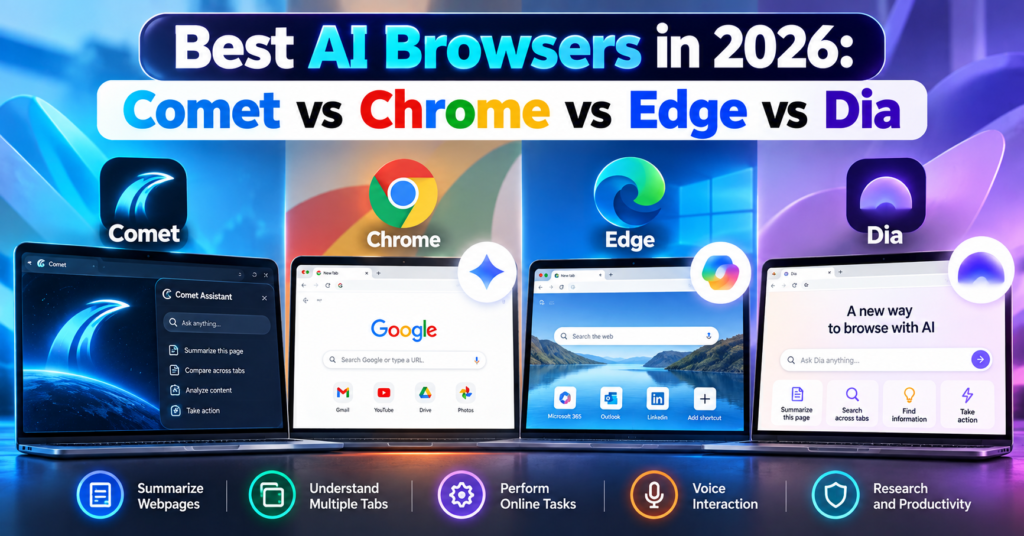
Best AI Browsers in 2026: Comet vs Chrome vs Edge vs Dia

Web browsers are changing.

For years, choosing a browser mostly came down to speed, extensions, privacy, and synchronization. In 2026, there is another major factor to consider: artificial intelligence.

A new category of AI browsers can summarize webpages, understand multiple open tabs, answer questions about what you are reading, remember context, and even perform certain online tasks for you.

Four browsers stand out in this new competition:

  • Perplexity Comet
  • Google Chrome with Gemini
  • Microsoft Edge with Copilot
  • Dia Browser

But which is the best AI browser in 2026?

The answer depends on whether you want AI for research, everyday browsing, work, automation, or productivity.

In this guide, we compare Comet vs Chrome vs Edge vs Dia, including their AI features, pricing, advantages, limitations, and ideal users.

What Is an AI Browser?

An AI browser is a web browser that integrates artificial intelligence directly into the browsing experience.

Instead of opening a website, copying information, switching to an AI chatbot, and pasting the content there, an AI browser can understand what you are already viewing.

Depending on the browser, you may be able to ask:

“Summarize this article.”

“Compare the products in these tabs.”

“What were the main differences between the three hotels I opened?”

“Find the webpage about AI agents I visited yesterday.”

More advanced AI browsers are moving beyond answering questions.

They can potentially navigate websites and complete multi-step tasks.

This development is part of the wider shift toward AI agents. If you want to understand how autonomous AI tools work outside browsers, read our guide to the 10 Best Free AI Agents You Can Use in 2026.

Best AI Browsers in 2026: Quick Comparison

FeatureCometChromeEdgeDia
AI assistantComet AssistantGeminiCopilotDia AI
Page summarizationYesYesYesYes with AI plan
Multi-tab understandingYesYesYesYes
Agentic web actionsYesYes, availability variesYes, through Copilot featuresTask-focused AI capabilities
Voice interactionYesAI features vary by platformYesVoice/dictation features
Browser history intelligenceYesAI context featuresYesYes
Built around AIYesNoIncreasinglyYes
Free browserYesYesYesYes
AI pricingFree + Perplexity paid tiersSome advanced features require eligible Google AI plansSome features/plans have limitsMain AI plan starts at $20/month
Best forAI researchGoogle usersMicrosoft/work productivityContext-heavy knowledge work

Feature availability can differ by device, region, account, subscription and browser version.

1. Perplexity Comet

Best for: AI-powered research and web automation

Perplexity Comet is one of the clearest examples of a browser designed around artificial intelligence from the beginning.

Instead of adding an AI chatbot to a traditional browser interface, Comet puts Comet Assistant directly into the browsing workflow.

The assistant can understand webpages, work with multiple tabs and perform certain browser actions.

What Can Comet Do?

Comet can help you:

  • Summarize webpages
  • Analyze PDFs
  • Ask questions about websites
  • Compare information across tabs
  • Navigate webpages
  • Fill forms
  • Draft content
  • Manage tabs
  • Use voice commands
  • Assist with online tasks

Its cross-tab capabilities are particularly useful.

Imagine researching four laptops.

Instead of manually creating a spreadsheet containing their specifications, you could open the product pages and ask Comet to compare them.

The same workflow can work for hotels, software, academic research, products and competitor analysis.

Comet Assistant

Comet Assistant lives directly inside the browser.

It understands the page you are viewing and can also reference specific tabs.

For example:

“Compare the pricing on these three tabs.”

or:

“Summarize these articles and tell me where they disagree.”

This makes Comet particularly attractive for people who regularly conduct online research.

Comet Can Perform Browser Actions

Comet goes beyond summarization.

Perplexity says its browser can navigate webpages, interact with web content, fill forms and perform certain online actions.

This moves Comet closer to an agentic browser rather than simply an AI chatbot attached to a browser.

Is Comet Free?

Yes.

The Comet browser is available free, although Perplexity also offers paid subscriptions and some advanced capabilities may depend on your plan.

You can visit the official Perplexity Comet website to check current availability.

We have also covered Comet separately in our detailed Perplexity Comet Browser Review 2026, where we look more closely at whether it can replace Chrome.

Comet Pros

  • Excellent AI research capabilities
  • Strong multi-tab understanding
  • Built-in AI assistant
  • Webpage summarization
  • Browser automation
  • Voice mode
  • Chrome data and extension importing
  • Available across major desktop and mobile platforms

Comet Cons

  • Much newer than Chrome and Edge
  • Agentic browsing introduces additional privacy considerations
  • Some advanced Perplexity capabilities may require paid access
  • Users heavily invested in Google or Microsoft ecosystems may prefer their respective browsers

2. Google Chrome With Gemini

Best for: Everyday browsing and Google ecosystem users

Chrome may look like the traditional option in this comparison, but describing Chrome as a normal non-AI browser is no longer accurate.

Google has integrated Gemini directly into Chrome.

Gemini can understand the webpage you are viewing, answer questions, summarize content and compare information across tabs.

Gemini in Chrome

Suppose you have several hotel pages open while planning a trip.

You could ask Gemini to compare information from those tabs rather than repeatedly switching between them.

Gemini in Chrome can also work with Google services such as:

  • Gmail
  • Google Calendar
  • Google Maps
  • YouTube

This ecosystem integration is one of Chrome’s biggest advantages.

For example, Gemini can help draft an email in Gmail or check information using Maps while you continue browsing.

Chrome Auto Browse

Chrome is also becoming more agentic.

Google’s auto browse capabilities allow Gemini to perform certain web tasks on behalf of users.

Examples provided by Google include organizing travel, updating recurring orders and handling other repetitive web activities.

Google has also integrated its broader agentic technology more deeply into Chrome.

However, availability of these capabilities varies depending on location, device and Google AI subscription.

Gemini Can Understand Multiple Tabs

One of the most important improvements is multi-tab reasoning.

Gemini can compare information from multiple webpages.

This makes Chrome much more competitive with AI-first browsers such as Comet.

Chrome Pros

  • Mature and widely supported browser
  • Gemini built into Chrome
  • Multi-tab AI analysis
  • Strong Google integration
  • Excellent extension ecosystem
  • Agentic browsing capabilities
  • Available across desktop and mobile
  • Familiar interface

Chrome Cons

  • Some advanced AI features require eligible subscriptions
  • AI features vary by region and platform
  • Less AI-first in design than Comet or Dia
  • Users who avoid the Google ecosystem may gain less from its biggest advantage

3. Microsoft Edge With Copilot

Best for: Windows users, productivity and Microsoft ecosystem users

Microsoft Edge has quietly become one of the most AI-focused mainstream browsers.

Its main AI system is Microsoft Copilot.

Copilot is integrated directly into Edge and can understand webpages, summarize information, answer questions and work with browser context.

Microsoft has gone further with Copilot Mode.

What Is Copilot Mode?

Copilot Mode is Microsoft’s AI-focused browsing experience inside Edge.

It combines browsing, search and AI assistance more closely.

Copilot can understand open tabs and browsing history to provide more contextual answers.

For example, you could ask:

“Which of the products I opened has the longest battery life?”

without manually copying information from every tab.

Copilot Vision

Edge also includes Copilot Vision.

Vision allows Copilot to understand what you are viewing and provide contextual assistance.

That creates a more visual interaction with the browser instead of relying entirely on text prompts.

Copilot Actions

Microsoft is also developing Edge around agentic actions.

Copilot Actions can perform certain online tasks rather than simply explain how to complete them.

Edge’s AI capabilities increasingly include:

  • Webpage summarization
  • Multi-tab reasoning
  • Browsing-history intelligence
  • Voice browsing
  • Product research
  • Price comparison
  • Video summarization
  • AI image generation
  • Tab organization
  • Agentic actions

For work environments, Microsoft’s integration with Microsoft 365 can make Edge especially attractive.

You can learn more through the official Microsoft Edge Copilot Mode page.

Edge Pros

  • Copilot built directly into Edge
  • Strong Windows integration
  • Multi-tab reasoning
  • Copilot Vision
  • Voice browsing
  • AI shopping tools
  • Microsoft 365 integration
  • Agentic capabilities
  • Mature Chromium-based browser

Edge Cons

  • Copilot Mode remains an evolving experience
  • Some AI features have usage or availability restrictions
  • Certain enterprise capabilities require Microsoft 365 Copilot
  • Feature availability varies between accounts and devices

4. Dia Browser

Best for: AI-assisted knowledge work and connected work apps

Dia takes another approach to the AI browser.

It is developed by The Browser Company, the team behind Arc.

Dia was created around a simple idea:

Your browser should understand the context of your work.

Rather than treating every tab as an isolated webpage, Dia is designed to let users work with information across tabs, browsing activity and connected applications.

Chat With Your Tabs

One of Dia’s fundamental ideas is the ability to chat with your tabs.

You might have several research pages open and ask Dia to summarize what you have discovered.

Or you could use context from your work tools when asking questions.

This makes Dia particularly interesting for people whose browser acts as their main workspace.

Dia Integrations

Dia has expanded its integrations with work applications.

Its paid AI offering can work with context from tools such as:

  • Gmail
  • Slack
  • Notion
  • Microsoft Outlook
  • GitHub
  • Google Calendar
  • Figma

That makes Dia less about traditional search and more about connecting information from your digital workspace.

Dia Search and Work Context

Dia has continued expanding contextual search in 2026.

For example, it can search previous chats and browsing history. Recent updates have also added deeper integrations such as Figma.

This can be useful when you remember seeing something but cannot remember exactly where.

Instead of manually searching through dozens of tabs and browser-history entries, you can ask Dia to retrieve relevant context.

Is Dia Free?

This requires an important distinction.

Dia offers a free browser plan, but its main AI capabilities are part of paid plans after the trial.

At the time of writing, Dia lists:

Better Browser — Free

Includes normal browser features such as profiles, tab groups, split view, ad/tracking blocking and cross-device sync.

Better Answers — $20/month

Adds AI chat across your tools, tabs and documents.

Better Days — $100/month

Adds substantially more AI usage along with features such as reports, recaps, meeting preparation and a Morning Brief.

Because AI pricing changes frequently, check the official Dia plans page before subscribing.

You can also compare wider AI subscription costs in our AI Tools Pricing Database 2026.

Dia Pros

  • Designed around AI-assisted work
  • Strong contextual understanding
  • Works across tabs and connected tools
  • Search across browser history
  • Work-app integrations
  • Clean productivity-focused design
  • Free browser tier

Dia Cons

  • Core AI capabilities require a paid plan after trial
  • $20/month may be difficult to justify for casual users
  • Smaller ecosystem than Chrome or Edge
  • Best features are targeted more toward knowledge workers

Comet vs Chrome vs Edge vs Dia: Which Has the Best AI?

There is no single answer because each browser approaches AI differently.

Choose Comet If You Do Lots of Research

Comet makes sense for researchers, students, marketers, writers and people who constantly compare information online.

Its combination of webpage understanding, cross-tab intelligence and browser actions makes research its strongest use case.

Choose Chrome If You Use Google Every Day

Chrome is particularly compelling if your digital life already revolves around Google’s services.

Gemini’s integration with Gmail, Calendar, Maps and YouTube makes Chrome much more than a normal browser with a chatbot.

Chrome also has the advantage of maturity, compatibility and an enormous extension ecosystem.

Choose Edge If You Use Windows and Microsoft 365

Edge is particularly attractive for Windows and Microsoft users.

Copilot Mode, Vision, multi-tab reasoning and Microsoft’s work ecosystem make it a strong productivity browser.

It is especially interesting for businesses already using Microsoft 365.

Choose Dia If Your Browser Is Your Workspace

Dia is aimed more directly at people who spend their workday inside the browser.

Its ability to connect information across tabs, history and apps such as Slack, Gmail, Notion, GitHub and Figma can be useful for professionals dealing with large amounts of digital context.

The downside is that the most interesting AI features are not included permanently in the free browser tier.

AI Browsers vs Traditional Browsers

The distinction between an “AI browser” and a “traditional browser” is becoming less meaningful.

Chrome and Edge demonstrate why.

Both started as conventional browsers and are now receiving increasingly sophisticated AI capabilities.

Meanwhile, Comet and Dia were designed during the generative-AI era.

The bigger shift is therefore not:

AI browsers vs normal browsers.

It is:

Browsers that display the web vs browsers that understand and act on the web.

That second category is becoming much more important in 2026.

Are AI Browsers Safe?

AI browsers introduce privacy and security questions that traditional browsers did not have to handle at the same level.

For an AI assistant to understand your browsing context, it may need access to information such as:

  • Current webpages
  • Open tabs
  • Browsing history
  • Connected applications
  • Documents
  • Account information

Agentic browsers can potentially go further by interacting with websites on your behalf.

That makes permissions extremely important.

Before giving an AI browser access to sensitive accounts, review:

  1. What browsing information the AI can access.
  2. Whether the feature can be disabled.
  3. What information is sent to cloud servers.
  4. Whether connected apps can be removed.
  5. Whether confirmation is required before sensitive actions.

Google and Microsoft have both introduced protections around prompt injection and sensitive actions, while Comet and Dia provide their own privacy and security controls.

However, no AI agent should be assumed to be error-free.

Be particularly cautious when allowing browser agents to interact with financial, medical, confidential business or other sensitive information.

Can AI Browsers Replace Chrome?

This question is becoming more complicated because Chrome itself is now an AI browser.

Comet and Dia originally stood out because AI was integrated much more deeply into their browsing experience.

But Google and Microsoft are moving quickly.

Chrome now combines Gemini with multi-tab reasoning and agentic browsing.

Edge combines Copilot with browsing context, Vision and actions.

That means newer AI browsers must compete not only on AI quality but also on:

  • Speed
  • Privacy
  • Compatibility
  • Extensions
  • Mobile support
  • Reliability
  • Ecosystem integrations
  • Price

Comet and Dia can still offer different experiences, but Chrome and Edge are no longer standing still.

Which AI Browser Should You Try First?

Your easiest approach is to test the browsers using the same real task.

For example, open several hotel pages and ask each AI browser:

“Compare these hotels by nightly price, location, guest rating, parking and breakfast. Put the results in a table and tell me what information is missing.”

Then try another research task involving long articles or product comparisons.

Look at:

  • Accuracy
  • Speed
  • Sources
  • Cross-tab understanding
  • Ease of use
  • Number of manual steps
  • Privacy controls
  • AI usage limits

This gives you a much better answer than choosing a browser because of marketing claims.

Frequently Asked Questions

What is the best AI browser in 2026?

Comet, Chrome, Edge and Dia are among the major AI-browser options in 2026. Comet emphasizes AI-assisted research and browser actions, Chrome combines Gemini with Google’s ecosystem, Edge integrates Copilot and Microsoft services, while Dia focuses heavily on contextual knowledge work.

Is Comet better than Chrome?

Comet offers an AI-first browsing experience and is particularly useful for research. Chrome provides a more mature browser ecosystem while increasingly offering comparable AI capabilities through Gemini. Read our full Perplexity Comet Browser Review 2026 for a detailed comparison.

Is Google Chrome an AI browser now?

Yes. Gemini is integrated into Chrome in supported markets and can summarize webpages, compare information across tabs and interact with Google services. Google has also introduced agentic browsing capabilities.

Is Microsoft Edge an AI browser?

Yes. Microsoft describes Edge as an AI browser and integrates Copilot directly into it. Copilot Mode provides additional AI-oriented browsing features.

Is Dia Browser free?

Dia has a free browser plan. However, its main AI capabilities are included in paid plans after the trial. Dia currently lists its Better Answers AI plan at $20 per month.

Can AI browsers perform tasks for me?

Some can. Agentic browser features can navigate webpages and perform certain online actions. The exact capabilities depend on the browser, account, device, region and subscription.

Which AI browser is best for students?

Comet can be particularly useful for research and summarizing multiple sources, while Chrome with Gemini can also summarize and compare information across tabs. Students should verify AI-generated summaries against original sources before using them academically.

Which AI browser is best for work?

Edge can be particularly useful in Microsoft 365 environments, while Dia focuses heavily on context from workplace tools. Chrome is attractive for Google Workspace users, and Comet can be useful for research-heavy professional workflows.

Are AI browsers free?

Chrome, Edge and Comet can be downloaded for free. Dia also has a free browser tier, although its primary AI capabilities require a paid plan after the trial. Some advanced AI functionality in Chrome, Edge and Comet may also depend on subscriptions, usage limits, region or account eligibility.

Final Thoughts

AI browsers are becoming one of the most interesting software categories of 2026.

Perplexity Comet shows what happens when a browser is designed around AI-assisted research and action.

Google Chrome demonstrates how Gemini can transform the world’s most established browser into an increasingly intelligent browsing assistant.

Microsoft Edge combines Copilot with productivity, browsing context and agentic features.

Dia takes a different path by trying to understand not just the webpage in front of you, but the wider context of your work.

The most important development is bigger than any one browser.

For decades, browsers mainly helped us find and display information.

AI browsers are increasingly trying to understand that information and act on it.

That shift could fundamentally change how we use the web over the next few years.

For more AI software, agents and productivity tools, explore Digital Discite’s Best Tech Tools.

Best AI Browsers in 2026: Comet vs Chrome vs Edge vs Dia Read More »
Perplexity Comet Browser review

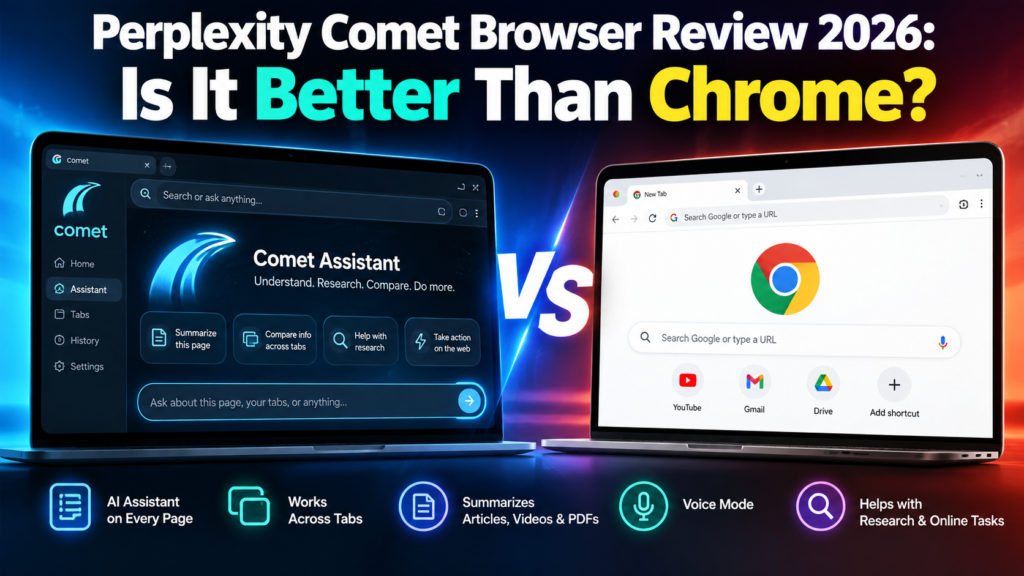
Perplexity Comet Browser Review 2026: Is It Better Than Chrome?

The Perplexity Comet Browser is no longer an experimental AI browser available only to a small group of users. Comet is now available for free worldwide, making it one of the most interesting alternatives to Google Chrome in 2026.

But Comet is not simply Chrome with an AI chatbot added to the side.

Perplexity designed Comet around an AI assistant that can understand webpages, work across tabs, summarize information, help with research, and assist with online tasks.

That raises an obvious question:

Is Perplexity Comet actually better than Google Chrome?

For people who spend hours researching, comparing products, reading long articles, studying, or working across dozens of browser tabs, Comet offers some impressive advantages. However, Chrome remains a mature browser with a huge ecosystem and increasingly powerful Gemini-based AI features.

In this Perplexity Comet Browser review 2026, we will look at its features, advantages, limitations, privacy, and how it compares with Google Chrome.

What Is Perplexity Comet Browser?

Comet is an AI-powered web browser developed by Perplexity.

Instead of treating artificial intelligence as an optional feature, Comet places AI directly inside the browsing experience.

Its main feature is Comet Assistant, which appears alongside the websites you visit. The assistant can understand the content of your open pages and help you work with that information.

For example, while reading a long report, you could ask Comet:

“Summarize the important points from this page.”

Or if several tabs contain different products:

“Compare the products in these tabs and create a table showing price, features, pros and cons.”

This is where Comet begins to feel different from a traditional browser.

Perplexity says Comet users can use the assistant for research, coding, meetings, shopping and other online activities.

If you are interested in AI systems that can go beyond ordinary chatbot conversations, you can also read our 10 Best Free AI Agents You Can Use in 2026.

Is Perplexity Comet Free in 2026?

Yes.

Perplexity Comet can now be downloaded for free.

Comet originally launched in limited release in July 2025. Perplexity later opened the browser to everyone worldwide for free after millions of people joined its waiting list.

You can download it from the official Perplexity Comet website.

The browser itself being free does not mean every premium Perplexity feature or AI allowance is unlimited. Perplexity continues to offer paid subscriptions with additional capabilities and usage allowances.

For a wider comparison of AI subscription costs, see our AI Tools Pricing Database 2026.

Perplexity Comet Browser: Key Features

1. Built-In Comet Assistant

The biggest difference between Comet and a conventional browser is its integrated AI assistant.

You do not always have to copy text from a webpage, open another AI tool, paste the information, and then ask your question.

Comet Assistant can work with the webpage you are already viewing.

You can ask questions about:

  • Articles
  • Research
  • Products
  • Documents
  • Images
  • Websites
  • Multiple open tabs

This can make web research considerably faster.

2. Ask Questions About Any Webpage

Imagine opening a 5,000-word article when you only need three pieces of information.

Instead of reading everything, you can ask Comet questions about the page.

For example:

“What are the main conclusions?”

“Explain this article in simple language.”

“What are the advantages and disadvantages mentioned here?”

This is particularly useful for students, researchers, marketers and professionals who regularly process large amounts of information.

3. Cross-Tab Intelligence

This may be one of Comet’s most useful features.

Comet can work with information across multiple tabs.

Suppose you are researching laptops and have five different models open.

Instead of manually switching between every tab, you could ask Comet to compare them.

The same idea can be applied to:

  • Hotels
  • Flights
  • Software
  • Research papers
  • News reports
  • AI tools
  • Competitors
  • Online products

This turns the browser into more of a research workspace.

4. Instant Webpage Summaries

Comet also provides quick summarization.

According to Perplexity’s documentation, its summarization capabilities can work with content including articles, videos, PDFs and social media pages.

For someone who regularly researches online, this can save a considerable amount of reading time.

5. Voice Mode

Comet supports voice interaction as well.

Instead of typing every request, users can talk to the assistant and ask questions while browsing.

Voice interaction can be useful when multitasking or when you want to quickly ask questions about information on the screen.

6. Chrome Data and Extension Support

Moving away from Chrome can be difficult because users may have years of bookmarks, saved passwords and browser extensions.

Perplexity has tried to make switching easier.

Its Comet documentation says users can import Chrome data including:

  • Bookmarks
  • Saved passwords
  • Autofill information
  • Browsing history
  • Preferences
  • Chrome extensions

This significantly lowers the barrier for existing Chrome users who simply want to test Comet.

Perplexity Comet vs Google Chrome

Here is the practical comparison.

FeaturePerplexity CometGoogle Chrome
Free browserYesYes
Built-in AIYes, Comet AssistantYes, Gemini integration
Ask questions about webpagesYesYes, through supported Gemini features
Cross-tab AI researchStrong focusAvailable/evolving through Gemini
Webpage summarizationYesAI features available
Chrome extensionsSupportedNative
Built-in ad blockingYesMore limited natively
AI-first interfaceYesNo — traditional browser enhanced with AI
Browser maturityNewerExtremely mature
Google ecosystemLimitedExcellent
Best suited forAI research and assisted browsingGeneral browsing and Google ecosystem users

Where Comet Is Better Than Chrome

AI Is Central to the Experience

Chrome has powerful AI capabilities, and Google has continued expanding Gemini throughout Chrome.

However, Chrome is fundamentally a traditional web browser that is becoming more intelligent.

Comet approaches the problem from the opposite direction.

It is designed around the idea that an AI assistant should accompany you while browsing.

That difference becomes noticeable when researching across many websites.

Research Is Faster

Comet is particularly attractive for users who constantly perform tasks such as:

  • Comparing information
  • Summarizing pages
  • Researching competitors
  • Reading reports
  • Finding answers across tabs
  • Organizing online information

Rather than repeatedly moving information between your browser and an AI chatbot, much of the interaction happens directly inside the browser.

Built-In Ad Blocking

Comet also includes built-in ad blocking.

Perplexity says this is partly intended to reduce tracking from advertising networks while also providing a cleaner browsing experience.

For users accustomed to installing separate ad-blocking extensions, having the functionality built into the browser is convenient.

Where Google Chrome Is Still Better

Comet has some impressive AI features, but that does not automatically make it the best browser for everyone.

Chrome Is More Mature

Google Chrome has been developed for many years and has an enormous global user base.

That maturity matters.

Users rely on Chrome for compatibility with websites, enterprise environments, extensions, synchronization and countless existing workflows.

Comet is much newer.

New AI browsers can therefore experience changes in functionality more frequently than established browsers.

Google Ecosystem Integration

If most of your digital life revolves around:

  • Gmail
  • Google Drive
  • Google Docs
  • Google Calendar
  • Android
  • Google Search
  • Google Password Manager

Chrome remains extremely convenient.

Google is also aggressively adding Gemini and agentic features to its products, so the AI gap between traditional browsers and AI-first browsers is becoming smaller.

Chrome’s AI Is Improving Quickly

Comet is not competing against the Chrome of several years ago.

Google announced numerous AI and agentic upgrades across Search, Gemini and Chrome during Google I/O 2026.

That means the browser competition is increasingly becoming:

Comet Assistant vs Gemini-powered Chrome

rather than simply:

AI browser vs normal browser.

Is Perplexity Comet Safe?

Comet includes many protections expected from a modern browser, including safe-browsing protections, a password manager, security updates and privacy controls.

Perplexity says much of Comet’s browsing data is stored locally on the user’s device.

However, there is an important distinction when using AI.

When you ask Comet Assistant to perform a task requiring personal context, information such as the current webpage and relevant browsing history may be sent to Perplexity’s servers so the request can be completed.

Perplexity has also introduced a Privacy Snapshot that lets users review privacy settings and control where Comet Assistant can take actions.

Users can, for example:

  • Disable Comet Assistant
  • Prevent the assistant from acting on selected websites
  • Manage ad blocking
  • Review browser permissions
  • Adjust privacy settings

You can read the official Comet privacy and security information before allowing an AI assistant to interact with sensitive accounts.

As with any AI browser, avoid giving unnecessary access to financial, confidential or highly sensitive information.

Who Should Use Comet?

Comet makes the most sense for people who spend significant amounts of time researching online.

It may be particularly useful for:

Students: Summarizing educational material and comparing sources.

Researchers: Processing information across multiple tabs.

Marketers: Studying competitors, products and industry information.

Content creators: Researching topics and organizing sources.

Developers: Understanding documentation and technical webpages.

Online shoppers: Comparing products and specifications.

Professionals: Working through large amounts of online information more efficiently.

Who Should Stay With Chrome?

Chrome may still be the better option if you primarily want a familiar, stable browser and do not regularly need AI assistance.

It also makes sense for users heavily dependent on Google’s ecosystem.

There is no requirement to completely replace Chrome either.

You can keep Chrome as your main browser and install Comet separately for research-intensive work.

That is probably one of the easiest ways to decide whether an AI browser genuinely improves your workflow.

Pros and Cons of Perplexity Comet

Pros

  • Free to download
  • AI assistant built directly into the browser
  • Excellent for web research
  • Can understand information across tabs
  • Quickly summarizes webpages
  • Supports voice interaction
  • Can import Chrome data
  • Supports Chrome extensions
  • Built-in ad blocking
  • Useful for comparing information

Cons

  • Much newer than Chrome
  • AI features introduce additional privacy considerations
  • Some advanced Perplexity capabilities may require paid access or have usage limits
  • Features and allowances can change as the product evolves
  • Chrome remains stronger for deeply integrated Google workflows

Is Perplexity Comet Better Than Chrome?

Comet is better than Chrome for some workflows, but it is not universally a better browser.

For AI-assisted research, webpage understanding, summarization and working across multiple tabs, Comet has a compelling approach. Its biggest advantage is that AI feels like part of the browser rather than a separate destination.

Chrome, however, remains the stronger choice for users who prioritize browser maturity, established workflows and deep integration with Google’s ecosystem.

The most interesting development is not necessarily whether Comet will replace Chrome.

It is that web browsers are turning into AI assistants.

Comet is one of the clearest examples of that transition.

Frequently Asked Questions

Is Perplexity Comet free?

Yes. Perplexity has made the Comet browser available to download for free worldwide. Some advanced Perplexity services, subscription features or usage allowances may still require payment.

Is Comet better than Google Chrome?

It depends on your workflow. Comet is particularly strong for AI-assisted research, summarization and cross-tab analysis. Chrome remains highly mature and deeply integrated with Google’s services.

Can Comet use Chrome extensions?

Yes. Perplexity’s documentation says Comet can import Chrome extensions along with bookmarks, passwords, history and other browser information.

Is Comet available on Windows?

Yes. Comet is available for Windows. Perplexity also currently lists Comet for Mac, iOS and Android.

Does Comet have an AI assistant?

Yes. Comet Assistant is one of the browser’s main features. It can understand webpages, answer questions about open tabs and assist with online tasks.

Can Comet replace Chrome?

For some users, yes. However, people heavily invested in Google’s ecosystem may prefer keeping Chrome as their primary browser while using Comet for AI-heavy research.

Is Comet safe to use?

Comet includes standard browser protections and additional privacy controls. However, AI-assisted actions can require webpage or browsing context to be processed by Perplexity. Users should review permissions and avoid granting unnecessary access to sensitive information.

Perplexity Comet Browser review

The Perplexity Comet Browser is worth trying in 2026, especially now that it is available free worldwide.

It is particularly useful for people who regularly research, compare information, read long webpages or manage many tabs.

Chrome remains difficult to replace as a general-purpose browser, but Comet offers something genuinely different: a browsing experience designed around an AI assistant from the beginning.

If your browser is mainly somewhere you open websites, Chrome remains excellent.

If you want your browser to help understand and work with those websites, Comet becomes much more interesting.

For more tools that can research, automate and complete tasks, explore our Best Tech Tools section.

Perplexity Comet Browser Review 2026: Is It Better Than Chrome? Read More »
Best Personal AI Agents

Best Personal AI Agents in 2026: 10 Tools That Actually Do Tasks for You

AI assistants used to wait for questions.

Personal AI agents are starting to do the work instead.

You can now ask an AI agent to research a product, organize information, browse websites, prepare reports, monitor topics, automate repetitive tasks, manage parts of your inbox, or complete multi-step online work.

That is a major difference.

A chatbot might tell you how to organize a trip.

A personal AI agent can potentially research flights, compare hotels, build an itinerary, and help you work through the booking process.

But not every product marketed as an “AI agent” is equally autonomous.

Some are powerful task executors. Others are closer to traditional AI assistants with a few agentic features.

In this Digital Discite guide, we compare 10 of the best personal AI agents in 2026, what they can actually do, their free or entry-level access, and which type of user each one suits.

If your main priority is spending nothing, start with our guide to the 10 Best Free AI Agents You Can Use in 2026.

Table of Contents

Best Personal AI Agents in 2026: Quick Comparison

Personal AI AgentBest ForCan Take Actions?Free Access?Technical Skill
ManusGeneral autonomous tasksYesYesBeginner
Perplexity CometWeb browsing and researchYesBrowser is free; advanced agent usage variesBeginner
GeminiGoogle ecosystem and scheduled routinesYes, depending on feature/accessYes, with limitsBeginner
ChatGPT WorkComplex multi-step projectsYesNoBeginner
Zapier AgentsApp automationYesYesBeginner
Relevance AICustom personal/work agentsYesYesBeginner–Intermediate
GensparkResearch and content tasksYesYesBeginner
LindyEmail, meetings and daily workYesTrial/paid accessBeginner
n8nAdvanced personal automationYesSelf-hostedIntermediate
ClaudeKnowledge work and computer-assisted tasksDepending on environment/featuresYes for core ClaudeBeginner–Intermediate

Important: AI-agent features and limits are changing rapidly. A platform may offer a free chatbot while reserving its more autonomous features for paid plans.

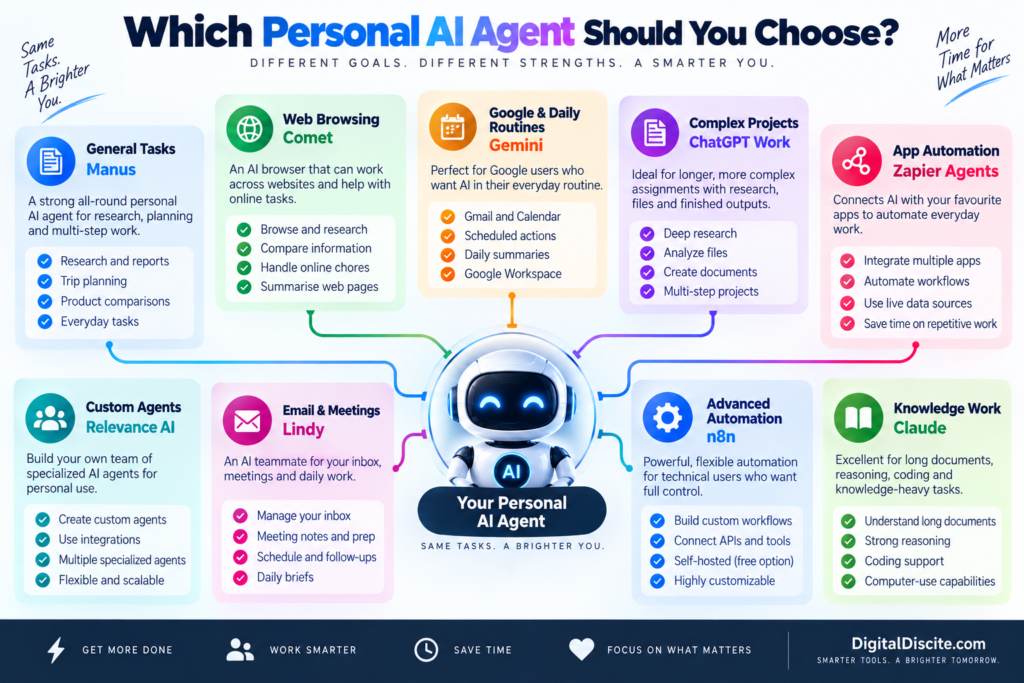
Personal AI Agent Decision Map

What Is a Personal AI Agent?

A personal AI agent is an AI system that can work toward a goal and perform multiple steps on your behalf.

Instead of requiring a new prompt after every step, an agent can often determine what needs to happen next.

For example, imagine giving this instruction:

“Find five highly rated hotels near Central Park for my dates, compare their prices and amenities, and prepare a shortlist.”

A traditional chatbot might explain where to search.

A capable personal AI agent can potentially:

  1. Search the web.
  2. Visit relevant pages.
  3. Gather hotel information.
  4. Compare options.
  5. Organize the results.
  6. Present a shortlist.

Depending on the agent and permissions you provide, some can go further and interact with websites or connected applications.

That is what separates agentic AI from ordinary AI chat.


Personal AI Agent vs AI Assistant

These terms are often used interchangeably, but there is an important difference.

FeatureAI AssistantPersonal AI Agent
Answers questionsYesYes
Writes contentYesYes
Researches informationYesYes
Breaks goals into stepsSometimesYes
Uses external toolsSometimesOften
Interacts with websitesLimitedOften
Performs actionsLimitedYes
Handles multi-step jobsLimitedCore capability
Can run scheduled workSometimesOften
Requires constant promptingUsually moreUsually less

The distinction is becoming less clear because major AI assistants are steadily gaining agentic capabilities.

The better question in 2026 is therefore:

What can this AI actually do for me after I give it a goal?

Let’s look at the options.


1. Manus — Strong General-Purpose Personal AI Agent

Best for: Research, planning, reports, web tasks and multi-step work

Manus is one of the clearest examples of the shift from AI chatbot to AI agent.

Instead of simply answering a question, Manus can work through a multi-step assignment.

You can give it a goal and allow it to determine many of the intermediate steps.

For example:

“Research the best destinations in Europe for a seven-day trip in October, compare approximate costs and weather, and create an itinerary.”

That type of request combines research, comparison, reasoning and organization.

What Can Manus Do?

Manus can be useful for:

  • Web research
  • Travel planning
  • Market research
  • Product comparisons
  • Data analysis
  • Report creation
  • Content research
  • File processing
  • Multi-step tasks
  • Scheduled work

Free Access

Manus currently provides free users with an initial credit allocation plus 300 daily refresh credits.

Credits are consumed when the agent is actively processing tasks.

This makes the free version useful for testing the platform before deciding whether autonomous AI is valuable enough for your workflow.

Why It Stands Out

The biggest advantage is that you don’t have to build the agent yourself.

There is no visual automation canvas to configure.

You describe the outcome you want.

That makes Manus particularly accessible for people experiencing autonomous AI for the first time.

Limitations

Complex jobs consume more credits.

You should also review important results before using them because autonomous research does not guarantee that every source or conclusion will be correct.

Best for: Students, researchers, creators, freelancers and professionals who want a general-purpose agent.


2. Perplexity Comet — Excellent for Agentic Web Browsing

Best for: Research, browsing, online chores and working across websites

Perplexity’s Comet turns the browser itself into an AI-assisted workspace.

Instead of copying information from multiple tabs into an AI chatbot, Comet Assistant can work alongside your browsing.

Perplexity describes Comet Assistant as agentic AI that can handle increasingly complex jobs across websites.

Potential use cases include:

  • Planning trips
  • Researching purchases
  • Job-search research
  • Comparing information
  • Working across multiple tabs
  • Handling repetitive online chores
  • Summarizing pages
  • Finding information while browsing

This makes Comet particularly interesting because much of our daily digital life already happens inside a browser.

Is Comet Free?

The Comet browser itself is available free.

However, Perplexity’s current plan comparison distinguishes the free Standard plan from paid access to Browser Agent/Comet Assistant queries. In other words, don’t assume that downloading the browser gives you unlimited autonomous agent usage.

Why It Stands Out

Comet reduces the gap between asking an AI a question and letting AI work with the websites you are already using.

Best for: Heavy web users, researchers, shoppers, travelers and professionals who spend much of their day in a browser.


3. Google Gemini — Great for Personal Routines and Google Users

Best for: Gmail, Calendar, Google services and recurring information tasks

Gemini becomes especially useful as a personal agent when your digital life already revolves around Google’s ecosystem.

One particularly useful feature is Scheduled Actions.

You can ask Gemini to prepare recurring information automatically.

Examples include:

  • Daily news digests
  • Calendar summaries
  • Email and task summaries
  • Weekly learning updates
  • Daily topic tracking
  • Creative prompts
  • Recurring research summaries

Google currently allows up to 10 active scheduled actions.

Gemini can also work with connected applications when appropriate permissions are provided.

Google has additionally been rolling out more advanced agentic capabilities, including browser-based task execution and its newer personal-agent experiences, although availability can depend on account, subscription and region.

Why It Stands Out

Gemini makes sense if the information needed to help you already lives in Google’s ecosystem.

You don’t necessarily need to create complicated workflows.

Limitations

Some of Google’s most advanced agent features are still being rolled out gradually and may be restricted by country, device or subscription.

Best for: Gmail, Google Calendar and Google Workspace users who want AI incorporated into everyday routines.


4. ChatGPT Work — Powerful for Longer Multi-Step Projects

Best for: Research, analysis, files and producing finished deliverables

ChatGPT’s agentic experience has evolved considerably.

OpenAI now positions ChatGPT Work for longer, more involved assignments.

It can research and analyze information, work across connected applications and files, navigate supported websites, and create finished outputs such as documents, spreadsheets, presentations and reports.

That changes the interaction from:

“Tell me how to make this report.”

to:

“Research this subject and produce the report.”

Examples of suitable tasks include:

  • Researching competitors
  • Analyzing files
  • Working across connected information
  • Preparing presentations
  • Building spreadsheets
  • Producing reports
  • Handling multi-step browser workflows
  • Running scheduled tasks

Is It Free?

No.

OpenAI’s current documentation says these longer-running agentic capabilities are rolling out on paid plans rather than the Free tier.

That is an important distinction if you’re comparing personal agents based on price.

For zero-cost options, see Digital Discite’s Best Free AI Agents in 2026.

Why It Stands Out

The biggest advantage is combining research, reasoning, files, applications and finished artifacts in one environment.

Limitations

Agentic features are plan-dependent, and users should still review important actions and outputs.

Best for: Professionals, researchers, creators and knowledge workers with complex multi-step assignments.


5. Zapier Agents — Best for Connecting Your Everyday Apps

Best for: Automating repetitive tasks across applications

Your personal work probably doesn’t happen in one application.

You may use:

  • Gmail
  • Google Sheets
  • Slack
  • Notion
  • Calendar
  • CRM software
  • Project-management tools
  • Cloud storage

Zapier Agents is designed for situations where AI needs to interact with this broader software ecosystem.

An agent can combine AI reasoning with connected data and automated actions.

For example, you might create an agent that helps research information, summarizes it and then uses another connected tool as part of the workflow.

Free Plan

Zapier currently provides an Agents Free plan with:

400 activities per month

It also includes web browsing, live data sources and Chrome-extension access.

Be careful with the word “activity.”

A single agent run can perform multiple activities, so 400 activities does not necessarily mean 400 complete jobs.

Why It Stands Out

Zapier’s strength is integrations.

If your personal agent needs to work across many apps, integrations can matter more than having the smartest chatbot.

Limitations

Complex workflows can consume your monthly activity allowance quickly.

Best for: Freelancers, marketers, creators and professionals who use multiple web applications.


6. Relevance AI — Best for Building Your Own Personal AI Workforce

Best for: Custom agents with specialized roles

What if you don’t want one general AI assistant?

You might want:

  • One research agent
  • One email agent
  • One marketing agent
  • One sales agent
  • One reporting agent

Relevance AI is built around creating specialized AI agents and workforces.

Its free plan currently includes 200 actions per month, unlimited agents and tools, access to integrations, one workforce, one user and one project.

That makes it particularly interesting if you want to experiment with building multiple specialized agents without immediately paying for the platform.

Example

A creator could theoretically build separate agents for:

Agent 1: Research new content ideas.

Agent 2: Organize research.

Agent 3: Prepare briefs.

Agent 4: Monitor recurring information.

Instead of asking one chatbot to behave differently every time, each agent can have a defined job.

Pros

  • Custom agents
  • Large integration ecosystem
  • Free entry tier
  • Multi-agent/workforce concept
  • No traditional programming required for many workflows

Limitations

The free plan’s 200 actions will not support unlimited automation.

Best for: Entrepreneurs, marketers, creators, agencies and people interested in building specialized AI workers.


7. Genspark — Useful All-in-One Agent Workspace

Best for: Research, content, information gathering and AI-created outputs

Genspark has expanded from AI search into a broader collection of AI agents and creation tools.

Its platform can help with research-oriented and content-oriented tasks, making it another interesting option for people who want more than simple conversational AI.

Depending on your plan and available features, Genspark includes tools around areas such as:

  • AI chat
  • Research
  • Slides
  • Content creation
  • Coding
  • Images
  • Agentic workflows

Free Access

Genspark currently lists a Free Plan providing basic access with standard features.

More extensive agent and creation capabilities are available on paid tiers with larger credit allocations.

Why It Stands Out

Genspark tries to bring several AI tasks into one environment rather than requiring a separate application for every type of output.

Limitations

You need to pay attention to which agents and features are included with your current tier.

Best for: Researchers, students, content creators and users who want several AI creation capabilities in one platform.


8. Lindy — Strong for Email, Meetings and Daily Administrative Work

Best for: Inbox management, meetings, scheduling and work routines

Lindy takes a different approach.

Its goal is closer to providing an AI teammate that handles parts of your everyday work.

Current capabilities include areas such as:

  • Inbox management
  • Drafting email replies
  • Meeting notes
  • Meeting scheduling
  • Meeting preparation
  • Follow-ups
  • Daily briefs
  • Scheduled routines
  • Connected tools
  • Computer use

This makes Lindy particularly interesting for people whose biggest problem isn’t writing content.

It is administrative overload.

Free Access

Lindy’s current pricing is primarily paid.

Its Plus plan is listed at $29.99 per user per month with 3,000 credits.

The company currently offers a limited free-trial route for eligible new teammates joining through Slack rather than a normal permanent free personal tier.

Approval Controls

One useful feature is approval for actions with outside impact.

For example, Lindy says actions such as sending an email or publishing a document wait for approval.

That type of human control is important for personal agents.

Best For

Busy professionals, founders and people who spend significant time managing meetings and email.


9. n8n — Best for Advanced Personal Automation

Best for: People who want complete control over their automated workflows

n8n is not the easiest personal AI agent on this list.

But it may be one of the most flexible.

It allows you to create automated workflows that connect:

  • AI models
  • APIs
  • Email
  • Databases
  • Web services
  • Business applications
  • Custom logic

With AI Agent nodes and integrations, technically inclined users can create powerful personal automation systems.

For example, you could build a workflow that:

  1. Receives information.
  2. Sends it to an AI model.
  3. Classifies it.
  4. Looks up additional data.
  5. Creates an output.
  6. Stores the result.
  7. Notifies you.

Is n8n Free?

n8n has a self-hosted Community Edition.

However, free software does not necessarily mean a zero-cost setup.

You may still pay for:

  • Hosting
  • AI API usage
  • Servers
  • External services

Why It Stands Out

Control.

Instead of accepting the restrictions of a closed AI assistant, technical users can design exactly how their automation should operate.

Limitations

It has a much steeper learning curve than Manus, Gemini or Comet.

Best for: Developers, automation enthusiasts, agencies and technically confident users.


10. Claude — Excellent for Knowledge Work With Growing Agentic Capabilities

Best for: Long documents, reasoning, coding and knowledge work

Claude remains particularly strong for tasks involving substantial amounts of information.

Anthropic has continued improving Claude’s abilities around:

  • Long-context reasoning
  • Coding
  • Agent planning
  • Computer use
  • Knowledge work
  • Complex documents

Claude’s computer-use technology is particularly important for agentic AI because it enables AI systems, in supported environments, to interact with graphical software more like a person.

Instead of requiring every service to provide a special API, an AI can potentially interpret what appears on a computer screen and interact with it.

Free Access

Claude provides a free consumer tier, although access to models, usage and specific agentic capabilities varies by plan and product.

Do not assume every computer-use or autonomous feature is included simply because basic Claude access is free.

Why It Stands Out

Claude is particularly compelling when the “task” involves understanding a large amount of information before taking the next step.

Limitations

Some agentic functionality depends on the environment and plan rather than being a universal one-click personal agent.

Best for: Writers, developers, researchers and knowledge workers.


Which Personal AI Agent Should You Choose?

There isn’t one correct choice because these tools solve different problems.

Choose Manus if…

You want to give an AI a multi-step assignment and let it work through much of the process for you.

Choose Comet if…

Most of the tasks you want AI to help with happen on websites.

Choose Gemini if…

Your personal digital life revolves around Gmail, Calendar and Google’s ecosystem.

Choose ChatGPT Work if…

You want AI to research, analyze files and produce substantial finished deliverables from complex assignments.

Choose Zapier Agents if…

Your biggest goal is connecting AI with the applications you already use.

Choose Relevance AI if…

You want to create several specialized agents instead of relying on one general assistant.

Choose Genspark if…

You want research and AI creation capabilities in one environment.

Choose Lindy if…

Email, meetings and administrative work consume too much of your day.

Choose n8n if…

You want maximum automation control and don’t mind a technical learning curve.

Choose Claude if…

Your workflow revolves around documents, coding, reasoning and knowledge-heavy work.


7 Real Tasks a Personal AI Agent Can Help With

The best way to understand agents is through actual tasks.

1. Research a Purchase

Instead of opening 20 tabs yourself, ask an agent to compare products based on your requirements.

It can potentially gather:

  • Prices
  • Specifications
  • Reviews
  • Advantages
  • Disadvantages

You still make the final buying decision.

2. Plan a Trip

An agent can research:

  • Destinations
  • Hotels
  • Transportation
  • Attractions
  • Restaurants
  • Estimated costs

It can then organize that information into an itinerary.

3. Prepare Your Morning Brief

A scheduled agent could gather:

  • Calendar events
  • Important emails
  • Tasks
  • News
  • Project updates

and prepare one morning summary.

4. Research a Topic

Instead of manually searching dozens of sources, an agent can collect information and organize findings into a report.

5. Manage Repetitive Email Work

With appropriate permissions, agents can help classify emails, summarize messages and prepare draft replies.

For important communication, keep human approval enabled.

6. Monitor Something for You

Agents and scheduled AI workflows can monitor recurring information such as:

  • Industry news
  • Competitors
  • Topics
  • Project updates
  • New content

and report meaningful changes.

7. Automate Repetitive Digital Work

The biggest opportunity may be boring work.

Copying information.

Formatting data.

Moving information between apps.

Preparing repetitive summaries.

Checking the same sources every day.

These tasks may not sound impressive in an AI demo, but automating them can save meaningful time.


What Personal AI Agents Still Cannot Reliably Do

The excitement around AI agents can create unrealistic expectations.

A personal AI agent is not a perfect digital employee.

Agents can still:

  • Misunderstand instructions
  • Use outdated information
  • Select the wrong website
  • Make reasoning errors
  • Misinterpret interfaces
  • Fail during long workflows
  • Produce incorrect summaries
  • Require human intervention

The consequences become more serious when the agent has permission to perform actions.

A chatbot giving you a wrong answer is one problem.

An agent taking the wrong action is another.

That is why important actions should still require confirmation.


Are Personal AI Agents Safe?

They can be useful, but permissions matter.

An agent becomes more powerful when you connect:

  • Email
  • Calendar
  • Cloud storage
  • Browsing history
  • Documents
  • Business applications
  • Personal accounts

Those connections also increase the amount of information the agent can potentially access.

Before connecting sensitive accounts:

  1. Review the provider’s privacy policy.
  2. Check what information the agent can access.
  3. Give it only the permissions it actually needs.
  4. Enable approval for external actions.
  5. Avoid providing unnecessary sensitive information.
  6. Periodically review connected applications.

The goal should be useful autonomy with sensible control.


Free vs Paid Personal AI Agents

Free plans are excellent for testing agentic AI.

However, autonomous tasks can consume substantially more computing resources than simple chatbot questions.

That is why agent platforms commonly limit:

  • Credits
  • Activities
  • Tasks
  • Agent runs
  • Browser actions
  • Monthly usage

A good strategy is to start free whenever possible.

Give the agent a real task from your everyday life.

Then ask:

Did it actually save me time?

If the answer is yes, paid access becomes much easier to evaluate.

For a dedicated zero-cost comparison, read 10 Best Free AI Agents You Can Use in 2026.

You can also compare broader AI subscription costs in Digital Discite’s AI Tools Pricing Database 2026.


Personal AI Agents vs AI Automation Tools

Another important distinction is between an agent and traditional automation.

Traditional automation usually follows predefined rules:

If X happens → do Y.

An AI agent can potentially evaluate the situation and decide what action should happen next.

For example:

Traditional Automation

New email arrives → copy attachment to cloud storage.

AI Agent

New email arrives → understand what the email is about → decide whether it requires action → summarize it → prepare an appropriate response → ask you for approval.

This ability to reason between steps is what makes agentic automation so interesting.

However, traditional automation remains preferable when the workflow needs to be completely predictable.


Frequently Asked Questions

What is the best personal AI agent in 2026?

There is no single best option for every use case. Manus focuses on general autonomous tasks, Comet on web-based work, Gemini on Google’s ecosystem, ChatGPT Work on longer multi-step projects, Zapier Agents on integrations, and Lindy on email and meeting workflows.

What AI can actually do tasks for you?

Modern AI agents can research information, interact with supported websites and applications, organize data, prepare reports, automate workflows and perform other multi-step tasks. Exact capabilities depend on the agent and the permissions you provide.

Are personal AI agents free?

Some are. Manus, Zapier Agents and Relevance AI currently provide free entry tiers. Other platforms provide free basic AI access while reserving advanced agent capabilities for paid subscriptions.

What is the best free personal AI agent?

The answer depends on the task. Manus is useful for general autonomous work, Zapier Agents is useful for application automation, and Relevance AI is useful for creating custom agents.

Can an AI agent control my computer?

Some AI systems have computer-use capabilities that can interpret interfaces and interact with them. Availability and implementation differ significantly between platforms.

Can AI agents send emails?

Some can, provided you connect a supported email service and give the required permission. For important messages, approval before sending is strongly recommended.

Can an AI agent browse websites for me?

Yes. Browser-oriented agents can research websites and, depending on the platform, interact with web interfaces. Comet and several general-purpose agents are designed around this type of workflow.

Can AI agents work while I am away?

Some platforms support scheduled or background tasks. Availability varies by product and subscription.

Are AI agents better than ChatGPT?

That comparison is increasingly outdated because ChatGPT itself has agentic capabilities. The more useful distinction is between AI that mainly responds and AI that can execute a multi-step task using tools.

Will personal AI agents replace normal apps?

Probably not in the near term. Agents are increasingly becoming a layer that works across apps rather than replacing every specialized application.


Final Thoughts

The most important AI shift in 2026 is not simply that models can produce better answers.

It is that AI is increasingly able to take action.

Personal AI agents can research, browse, organize information, work across applications, automate routines and complete parts of multi-step digital tasks.

But choosing the right tool depends on where you want the work to happen.

Manus is built around general autonomous tasks.

Comet brings agentic AI into web browsing.

Gemini fits naturally into Google’s ecosystem.

ChatGPT Work focuses on substantial multi-step projects and finished outputs.

Zapier Agents connects AI with everyday applications.

Relevance AI lets you create specialized agents.

Genspark combines research and AI creation.

Lindy targets email, meetings and administrative work.

n8n provides much deeper automation control.

And Claude is especially relevant for knowledge-heavy and computer-assisted workflows.

Don’t choose an AI agent because it looks impressive in a demonstration.

Give it one repetitive task that currently takes you 30 minutes.

See whether it can complete the task accurately, safely and with less effort.

That is the real test of a useful personal AI agent.

For more comparisons, explore Digital Discite’s Best Tech Tools.

Best Personal AI Agents in 2026: 10 Tools That Actually Do Tasks for You Read More »

Best Free AI Agents

10 Best Free AI Agents You Can Use in 2026

AI agents are becoming one of the biggest AI trends of 2026.

Unlike a normal chatbot that simply answers questions, an AI agent can take a goal, decide what steps are needed, use tools, access information, and complete parts of the task automatically.

The good news is that you do not always need an expensive subscription to try them.

Several powerful platforms now provide permanent free plans, free credits, or open-source versions that let you experiment with agentic AI without paying a monthly subscription.

In this guide, we compare 10 of the best free AI agents you can use in 2026, including their free-plan limits, ideal use cases, advantages, and disadvantages.

If you are comparing the wider cost of artificial intelligence software, also see Digital Discite’s AI Tools Pricing Database 2026.

Table of Contents

Best Free AI Agents in 2026: Quick Comparison

AI AgentBest ForFree AccessCoding Required?
ManusGeneral autonomous tasksFree plan with daily creditsNo
Zapier AgentsBusiness automation400 activities/monthNo
Make AI AgentsVisual automationFree plan with 1,000 credits/monthNo
MindStudioBuilding custom AI agents1 agent + up to 1,000 runs/monthNo
DifyCustom AI apps and agentsFree Sandbox planLow
FlowiseVisual AI agent building2 flows/assistants + 100 predictions/monthLow
n8nAdvanced automationFree self-hosted Community EditionLow–Medium
CrewAIMulti-agent systemsOpen-source optionsYes
Relevance AIBusiness AI workforceLimited free accessNo/Low
OpenHandsAI coding agentsOpen sourceYes

Important: “Free” does not mean unlimited. Some platforms provide monthly allowances, some provide daily credits, and open-source agents can still require paid API models or hosting.

What Is an AI Agent?

An AI agent is an artificial intelligence system designed to complete tasks with some degree of autonomy.

For example, you could tell an AI agent:

“Research five competitors, compare their prices, summarize their strengths, and prepare the results in a table.”

A normal chatbot may explain how to perform the task.

An AI agent can potentially break the job into steps, search for information, process the results, use connected tools, and return a completed output.

Depending on the platform, AI agents can:

  • Search the web
  • Analyze documents
  • Research competitors
  • Send or prepare emails
  • Update spreadsheets
  • Work with CRM systems
  • Generate reports
  • Automate repetitive workflows
  • Write and test code
  • Schedule tasks
  • Connect multiple apps
  • Monitor information

That ability to take action is what makes agents different from ordinary AI chatbots.

You can explore more artificial intelligence software in Digital Discite’s AI Tools section.

1. Manus — Best Free General-Purpose AI Agent

Best for: Research, reports, planning, web tasks, and general autonomous work

Manus is one of the most interesting general-purpose AI agents available in 2026.

Instead of only chatting with you, Manus is designed to work through multi-step tasks and produce a finished result.

You might ask it to research a market, compare products, analyze information, prepare a document, or work through another complex assignment.

Its biggest advantage is accessibility.

You do not need to build workflows or understand programming before using it.

What Can Manus Do?

Manus can be useful for:

  • Web research
  • Competitive analysis
  • Reports
  • Data organization
  • Planning
  • Content research
  • Document creation
  • Multi-step online tasks

Manus Free Plan

Manus currently provides a $0 free plan.

The free tier includes access to Chat Mode and the Lite version of Manus in Agent Mode. Manus says free users receive 300 daily refresh credits, can run one task concurrently, and can maintain up to two scheduled tasks.

That makes Manus particularly attractive for people who want to experience autonomous AI without first building an agent themselves.

Pros

  • Beginner-friendly
  • No coding required
  • General-purpose agent
  • Can handle multi-step tasks
  • Daily free credits
  • Useful for research

Cons

  • Free users receive the lighter agent model
  • Complex tasks can consume credits quickly
  • Only one concurrent task on the free plan

Best For

Students, researchers, marketers, freelancers, creators, and professionals who want a ready-made AI agent.

2. Zapier Agents — Best for Business Automation

Best for: Automating work across different apps

Zapier has long been known for connecting applications.

Zapier Agents takes that idea further by allowing AI agents to perform tasks using connected data and software.

For example, an agent could research a prospect, access information from connected tools, summarize the findings, and help trigger another workflow.

Zapier is especially useful when your work already involves several cloud applications.

Free Plan

Zapier currently offers an Agents Free plan with 400 activities per month.

The free plan also includes live data sources, web browsing, and access through its Chrome extension. Zapier counts actions performed by the agent as activities, so complex workflows can consume multiple activities.

Pros

  • Permanent free tier
  • No coding required
  • Excellent app ecosystem
  • Web browsing
  • Live data sources
  • Easy for business users

Cons

  • 400 activities can disappear quickly with complex agents
  • Testing can count toward the free allowance
  • Advanced automation may require paid services

Best For

Small businesses, marketers, sales teams, freelancers, and anyone already using multiple SaaS tools.

3. Make — Best Free Visual Automation Platform

Best for: Visual AI automation and multi-app workflows

Make is another strong choice for people who prefer visual automation.

Instead of writing code, you create workflows by connecting modules on a visual canvas.

This makes it easier to understand what happens at every stage of an automation.

Make has also expanded its platform around AI and agentic workflows, making it useful for building systems that combine AI with business applications.

Make Free Plan

Make currently provides up to 1,000 credits per month on its free plan.

Free users also get its visual workflow builder, access to thousands of applications, routers, filters, and other core automation features. The free tier has a 15-minute minimum interval between scheduled runs.

Pros

  • 1,000 free credits per month
  • Excellent visual interface
  • Thousands of app integrations
  • No-code friendly
  • Powerful workflow logic

Cons

  • More complicated than simple chat-based agents
  • Credit usage increases with automation activity
  • Some advanced capabilities require paid plans

Best For

Marketers, automation enthusiasts, small businesses, and people who want visual control over their AI workflows.

4. MindStudio — Best for Building an AI Agent Without Coding

Best for: Beginners creating custom agents

MindStudio provides a visual environment for creating AI-powered applications and agents.

Instead of developing an AI system from scratch, you can define its instructions, connect models and data, and design how the agent behaves.

Its free allowance makes it especially interesting for experimentation.

MindStudio Free Plan

MindStudio’s free offering currently includes:

  • One AI agent
  • Up to 1,000 runs per month
  • Access to its platform features
  • Connections to 200+ AI models through its service router
  • Option to bring your own API keys

The pricing page lists the platform at $0 for one agent, although usage-related costs can still apply depending on how you configure it.

Pros

  • Generous run allowance
  • No-code approach
  • Many AI models available
  • Good learning resources
  • Build your own specialized agent

Cons

  • Free tier is limited to one agent
  • External model or API usage may cost money
  • More setup than a ready-made agent such as Manus

Best For

Entrepreneurs, marketers, creators, agencies, and beginners experimenting with custom AI agents.

5. Dify — Best Free Platform for Custom AI Applications

Best for: Building AI apps, assistants, workflows, and agents

Dify is a flexible platform for building AI applications.

It allows you to connect large language models with tools, workflows, knowledge bases, and external services.

This means you can build far more than a basic chatbot.

For example, you could create an internal knowledge assistant that searches company documents and then calls external tools when necessary.

Dify Free Plan

Dify’s cloud Sandbox plan is free.

At the time of writing, it includes:

  • 200 message credits
  • One team workspace
  • One team member
  • Five apps
  • 50 knowledge documents
  • 50 MB of knowledge storage

Once included model credits are exhausted, users can configure their own model-provider API keys.

Pros

  • Powerful agent-building environment
  • Knowledge-base support
  • Multiple model providers
  • Custom tools
  • Workflow creation
  • Free cloud tier

Cons

  • Only 200 included message credits
  • More technical than Manus or Zapier
  • External API usage may cost money

Best For

Developers, startups, SaaS builders, researchers, and businesses building customized AI applications.

6. Flowise — Best Free Visual AI Agent Builder

Best for: Visually building LLM workflows and AI assistants

Flowise is another excellent choice if you want to understand how AI agents actually work.

It uses a visual builder where components can be connected to create AI workflows and assistants.

This approach makes complex LLM systems easier to understand than building everything manually with code.

Flowise Free Plan

Flowise currently offers a cloud free plan with:

  • Two flows and assistants
  • 100 predictions per month
  • 5 MB storage
  • Evaluations and metrics
  • Custom embedded chatbot branding
  • Community support

The platform also has a strong open-source community.

Pros

  • Visual agent building
  • Beginner-friendly compared with coding frameworks
  • Free cloud plan
  • Open-source ecosystem
  • Useful for prototypes

Cons

  • Only 100 cloud predictions per month
  • Some technical understanding helps
  • Production-scale projects may require paid infrastructure

Best For

Developers, students, AI enthusiasts, and startups learning how agentic systems are constructed.

7. n8n — Best Free AI Agent for Advanced Automation

Best for: Technical users who want powerful self-hosted automation

n8n is one of the most powerful tools on this list.

It combines workflow automation with AI capabilities, allowing users to connect applications, APIs, databases, AI models, and agent nodes.

You could create an AI agent that receives a customer inquiry, analyzes it, searches a database, generates a response, updates a CRM, and triggers another workflow.

Is n8n Really Free?

The self-hosted Community Edition can be used without paying a normal n8n Cloud subscription.

That is important because hosted AI-agent platforms normally impose monthly limits.

However, self-hosting does not mean the entire setup costs nothing.

You may still need:

  • A server or computer
  • Hosting
  • AI API access
  • Database resources
  • Technical maintenance

So n8n is better described as free self-hosted software rather than a completely zero-cost AI service.

Pros

  • Extremely flexible
  • Self-hosting available
  • Advanced automation
  • AI Agent nodes
  • API integrations
  • Suitable for sophisticated workflows

Cons

  • Learning curve
  • Self-hosting requires technical knowledge
  • Model APIs may cost money
  • Maintenance is your responsibility

Best For

Developers, agencies, automation professionals, startups, and technical users.

8. CrewAI — Best for Multi-Agent AI Systems

Best for: Developers creating teams of specialized AI agents

Most tools on this list focus on one agent.

CrewAI takes a different approach.

It is designed around multiple AI agents working together.

Imagine creating:

  • A research agent
  • A writing agent
  • A fact-checking agent
  • An SEO agent

You could assign each one a different role and let them collaborate on a larger task.

That is why CrewAI is particularly interesting for developers experimenting with multi-agent systems.

Is CrewAI Free?

CrewAI has open-source components that developers can use to build agentic systems.

However, this is another case where free software does not necessarily mean free operation.

Your agents may rely on paid language-model APIs, hosting, databases, or external tools.

Pros

  • Built for multi-agent workflows
  • Open-source ecosystem
  • Highly customizable
  • Excellent for experimentation
  • Useful for complex agent architectures

Cons

  • Coding knowledge recommended
  • API costs can apply
  • Not ideal for complete beginners
  • Requires more setup than hosted agents

Best For

Developers, AI engineers, startups, researchers, and technical teams.

9. Relevance AI — Best for Business AI Workforces

Best for: Sales, marketing, research, operations, and business agents

Relevance AI focuses heavily on the idea of building an AI workforce.

Instead of simply chatting with AI, businesses can create agents for particular jobs.

These might include agents for:

  • Lead research
  • Sales
  • Customer support
  • Market research
  • Marketing
  • Data enrichment
  • Operations

Its visual approach makes agent creation more accessible to non-developers than traditional frameworks.

Free Access

Relevance AI provides entry-level access for experimenting with agents, although usage allowances and available features can change.

Because agent platforms are changing their credit systems rapidly in 2026, check the current allowance before designing a production workflow around the free tier.

Pros

  • Business-focused agents
  • No-code/low-code approach
  • Agent teams
  • Integrations
  • Good for sales and marketing automation

Cons

  • Free usage is limited
  • Complex business workflows may require upgrading
  • Credit consumption varies by task

Best For

Sales teams, agencies, marketers, startups, and small businesses.

10. OpenHands — Best Free Open-Source Coding Agent

Best for: Developers and autonomous coding tasks

OpenHands is different from the business automation platforms above.

It is focused on software development.

AI coding agents can go beyond traditional autocomplete. They can inspect a codebase, modify files, run commands, debug problems, and work through development tasks.

OpenHands is open source, making it especially attractive to developers who want greater control over their coding-agent environment.

What Can OpenHands Help With?

Depending on the configuration, coding agents can assist with:

  • Writing code
  • Fixing bugs
  • Understanding repositories
  • Editing multiple files
  • Running commands
  • Testing software
  • Working through development tasks

Is OpenHands Free?

The software is open source, but running an autonomous coding agent still requires computing resources and usually access to an AI model.

Therefore, your final operating cost depends on your model and hosting setup.

Pros

  • Open source
  • Developer-focused
  • Autonomous coding capabilities
  • Highly customizable
  • Greater control over your setup

Cons

  • Technical setup required
  • AI model costs may apply
  • Not intended for everyday non-technical automation

Best For

Programmers, software engineers, AI developers, and technical teams.

For more developer-focused software, browse Digital Discite’s Coding Tools section.

Which Free AI Agent Should You Choose?

The right option depends heavily on what you actually want the agent to do.

If you simply want an AI agent that can take a task and work through it without building anything yourself, Manus is one of the easiest starting points.

For automating everyday business applications, Zapier Agents and Make are easier choices.

People who want to build their own agent without becoming full-time developers should look at MindStudio, Dify, or Flowise.

More technical users who want control over complex automation should investigate n8n.

Developers interested in multi-agent systems can experiment with CrewAI, while programmers specifically interested in autonomous software development can explore OpenHands.

The important point is that these tools solve different problems. The “best” agent for writing code is unlikely to be the best one for automating a sales workflow.

Free AI Agents for Every Goal

Free Hosted AI Agents vs Open-Source AI Agents

There are two very different meanings of “free” in the AI-agent market.

Hosted Free Plans

Tools such as Manus, Zapier Agents, Make, MindStudio, Dify, and Flowise provide hosted infrastructure.

You create an account and start using the platform.

The advantage is simplicity.

The disadvantage is usage limits.

You may receive only a certain number of:

  • Credits
  • Activities
  • Runs
  • Predictions
  • Messages
  • Tasks

per month or day.

Open-Source Agents

Platforms and frameworks such as n8n Community Edition, CrewAI, and OpenHands give you much more control.

But you may need to provide the infrastructure yourself.

Your costs can therefore include:

Hosting + AI API usage + storage + maintenance

This distinction is important.

An open-source AI agent can have a $0 software licence while still costing money to operate.

Are Free AI Agents Actually Useful?

Yes, but their biggest value is experimentation.

Free tiers are excellent for learning:

  • How agents work
  • Which tasks are worth automating
  • How many agent actions your workflow needs
  • Which AI models perform best
  • Whether automation actually saves time

You should test your real workflow before paying.

For example, do not create a simple “Hello World” agent and immediately purchase an annual subscription.

Give it a realistic task.

If you run a website, you might ask an agent to:

  1. Find five competitors.
  2. Collect their article titles.
  3. Group the titles by search intent.
  4. Identify missing topics.
  5. Produce a content-gap table.

You will quickly discover whether the agent is genuinely useful and how much of the free allowance a real task consumes.

What to Check Before Choosing a Free AI Agent

1. Free-Plan Limit

Do not stop at seeing “Free.”

Check exactly what is limited.

A provider might offer 1,000 credits, but one complicated workflow could consume many credits.

2. Integrations

An agent becomes much more useful when it can interact with the software you already use.

Look for integrations with tools such as:

  • Gmail
  • Google Drive
  • Google Sheets
  • Slack
  • Notion
  • CRMs
  • Databases
  • WordPress
  • APIs

3. Model Costs

Some agent builders require you to provide an API key from an AI-model provider.

That means the agent platform might be free while the underlying AI usage is not.

4. Privacy

Think carefully before allowing an agent to access:

  • Customer information
  • Private documents
  • Email
  • Financial information
  • Company databases
  • Proprietary code

Review the provider’s current privacy and data-retention policies first.

5. Human Approval

For important business processes, use human approval before an agent performs an irreversible external action.

An AI agent can still misunderstand instructions or use incorrect information.

Automation should reduce repetitive work—not remove sensible oversight.

Are AI Agents Better Than Chatbots?

Not necessarily.

They serve different purposes.

FeatureAI ChatbotAI Agent
Answers questionsYesYes
Generates textYesYes
Uses toolsSometimesUsually
Performs multi-step tasksLimitedYes
Makes workflow decisionsLimitedYes
Connects with business appsSometimesOften
Works autonomouslyLimitedCore feature
Best forConversationCompleting tasks

If you only need help writing an email or explaining a topic, a chatbot may be enough.

If you want AI to do something across multiple steps or tools, an agent becomes much more useful.

The first wave of generative AI focused on answers.

The next wave is increasingly focused on actions.

Instead of asking:

“How should I research my competitors?”

people increasingly want to say:

“Research my competitors and prepare the report.”

That difference explains much of the excitement around agentic AI.

Agents can potentially reduce repetitive digital work in areas such as marketing, software development, research, customer support, sales, and administration.

However, 2026’s agent market is still changing quickly.

Pricing changes.

Credit systems change.

Models improve.

Products appear and disappear.

That is why users should avoid choosing a platform based purely on hype.

Start with the free tier and test it using the exact workflow you eventually want to automate.

Frequently Asked Questions

What are the best free AI agents in 2026?

Popular options include Manus, Zapier Agents, Make, MindStudio, Dify, Flowise, n8n, CrewAI, Relevance AI, and OpenHands. They serve different purposes, ranging from general research to business automation and coding.

Are there completely free AI agents?

Yes, some agent software is available free or open source. However, self-hosted agents may still require server resources or paid AI-model APIs. Hosted free plans normally impose usage limits.

What is the easiest free AI agent for beginners?

A ready-made general-purpose agent such as Manus is easier for beginners because you can give it instructions in natural language without constructing an automation workflow.

What is the best free AI agent for business automation?

Zapier Agents and Make are strong options for business automation because they connect AI with large ecosystems of business applications.

What is the best free AI agent builder?

MindStudio, Dify, and Flowise are worth considering if you want to create customized AI agents without building the entire system from scratch.

What is the best free open-source AI agent?

It depends on the task. n8n is useful for automation, CrewAI focuses on multi-agent systems, and OpenHands is designed around software-development agents.

Can I use free AI agents for my business?

Many platforms can be used for business workflows, but you should verify the provider’s current licence, privacy policy, usage restrictions, and commercial terms before processing customer or confidential company data.

Do AI agents require coding?

Not always.

Manus, Zapier Agents, Make, and MindStudio can be used with little or no coding. Frameworks such as CrewAI and developer-oriented tools such as OpenHands require more technical knowledge.

Can an AI agent build a website?

Some AI agents and coding agents can generate website files, applications, layouts, or code. The quality varies considerably, so generated code should be tested for functionality, security, responsiveness, and accessibility before publication.

Are AI agents safe?

AI agents can make mistakes just like other generative AI systems. The risk becomes more important when an agent can perform actions rather than merely generate text. Use permissions carefully and require human approval for sensitive or irreversible actions.

Final Thoughts

The best free AI agents in 2026 are no longer simple experimental chatbots.

They can research information, automate workflows, interact with applications, build customized AI systems, and even work on software projects.

For beginners, Manus provides an easy introduction to autonomous AI tasks.

For business automation, Zapier Agents and Make provide accessible visual options.

For building customized agents, MindStudio, Dify, and Flowise provide useful starting points.

Technical users can go much further with n8n, CrewAI, and OpenHands.

The most important rule is simple: test before you pay.

Use the free allowance to run a real task from your everyday workflow. Measure how much time it saves, how reliable the results are, and how quickly it consumes the free allowance.

Then decide whether upgrading actually makes financial sense.

Pricing and free-plan limits were checked in September 2026. AI platforms frequently change credits, limits, features, and pricing, so verify the provider’s current plan before relying on a free allowance.

10 Best Free AI Agents You Can Use in 2026 Read More »

AI tools pricing database 2026 with free plans, monthly prices, annual savings and commercial-use rules

AI Tools Pricing Database 2026: Free Plans, Monthly Costs, Annual Discounts and Commercial-Use Rules

Pricing last checked: 29 August 2026. Prices are in US dollars unless stated otherwise. Taxes, regional pricing, app-store charges, introductory offers and usage-based fees may differ. Always verify the linked official pricing and terms pages before purchasing or using AI output commercially.

AI tools can look inexpensive until credits run out, an annual payment is charged upfront, or you discover that a free plan does not permit commercial use. This AI tools pricing database 2026 compares popular platforms using the details buyers actually need: free-plan availability, monthly prices, annual discounts, usage limits and commercial-use rules.

The fastest answer is that many leading AI assistants still offer a free plan, while common individual subscriptions begin near $10–$30 per month. Specialist video, SEO and marketing tools can cost considerably more. An annual plan often saves around 17%–60%, but it is only good value when you expect to use the product for most of the year.

AI Tools Pricing Database Comparison 2026

AI toolMain useFree planEntry paid priceAnnual option or discountCommercial-use summary
ChatGPTGeneral AI, research, writing, images and codingYesGo $8/mo; Plus $20/moIndividual Go/Plus: no standard annual plan; Business $20/user/mo annually vs $25 monthlyGenerally usable commercially subject to OpenAI terms; users remain responsible for rights, accuracy and lawful use
ClaudeWriting, analysis, coding and researchYesPro $20/mo$200/year, equivalent to $16.67/mo; about 16.7% savingsCommercial work is generally allowed under Anthropic terms; review outputs and do not assume exclusivity or copyright protection
Google Gemini / Google AIGeneral AI, Google apps, research and mediaYesGoogle AI Pro $19.99/moPricing and promotions vary by country; check checkoutBusiness use depends on the product and applicable Google terms; verify rights for generated media and third-party materials
PerplexityAI search and cited researchYesPro commonly $20/moMax: $2,000/year vs $200/mo, saving $400/yearResearch can support commercial work, but cited material keeps its original rights; verify and license sources separately
MidjourneyAI images and videoNo permanent free planBasic $10/mo20% off annually; Basic $96/year ($8/mo)Paid subscribers receive broad commercial rights; companies above $1M gross revenue need Pro or Mega under current terms
RunwayAI video and image generationYes; 125 one-time creditsStandard $15/mo$12/mo annually; 20% off and $36/year savingsCommercial use is generally permitted subject to Runway terms and rights in inputs; confirm model- or partner-specific restrictions
ElevenLabsAI voice, dubbing, audio and agentsYesStarter $6/moAnnual pricing may vary by plan and regionFree output is non-commercial; paid plans include a commercial licence, excluding some beta services and subject to input rights
CanvaDesign, presentations, social content and AI mediaYesPro price is localized; Business starts around $20/person/mo in the USMonthly and yearly billing available; savings shown at checkoutCommercial designs are often allowed, but Canva content, templates, music and AI features have separate licence conditions; do not resell unaltered stock assets
JasperAI marketing and brand contentTrial, not a permanent full free planPro $69/mo$59/mo billed yearly; saves $120/year, about 14.5%Intended for business content, subject to Jasper terms; users must check facts, claims, trademarks and third-party rights
GrammarlyEditing, rewriting and generative writingYesPro $30/member/mo$144/year, equivalent to $12/mo; 60% below monthly billingSuitable for commercial writing, but the user remains responsible for final text, confidentiality, originality and compliance
GitHub CopilotCode completion, chat and coding agentsYes; 2,000 completions and 50 chat requestsPaid individual plans shown on official pageBilling options and included AI credits depend on tierCode may be used in commercial projects, but developers must review suggestions for security and licensing; organization plans add policy controls and certain IP protections
CursorAI code editor and agentsLimited free accessIndividual prices vary by tier; Teams Standard $40/user/moTeams Standard $32/user/mo annually; 20% savingsCommercial development is generally allowed; on-demand model use may create extra charges, and generated code needs licence and security review
NotionWorkspace, notes, research and AI agentsYesPlus and Business vary by region; Business about $20/member/mo in the USAnnual billing typically lowers the effective monthly rateBusiness documents can be created commercially; custom agents can add usage credits, and users must protect confidential or third-party content
ZapierAI automation, workflows, forms and tablesYesProfessional from $19.99/moAnnual rates depend on task volume and selectionCommercial workflows are allowed under service terms; each connected app has separate data, licence and automation rules
SemrushSEO research, audits and AI visibilityLimited free access/trialsSEO Toolkit Pro $139.95/moAnnual offers can vary; verify official checkoutReports may support client and business work, but database access, exports, sharing and resale remain limited by the subscription terms
SurferContent optimization and AI search visibilityTrial or limited entry accessDiscovery $49/mo billed yearlyAdvertised yearly savings vary; Discovery saves $120/yearCommercial client content is generally supported, but generated text must be edited for accuracy, originality and legal compliance

Key Findings from the 2026 Pricing Data

Free does not always mean commercially usable

This is the most important distinction in the database. ElevenLabs states that its free plan does not include a commercial licence, while its paid plans generally do. Midjourney does not offer a permanent free tier and ties broad commercial rights to paid subscriptions. Other products may let you create commercial work on a free plan, but you still need rights to uploaded images, voices, data, trademarks and other source material.

Annual discounts can be substantial

Annual savings range from modest reductions to major differences. Midjourney and Runway advertise 20% annual savings. Claude Pro costs $200 per year instead of $240 through monthly payments. Grammarly Pro shows the largest headline difference in this comparison: $144 per year compared with $360 if twelve monthly payments of $30 are made.

Do not compare only the displayed “per month” number. Annual plans are usually charged upfront. A plan shown as $12 per month may therefore require a single $144 payment.

Credits and usage pools are becoming normal

Runway plans include generation credits. ElevenLabs plans include shared credits. Cursor can bill on-demand usage after the included model allowance is consumed. GitHub describes AI credits for chat and agent activity. Notion custom agents can require additional credits. For heavy users, the real cost is:

Subscription price + extra credits or overages + additional seats + taxes.

A provider may permit commercial use without promising that every output is copyrightable, exclusive or free from third-party claims. Laws also differ by country. Businesses should keep human creative involvement, document their prompts and edits, check trademarks, scan generated code, confirm releases for voices or faces, and avoid uploading material they do not have permission to use.

Detailed AI Tool Pricing Notes

1. ChatGPT pricing in 2026

ChatGPT offers a free tier. OpenAI lists Go at $8 per month in the United States, Plus at $20 and Pro at $200, while local prices may differ. Business pricing is $25 per user on monthly billing or $20 per user per month when billed annually. Individual subscriptions and API usage are separate products, so a ChatGPT subscription does not automatically include API credits.

Best for: People who want one flexible tool for research, writing, images, file analysis and coding.

Read more in Digital Discite’s AI tools section.

2. Claude pricing in 2026

Claude has a free plan, Pro at $20 monthly or $200 annually, and Max tiers at $100 or $200 per month for higher usage. Team Standard seats cost $25 monthly or $20 per month on annual billing; Premium seats cost $125 monthly or $100 annually.

Best for: Long documents, careful writing, analysis and coding workflows.

3. Google Gemini pricing in 2026

Gemini has free access, while Google AI Pro is listed at $19.99 per month in the United States and includes additional Google storage and higher AI limits. Google uses localized pricing and changes included benefits by country, account type and availability. Google Workspace business offerings should not be confused with personal Google AI plans.

Best for: Users who already work in Gmail, Docs, Drive and other Google services.

4. Perplexity pricing in 2026

Perplexity Standard is free. Pro targets regular research users, while Max costs $200 per month or $2,000 per year. Enterprise Pro starts at $40 per seat monthly or $400 annually. A citation in a Perplexity answer is not a licence to copy the cited source, so publishers should open and verify original material.

Best for: Fast web research with source links.

5. Midjourney pricing in 2026

Midjourney’s Basic, Standard, Pro and Mega plans cost $10, $30, $60 and $120 per month. Paying yearly reduces the effective prices to $8, $24, $48 and $96 per month. Standard and higher plans include unlimited image generation in Relax Mode, while private Stealth Mode requires Pro or Mega.

Best for: High-quality visual concepts and creative image production.

Explore more comparisons in Digital Discite’s design tools guides.

6. Runway pricing in 2026

Runway Free includes 125 one-time credits. Standard costs $15 monthly or $12 per month on annual billing; Pro is $35 monthly or $28 annually; Max is $95 monthly or $76 annually. The annual rates represent 20% savings, but generation volume depends on the model and output settings.

Best for: AI video generation, editing, upscaling and creative media workflows.

See Digital Discite’s video tools coverage.

7. ElevenLabs pricing in 2026

ElevenLabs offers Free at $0, Starter at $6, Creator at $22, Pro at $99, Scale at $299 and Business at $990 per month, with Enterprise priced separately. Credits are shared across supported products. The free plan is for non-commercial use, while paid plans include commercial licensing subject to the provider’s terms and exclusions.

Best for: Voiceovers, narration, dubbing, sound effects and voice agents.

8. Canva pricing in 2026

Canva Free remains available. Canva Pro and Business pricing is localized, and annual or monthly billing may be offered. Canva announced Canva Business at $20 per person per month in the United States, but users should check their own pricing page. Commercial licensing is more nuanced than a simple yes/no because stock photos, music, templates, fonts, third-party apps and AI-generated assets can follow different rules.

Best for: Social graphics, presentations, videos, brand assets and collaborative design.

9. Jasper pricing in 2026

Jasper Pro is $69 per month or $59 per month when billed annually. The annual commitment saves about $120 over twelve monthly payments. Jasper offers a short trial rather than a broad permanent free plan; Business pricing is custom.

Best for: Brand-controlled marketing content and campaign workflows.

Browse Digital Discite’s writing tools comparisons.

10. Grammarly pricing in 2026

Grammarly Free includes core writing help and a limited number of AI prompts. Grammarly Pro costs $30 per member monthly, $60 quarterly or $144 annually. The annual plan averages $12 per month, but payment is generally collected upfront.

Best for: Editing, rewriting, tone improvement and brand consistency.

11. GitHub Copilot pricing in 2026

GitHub Copilot Free includes 2,000 completions and 50 chat requests. Paid plans add higher allowances and expanded agent features. GitHub now explains that AI credits are consumed by chat, agents, CLI, Spaces and Spark, while code completions and next-edit suggestions remain unlimited on paid plans. Business and Enterprise plans add organization controls; certain IP protection is tied to qualifying organizational use and settings.

Best for: Developers who work inside GitHub and supported code editors.

Find more options in Digital Discite’s coding tools category.

12. Cursor pricing in 2026

Cursor combines subscriptions with included model usage and optional on-demand charges. Teams Standard costs $40 per user monthly or $32 on annual billing. Teams Premium costs $120 monthly or $96 annually. Because model usage can continue after the included pool is used, teams should set spending controls where available.

Best for: Agent-assisted coding in an AI-first editor.

13. Notion pricing in 2026

Notion has Free, Plus, Business and Enterprise tiers. Displayed prices vary by region; the US Business reference price is around $20 per member monthly. Some AI capabilities are included or available as trials, while custom agents can use Notion credits priced separately. This means workspace subscription cost and agent usage should be budgeted independently.

Best for: Knowledge bases, project documentation, research and team productivity.

See more productivity tools on Digital Discite.

14. Zapier pricing in 2026

Zapier offers a free plan. Professional starts at $19.99 per month and Team starts at $69, with the final cost depending heavily on task volume. All plans bring together Zap workflows, Tables and Forms, but premium apps, multi-step workflows, webhooks and team controls vary by tier.

Best for: Connecting apps and automating repeatable business processes.

15. Semrush pricing in 2026

Semrush SEO Toolkit tiers are $139.95, $249.95 and $499.95 per month. Separate toolkits and add-ons can increase the bill: for example, the AI Visibility Toolkit is $99 per month and the Content Toolkit is $60 per month. Free accounts and trials are useful for evaluation but have strict limits.

Best for: Keyword research, competitor analysis, audits, rank tracking and AI-search visibility.

Visit Digital Discite’s SEO tools section for related guides.

16. Surfer pricing in 2026

Surfer’s Discovery plan is advertised at $49 per month when billed yearly, with higher Standard, Pro and enterprise-level options. AI Search Analytics can be purchased as a separate product and may cost far more than entry content optimization. Check document, page, prompt and workspace limits rather than comparing plan names alone.

Best for: Search-focused content briefs, optimization and AI visibility monitoring.

How to Choose the Right AI Plan

Before subscribing, follow this five-step check:

  1. Test the free plan or trial. Confirm that the output quality matches your real work, not only a sample prompt.
  2. Estimate monthly usage. Count documents, images, video seconds, voice characters, coding requests, automation tasks or tracked keywords.
  3. Calculate the full annual cost. Include seats, add-ons, overages, taxes and any credits that do not roll over.
  4. Read the commercial terms. Check ownership, licence scope, attribution, revenue thresholds, privacy, training settings and prohibited uses.
  5. Keep human review. Verify facts, sources, code security, plagiarism, brand claims and the rights attached to every input.
How to compare AI tool pricing, annual discounts, usage limits and commercial rights

Which AI Tools Offer the Best Value?

There is no universal winner, but these are sensible starting points:

  • Best flexible free options: ChatGPT, Claude, Gemini, Perplexity, Canva, Grammarly and GitHub Copilot.
  • Best annual value for regular writing: Claude Pro or Grammarly Pro, depending on whether you need generation or editing.
  • Best for commercial AI voice: An eligible paid ElevenLabs plan, because its free tier is explicitly non-commercial.
  • Best for AI images: Midjourney for dedicated generation or Canva for an integrated design workflow.
  • Best for AI video: Runway, provided you calculate credit consumption before choosing a tier.
  • Best for developers: GitHub Copilot for GitHub-centric workflows or Cursor for an AI-first editor.
  • Best for SEO professionals: Semrush for broad SEO data or Surfer for content optimization; both require a larger budget than general AI assistants.

Frequently Asked Questions

What is the average price of an AI tool in 2026?

Many individual AI assistants cost around $10–$30 per month. Specialist marketing, video, coding-team and SEO platforms can range from roughly $40 to several hundred dollars per month, before add-ons and overages.

Which AI tools are free in 2026?

ChatGPT, Claude, Gemini, Perplexity, Canva, Grammarly, GitHub Copilot, Notion, Zapier and several other tools offer free access with limits. Runway provides one-time free credits. Midjourney and Jasper generally require a paid plan or trial for continued use.

Can free AI tools be used commercially?

Sometimes, but not always. ElevenLabs specifically limits free-plan output to non-commercial use. Other tools may allow business use while still requiring you to respect input rights, trademarks, privacy, attribution rules and their acceptable-use policies.

Is annual AI pricing cheaper than monthly pricing?

Usually, when an annual option exists. Common savings are around 15%–20%, although Grammarly’s annual rate is substantially lower than twelve monthly payments. Annual billing normally requires an upfront payment and may be less flexible.

Does an AI subscription include API access?

Usually not. Chat subscriptions and developer APIs are commonly billed separately. Always check whether a plan covers the website or app, API usage, team seats, credits and overages.

Can AI pricing change during 2026?

Yes. Providers frequently change prices, credits, model access and plan names. Use this database as a comparison starting point and confirm the official pricing page before buying.

Final Verdict

The best AI subscription is not simply the one with the lowest monthly price. A useful comparison includes the free allowance, annual commitment, credit consumption, extra-user cost, overage policy, privacy settings and commercial licence.

For occasional use, begin with free plans and upgrade only when a limit repeatedly interrupts real work. For professional use, choose a paid tier whose commercial terms fit your content, confirm that client data is handled appropriately and calculate the total yearly cost before committing.

Disclosure: Pricing and licensing information is provided for general comparison and is not legal advice. Digital Discite may update this page as providers change their plans. If affiliate links are added later, include a clear affiliate disclosure before the first affiliate link.

AI Tools Pricing Database 2026: Free Plans, Monthly Costs, Annual Discounts and Commercial-Use Rules Read More »

Remove.bg Background Remover

Remove.bg Background Remover: The Ultimate AI Tool for Fast and Professional Background Removal

Table of Contents

Introduction

In today’s digital-first world, visuals play a major role in marketing, branding, social media, and online selling. Whether you are a photographer, content creator, eCommerce seller, graphic designer, or marketer, having clean and professional images is essential.

One of the biggest challenges in image editing is removing backgrounds accurately and quickly. Traditional editing tools often require advanced skills and hours of manual work. Fortunately, AI-powered tools have transformed this process completely.

Among all available tools, the remove.bg background remover has become one of the most popular solutions for instantly removing backgrounds from images with just one click.

This detailed guide explores everything you need to know about the remove.bg background remover — including features, benefits, pricing, use cases, SEO advantages, alternatives, and professional tips.

What is Remove.bg Background Remover?

Remove.bg is an AI-powered online tool designed to automatically remove image backgrounds within seconds.

Instead of manually selecting subjects using complex editing software, remove.bg uses advanced artificial intelligence to detect objects, people, animals, and products automatically.

The tool works directly in the browser and supports:

  • Portrait images
  • Product photos
  • Logos
  • Vehicles
  • Animals
  • Social media graphics
  • Marketing visuals

The biggest advantage is speed and simplicity. Users can upload an image and receive a transparent PNG almost instantly.

The remove.bg background remover gained massive popularity because it solves a universal problem:

People want professional-looking images without learning Photoshop.

The platform became a favorite among:

  • Bloggers
  • YouTubers
  • Online stores
  • Freelancers
  • Marketing agencies
  • Social media managers
  • Graphic designers
  • Small businesses

Its AI accuracy and ease of use make it accessible even for beginners.

AI Background Removal Example

AI Background Removal Example

eCommerce Product Background Removal

eCommerce Product Background Removal

Social Media & Creative Design Usage

Social Media & Creative Design Usage

Key Features of Remove.bg Background Remover

1. One-Click Background Removal

The main feature is automatic background removal.

Users simply:

  1. Upload an image
  2. Wait a few seconds
  3. Download the transparent image

No manual editing is required.

2. AI-Powered Accuracy

The AI can accurately detect:

  • Hair
  • Fur
  • Clothing edges
  • Complex shadows
  • Fine details

This makes the remove.bg background remover superior to many traditional free tools.

3. Transparent PNG Downloads

The platform generates high-quality transparent PNG images that can be used for:

  • Websites
  • Product listings
  • Presentations
  • Social media
  • Marketing banners

4. Background Replacement

Users can:

  • Add solid colors
  • Use custom backgrounds
  • Create studio-style effects
  • Add blur effects

This is especially useful for branding and advertising.

5. API Integration

Developers can integrate remove.bg into:

  • eCommerce platforms
  • Mobile apps
  • CMS systems
  • Design software

This automation saves businesses huge amounts of editing time.

6. Batch Editing

Businesses handling large numbers of images can process multiple files simultaneously.

This is extremely valuable for:

  • Amazon sellers
  • Shopify stores
  • Real estate agencies
  • Product photographers

How to Use Remove.bg Background Remover

Step 1: Visit the Website

Go to:

Remove.bg Homepage

Step 2: Upload Your Image

You can:

  • Drag and drop files
  • Upload from desktop
  • Paste image URLs

Supported formats usually include:

  • JPG
  • PNG
  • JPEG

Step 3: Let AI Process the Image

The AI instantly identifies the subject and removes the background automatically.

Step 4: Download the Final Result

You can download:

  • Transparent PNG
  • Edited versions
  • Custom background versions

Benefits of Using Remove.bg Background Remover

Saves Time

Manual editing can take 15–30 minutes per image.

Remove.bg completes the task in seconds.

Beginner-Friendly

No design experience is needed.

Anyone can create professional-looking images.

Cost-Effective

Hiring editors or using advanced software can be expensive.

Remove.bg reduces editing costs significantly.

Improves eCommerce Conversion Rates

Professional product images improve trust and sales.

Transparent or white backgrounds help products stand out.

Enhances Social Media Content

Creators can design:

  • Better thumbnails
  • Promotional graphics
  • Story visuals
  • Brand assets

Best Use Cases for Remove.bg Background Remover

1. eCommerce Product Photography

Online marketplaces prefer clean product images.

Popular platforms include:

  • Amazon
  • Shopify
  • Etsy
  • eBay

2. YouTube Thumbnail Design

Creators can isolate faces and objects for eye-catching thumbnails.

3. Professional Headshots

Users can create:

  • LinkedIn profile photos
  • Resume images
  • Corporate portraits

4. Marketing Campaigns

Businesses use transparent PNGs for:

  • Ads
  • Posters
  • Banners
  • Landing pages

5. Graphic Design Projects

Designers can quickly isolate subjects for:

  • Flyers
  • Logos
  • Website graphics
  • Mockups

Remove.bg Background Remover for SEO & Blogging

Many bloggers and website owners underestimate how image quality impacts SEO.

Using the remove.bg background remover can improve:

  • Visual engagement
  • CTR (Click-through rates)
  • User experience
  • Social sharing

Optimized images also help:

  • Faster page loading
  • Better mobile experience
  • Cleaner web design

Remove.bg Background Remover Pricing

Remove.bg offers:

  • Free usage with limitations
  • Subscription plans
  • Pay-as-you-go credits

Pricing varies depending on:

  • Resolution
    • Number of images
  • Commercial usage

For updated pricing:

Remove.bg Pricing Page

Remove.bg Plugins & Integrations

The remove.bg background remover supports integrations with:

  • Adobe Photoshop
  • Figma
  • Shopify
  • Windows apps
  • Mac apps

This makes workflow automation easier for professionals.

Remove.bg vs Photoshop

FeatureRemove.bgPhotoshop
Ease of UseVery EasyComplex
AI AutomationYesPartial
SpeedSecondsManual
Learning CurveBeginner-FriendlyHigh
Batch EditingYesAdvanced Setup
CostAffordableHigher

Remove.bg is ideal for quick editing, while Photoshop remains better for advanced customization.

Best Alternatives to Remove.bg Background Remover

Canva Background Remover

Canva

Great for social media creators.

Adobe Express Background Remover

Adobe Express

Best for Adobe ecosystem users.

PhotoRoom

PhotoRoom

Popular among eCommerce sellers.

Fotor AI Background Remover

Fotor

Good for beginners and quick edits.

Tips for Better Results with Remove.bg

Use High-Quality Images

Higher resolution improves AI accuracy.

Avoid Blurry Subjects

Sharp edges produce cleaner cutouts.

Ensure Good Lighting

Proper lighting helps AI distinguish foreground and background.

Use Contrast

Subjects that contrast with backgrounds are easier to isolate.

Common Problems and Solutions

Hair Not Properly Cut Out

Solution:

  • Upload higher-resolution photos
  • Use manual touch-up tools

Missing Object Edges

Solution:

  • Improve image lighting
  • Avoid heavily compressed images

Background Shadows Remain

Solution:

  • Use editing tools after AI processing

Future of AI Background Removal

AI image editing is evolving rapidly.

Future improvements may include:

  • Real-time video background removal
  • 3D subject isolation
  • AI-generated studio environments
  • Fully automated product photography pipelines

The remove.bg background remover is already leading this transformation.

Final Thoughts

The remove.bg background remover has revolutionized image editing by making professional background removal accessible to everyone.

Whether you are:

  • A blogger
  • A designer
  • An entrepreneur
  • A photographer
  • A social media creator

This AI-powered tool can dramatically improve your workflow and save valuable time.

Its speed, simplicity, and professional results make it one of the best background removal tools available today.

If you regularly work with images, using remove.bg can help you:

  • Increase productivity
  • Improve branding
  • Create cleaner visuals
  • Boost marketing performance

For beginners and professionals alike, it remains one of the top AI image editing solutions in the market.

FAQs About Remove.bg Background Remover

Is remove.bg free to use?

Yes, remove.bg offers free image background removal with limited resolution downloads.

Does remove.bg work on mobile devices?

Yes, it works on smartphones, tablets, and desktops.

Can remove.bg remove backgrounds from product photos?

Absolutely. It is widely used for eCommerce product photography.

Is remove.bg better than Photoshop?

For quick automatic background removal, yes. For advanced editing, Photoshop offers more manual control.

Does remove.bg support transparent PNG downloads?

Yes, transparent PNG export is one of its primary features.

Picsart AI Image Enhancer (2026 Review): Turn Low-Quality Images into HD in Seconds

Remove.bg Background Remover: The Ultimate AI Tool for Fast and Professional Background Removal Read More »

AI Voice Agents

AI Voice Agents: How Conversational AI is Transforming Business Communication in 2026

Artificial intelligence is rapidly changing how businesses interact with customers, and AI voice agents are becoming one of the most transformative technologies in the communication industry. From customer support automation to real-time multilingual conversations, AI-powered voice systems are helping companies improve efficiency, reduce costs, and deliver better user experiences.

Modern AI voice agents are far more advanced than traditional voice assistants or IVR systems. They can understand natural language, detect emotions, respond intelligently, and complete tasks autonomously in real time.

AI Voice Assistant Interface

The voice AI industry is experiencing explosive growth. According to industry reports, the voice recognition market reached billions in value and is expected to grow rapidly over the next several years.

What Are AI Voice Agents?

AI voice agents are intelligent software systems that can communicate with humans using spoken language. Unlike basic chatbots or traditional phone automation systems, AI voice agents can understand context, respond conversationally, and perform complex tasks autonomously.

These systems typically combine:

  • Automatic Speech Recognition (ASR)
  • Large Language Models (LLMs)
  • Natural Language Processing (NLP)
  • Text-to-Speech (TTS)
  • Real-Time Voice Synthesis
  • Machine Learning

Modern AI voice agents can:

  • Answer calls
  • Book appointments
  • Handle customer support
  • Qualify leads
  • Process transactions
  • Conduct outbound sales calls
  • Provide multilingual assistance

Experts increasingly describe AI agents as the next evolution of intelligent automation.

Conversational AI Voice Agent

Why AI Voice Agents Are Growing So Fast

Businesses are rapidly adopting AI voice agents because they solve major operational challenges while improving customer experiences.

Key Benefits of AI Voice Agents

1. 24/7 Customer Support

AI voice agents can answer customer calls at any time without requiring human staff. This reduces wait times and ensures continuous support availability.

2. Cost Reduction

Companies can significantly reduce operational expenses by automating repetitive phone interactions and customer service workflows.

3. Human-Like Conversations

Modern voice AI systems sound increasingly natural and conversational.

Recent innovations allow AI voice systems to understand tone, pacing, and emotional cues during conversations.

4. Scalability

AI voice agents can handle thousands of simultaneous conversations without performance issues.

Research indicates that enterprise adoption of AI agents is accelerating rapidly.

5. Faster Response Times

Unlike traditional support centers, AI voice agents provide instant responses and can complete tasks in seconds.

AI Call Center Automation

How AI Voice Agents Work

AI voice agents use several technologies together to create real-time conversational experiences.

Step 1: Speech Recognition

The system converts spoken language into text using ASR technology.

Step 2: Language Understanding

Natural Language Processing identifies user intent, context, and conversation history.

Step 3: Decision Making

The AI agent determines the appropriate response or action.

Step 4: Voice Generation

The response is converted back into natural-sounding speech using advanced TTS models.

New end-to-end speech-to-speech systems are replacing older multi-step voice pipelines, reducing latency and improving conversation quality.

Top Use Cases of AI Voice Agents

AI Voice Agents for Customer Support

One of the biggest applications of AI voice agents is customer service automation.

These systems can:

  • Answer FAQs
  • Handle billing inquiries
  • Reset passwords
  • Track orders
  • Route calls intelligently
  • Escalate complex issues

Businesses are increasingly replacing traditional call center workflows with AI-powered voice systems.

AI Voice Agents for Sales

AI voice systems are helping sales teams automate:

  • Cold calling
  • Lead qualification
  • Appointment scheduling
  • Follow-up calls
  • Customer onboarding

This improves sales productivity while reducing manual workloads.

AI Voice Agents in Healthcare

Healthcare providers use AI voice agents for:

  • Appointment reminders
  • Patient intake
  • Prescription refill requests
  • Medical transcription
  • Symptom screening

Voice AI is becoming increasingly important in healthcare automation.

Healthcare AI Voice Assistant

AI Voice Agents in Banking

Banks and financial institutions use AI voice agents for:

  • Fraud alerts
  • Balance inquiries
  • Loan applications
  • Customer authentication
  • Financial assistance

Major AI companies are actively expanding AI agent solutions into finance and enterprise sectors.

AI Voice Agents for E-Commerce

E-commerce companies use voice AI for:

  • Order updates
  • Product recommendations
  • Returns processing
  • Customer engagement
  • Voice commerce

AI Voice Agents vs Traditional IVR Systems

Traditional IVR systems rely on rigid menus and scripted interactions. AI voice agents are much more advanced.

FeatureTraditional IVRAI Voice Agents
Conversational AbilityLimitedHuman-like
Context UnderstandingBasicAdvanced
PersonalizationMinimalHigh
Task AutomationLimitedExtensive
Multilingual SupportLimitedAdvanced
Real-Time AdaptationNoYes

AI voice agents provide significantly more natural interactions compared to older phone systems.

Voice AI Dashboard

Emerging Trends in AI Voice Agents

Emotional AI

New voice models can detect user emotions and adapt responses dynamically.

This emotional intelligence is making AI conversations feel more human and empathetic.

Multilingual AI Voice Agents

Businesses increasingly require AI systems that can communicate across multiple languages in real time.

Multilingual support is becoming a standard expectation in voice AI platforms.

Agentic Voice AI

The next generation of AI voice agents can autonomously execute tasks without requiring continuous human input.

This includes:

  • Booking reservations
  • Completing transactions
  • Updating CRMs
  • Sending emails
  • Managing workflows

Agentic AI systems are becoming one of the most important enterprise AI trends.

Real-Time Translation

Voice AI systems can now translate conversations instantly while preserving natural speech characteristics.

AI Voice Commerce

Voice-enabled purchasing and transactional AI systems are becoming increasingly common in digital commerce.

Future Voice AI Technology

Challenges of AI Voice Agents

Despite rapid advancements, AI voice agents still face important challenges.

Privacy and Security Risks

Voice systems process sensitive user information, making security a major concern.

Researchers have highlighted vulnerabilities involving privacy leakage and behavioral attacks in AI voice systems.

Hallucinations and Incorrect Responses

AI systems can occasionally generate inaccurate or misleading responses.

Regulatory Compliance

Businesses must comply with regulations related to:

  • Data protection
  • Voice recordings
  • Consent management
  • AI transparency

Trust and User Acceptance

Some customers still prefer human interaction for sensitive or complex situations.

Best Industries for AI Voice Agents

AI voice agents are transforming multiple industries, including:

  • Customer service
  • Healthcare
  • Banking
  • Insurance
  • E-commerce
  • Hospitality
  • Real estate
  • Logistics
  • Telecommunications

The adoption of voice AI continues to expand globally as businesses seek more efficient communication solutions.

The Future of AI Voice Agents

The future of AI voice agents looks extremely promising. Experts predict that AI-powered voice systems will become a core interface for digital interactions over the next decade.

Major trends shaping the future include:

  • Real-time conversational AI
  • Emotion-aware voice systems
  • Autonomous AI agents
  • Personalized AI communication
  • Voice-driven commerce
  • Multimodal AI experiences

Investment in voice AI startups is also accelerating rapidly. Companies like ElevenLabs have reached multi-billion-dollar valuations due to growing demand for AI voice technologies.

Conclusion

AI voice agents are revolutionizing how businesses communicate with customers. From customer support and sales automation to healthcare and banking, voice AI is enabling faster, smarter, and more personalized interactions.

As AI technology continues to improve, voice agents will become more human-like, emotionally intelligent, and capable of handling increasingly complex tasks autonomously.

Businesses that adopt AI voice agents early will gain significant advantages in efficiency, scalability, customer experience, and operational automation.

The future of communication is conversational, intelligent, and AI-powered.

AI Agents for Real Estate: How Intelligent Automation is Transforming Property Businesses in 2026

How to Use AI to Get More Clients (A Complete, Practical Guide)

AI Voice Agents: How Conversational AI is Transforming Business Communication in 2026 Read More »

AI Agents for Real Estate

AI Agents for Real Estate: How Intelligent Automation is Transforming Property Businesses in 2026

The real estate industry is experiencing a major technological shift, and AI agents for real estate are leading the transformation. From automating lead generation to handling client communication and predicting market trends, AI-powered systems are helping brokers, agencies, investors, and property managers work smarter and faster.

AI Real Estate Dashboard

As artificial intelligence becomes more advanced, AI agents are no longer simple chatbots. Modern AI agents can autonomously manage workflows, schedule appointments, analyze property data, qualify leads, generate listings, and even assist with property valuation.

Industry reports show that AI adoption in real estate is growing rapidly, with businesses investing heavily in automation and predictive analytics.

What Are AI Agents for Real Estate?

AI agents for real estate are intelligent software systems designed to automate and optimize real estate operations. Unlike traditional software tools, AI agents can make decisions, communicate naturally with users, and perform multi-step tasks with minimal human intervention.

These AI systems typically use:

  • Large Language Models (LLMs)
  • Machine Learning
  • Predictive Analytics
  • Natural Language Processing (NLP)
  • CRM Integrations
  • Property Data APIs
AI CRM for Real Estate

Modern agentic AI systems can handle complex workflows autonomously, making them highly valuable for real estate businesses.

Why AI Agents Matter in Real Estate

Real estate professionals handle repetitive and time-consuming tasks every day. AI agents help reduce manual work while improving customer experiences and operational efficiency.

Key Benefits of AI Agents for Real Estate

1. 24/7 Lead Qualification

AI agents can instantly respond to inquiries, qualify buyers, answer property questions, and schedule appointments without human involvement.

This reduces response time dramatically and improves lead conversion rates.

2. Automated Property Recommendations

AI systems analyze buyer behavior, search history, location preferences, and budget to recommend highly relevant properties.

Property Recommendation AI

Hyper-personalized recommendations are becoming one of the biggest AI trends in real estate.

3. Faster Property Valuation

AI-powered valuation models can estimate home prices using market trends, comparable properties, neighborhood insights, and property features.

Research shows LLMs are increasingly capable of generating interpretable property price estimates.

4. Marketing Automation

AI agents can automatically:

  • Generate listing descriptions
  • Create ad copy
  • Write emails
  • Schedule social media posts
  • Run follow-up campaigns

This allows agents to focus on closing deals rather than repetitive marketing tasks.

AI Marketing Automation

5. Better Customer Experience

AI assistants provide instant support through:

  • Website chat
  • WhatsApp
  • Voice assistants
  • SMS automation
  • Email communication

This improves engagement and customer satisfaction.

Top Use Cases of AI Agents for Real Estate

AI-Powered Lead Generation

Lead generation remains one of the most important applications of AI in real estate.

AI agents can:

  • Identify motivated buyers and sellers
  • Analyze browsing behavior
  • Score leads automatically
  • Follow up with prospects
  • Book consultations

Predictive analytics is becoming a major advantage for real estate teams.

Virtual Property Assistants

Virtual assistants powered by AI can:

  • Answer property questions
  • Schedule site visits
  • Explain financing options
  • Share neighborhood insights
  • Provide multilingual support

This creates a seamless customer journey.

Virtual Real Estate Assistant

Smart Property Valuation

AI valuation systems analyze:

  • Historical sales data
  • Neighborhood demand
  • Market trends
  • Property conditions
  • Comparable listings

However, experts warn that AI valuations should complement human expertise rather than replace it entirely.

AI in Property Management

Property managers use AI agents for:

  • Maintenance ticket automation
  • Tenant communication
  • Rent collection reminders
  • Lease management
  • Occupancy forecasting

AI-powered property management is helping businesses improve efficiency and reduce costs.

Property Management Dashboard

AI-Powered Real Estate Marketing

AI agents can generate:

  • SEO property descriptions
  • Facebook ads
  • Google Ads copy
  • Email newsletters
  • Video scripts

Generative AI is rapidly transforming digital marketing in real estate.

How AI Agents Are Changing the Real Estate Industry

Smarter Decision-Making

AI tools help investors and brokers make informed decisions using predictive analytics and real-time market insights.

Increased Productivity

AI could automate a significant portion of real estate operations, leading to major efficiency gains over the next decade.

Improved Sales Conversion

AI-driven lead nurturing improves engagement by delivering personalized interactions at scale.

Enhanced Market Forecasting

AI can detect trends earlier than traditional analysis methods by processing massive datasets quickly.

Real Estate Analytics Dashboard

Challenges of AI Agents in Real Estate

Despite the benefits, AI adoption comes with several challenges.

Data Privacy Concerns

Real estate platforms collect sensitive financial and personal information. Businesses must ensure compliance with privacy regulations.

AI Bias in Property Valuation

AI systems can unintentionally inherit biases from historical datasets.

Over-Reliance on Automation

Human expertise remains critical in negotiations, relationship-building, and final decision-making.

Fake Reviews and Content Risks

The rise of AI-generated reviews has raised concerns about trust and transparency in property platforms.

Future Trends in AI Agents for Real Estate

Agentic AI Systems

The future of AI in real estate is shifting toward autonomous AI agents capable of handling entire workflows independently.

These systems can:

  • Analyze leads
  • Schedule meetings
  • Send contracts
  • Manage pipelines
  • Coordinate transactions
Future AI Real Estate Technology

AI-Powered Virtual Tours

AI combined with AR and VR technologies will enable immersive virtual property experiences.

Blockchain + AI Transactions

AI-driven smart contracts may streamline legal and financial transactions in real estate.

Predictive Investment Analytics

Investors will increasingly rely on AI to identify profitable markets and forecast property appreciation.

Best AI Tools for Real Estate Businesses

Popular AI-powered solutions include:

  • AI CRM platforms
  • Predictive analytics tools
  • Automated listing generators
  • AI chat assistants
  • Property valuation systems
  • Marketing automation platforms

The market for AI in real estate is expected to grow significantly over the next decade.

Conclusion

AI agents for real estate are reshaping how the industry operates. From lead generation and customer service to property valuation and transaction automation, AI is helping businesses increase efficiency, reduce costs, and deliver better customer experiences.

While AI will not replace human real estate professionals entirely, it will significantly enhance productivity and decision-making capabilities. Companies that embrace AI-powered automation early will likely gain a strong competitive advantage in the rapidly evolving property market.

As AI technology continues to mature, the future of real estate will become increasingly data-driven, automated, and customer-centric.

AI for Daily Organization: How AI Can Help You Stay Organized and Boost Productivity

AI Agents for Real Estate: How Intelligent Automation is Transforming Property Businesses in 2026 Read More »

AI for Daily Organization

AI for Daily Organization: How AI Can Help You Stay Organized and Boost Productivity

Staying organized used to mean planners, sticky notes, and endless to-do lists. Today, artificial intelligence has changed the game. AI for daily organization goes beyond simply tracking tasks—it can prioritize, automate, remind, and even think ahead for you.

If your days feel scattered, overwhelming, or inefficient, this guide will show you exactly how AI for daily organization can bring structure, clarity, and control back into your routine.

🧠 1. Smart Task Management That Thinks for You

https://images.openai.com/static-rsc-4/XyzOTWYYB1Mhl_bDrabDqWN0GPqDbxcC5iSBqpjZbxHRT85VyVJqm9vSE4mrqBl3dNJ2UltUbD2Y90hjnXGiDN3msjYVzWWaR8Auqx6nfi-iuUtyINDw5o0bqZe7ECEZdCbSAkE93m7leMoOghiYf75lLFoW2RxYh7RIC_IGhm8t8jAQ2pCixb6Pgu8kt92K?purpose=fullsize
https://images.openai.com/static-rsc-4/fj2yIzNaCgGVgZ1HrvCdUtP0fYEV_5B2OWOvm6KH1VVoTr82swLU8AN1Dh5w1nO1WejeyuMOJXOAi5Rh2h03ykk1XeP1TZwW3-xKDv3liTBi-qoNrmOu3_qrBj4V2mfg8Ha6wkifKrtAkmcw07P2YjIXV-wtWR7oy6PXfp7a-XzfJDvoGGvIr8xQpLRsobLL?purpose=fullsize
https://images.openai.com/static-rsc-4/Yu9oH8kAPATjutvwTrVn0KHkis_c4eOpC9g8jL6tY9lkf9gJMhI6MwT1UHYlee0qmgk7JPf5b1ur-qkDM_VC_ej6xlirozT9h3bANRDJk6yBj-8GY6Ko4x5Z57cInmjlt64TcrSzddTiCWPdXvnodGIDMoeziD2EfxFmuYywlaiCXINMX1LCfzZk5oYfWWlx?purpose=fullsize

Traditional to-do lists rely on you to decide what matters most. AI flips that.

What AI does differently:

  • Automatically prioritizes tasks based on urgency and importance
  • Suggests deadlines based on your habits
  • Reorders your day dynamically

How to use it:

Use tools like Notion, Todoist, or ClickUp with AI features enabled.

Example:

Instead of writing:

“Finish report”

AI-enhanced tools can turn it into:

  • Break into subtasks
  • Assign time blocks
  • Remind you at optimal times

Result: You stop guessing what to do next—AI guides your workflow.

📅 2. Intelligent Scheduling and Calendar Optimization

https://images.openai.com/static-rsc-4/fTk8Z77Y85-QA0v49pULqwvGuC09Cd9KfPuPTZysRceSJ3XQ1VbEVW-IH-dgVijnkXgyRJlymlojYG5ciENAt3FdNa7EpP_opoW-SqMSfSAJYP2TfLNyoi7PzEn7ZoeyQaJOA4no4U9Yvfh5Ow8-VarTj-xSQA6kiA-tlAVvAkNm_OcLeTA3YUAj5GId_rQi?purpose=fullsize
https://images.openai.com/static-rsc-4/gWDyiL7ewUAusxGsfnzyd6ayYvzA9c5HRtUu7ZQgT27HYrhSKV4hgZ5gw_yvpxDVh8T7E5ssedK1xJOvpfpCY_ouUzcZOtd8-jq4Vk2sU832599IlApFLlSsy1FEpylVsH7ShzKxJpV_0fRGXs7xGiFf9GBnBE4_pq6A0AbzNWUzXRa2p-Zc7JLrjGLZRx0Z?purpose=fullsize
https://images.openai.com/static-rsc-4/6ALXJ1JjCEo159VV97zMaNGhEA-WVs56S1JYHvZ7PD9a2XQevFKbB_mFp67bp_5JfSCtj9_cy8UMTW5fnUHD9uJg1bDs9xhhMUU-fbhVe86_ByN3kgT9n1RjVYr-Ovj3Fb4FwzP24H9giueVVpO1dhDN_-soqHeK6G5Jj3qdhqbKDuZAdxE7S9LJvER6geSo?purpose=fullsize

Your calendar shouldn’t just hold events—it should help you manage energy and time effectively.

What AI can do:

  • Find the best time slots for deep work
  • Avoid overbooking
  • Automatically schedule meetings
  • Suggest breaks to prevent burnout

Tools to try:

  • Google Calendar (with AI integrations)
  • Motion
  • Reclaim.ai

Why it matters:

AI doesn’t just manage time—it manages how your time feels.

📨 3. Email Organization Without the Stress

https://images.openai.com/static-rsc-4/_bsXdHWi3tdQOQ8NmwuG5oBsf3fyvrLG4zNVFDMIfENLhzPTldjvhwBmqWaTck3E7LybZhinTNDJGByN0xS3_V4VB29IQOt2DjtccfmNSCuOLSIxCoSr1N-nsXAZXEPccTB25a5k-sNYYkByitVYXcAwjHhWctZIe9aUshA1VlrxwVXdhDTWSvdG7bzKpAqs?purpose=fullsize
https://images.openai.com/static-rsc-4/a4a8INK7f364PzrRbvMfXXypEsGnnVR13rpakk3A6uYB4f2bbacfVlBGbyOMX6DHd1q1XdeMbkcKdXY9GNAWE9rvpslbvyZ32K48926rkK0vveoc0YCuNJWYQBCmxiOyv2oQOZ8OuVZm7ukgLJ4P93PSVmo6cT5UdfgUVppKPLdaugsSb-SllXXluZM8qK1v?purpose=fullsize
https://images.openai.com/static-rsc-4/ApySFQuo-dKbjD8FY7cm7SaN1I6AWtIOb9LcWZqj1mCPRaVBsV09G14_9IIawqbd_FNyBz0qiOtYIPJi9lwuMqu2VbO-VCqj7mOIt4vtdLZQ5hgbUSszoBEwAJa--O6mskFuO-sjKqNISQ84YSMxqrJzK-G5hg-u7U5-gV2sgFfRGKYbr7A7D0hUejFCpU6X?purpose=fullsize

Inbox overload is one of the biggest productivity killers.

AI can:

  • Sort emails into categories automatically
  • Highlight important messages
  • Draft replies for you
  • Summarize long threads

Platforms that excel:

  • Gmail
  • Microsoft Outlook

Daily impact:

Instead of spending hours on email, you spend minutes.

🧾 4. Note-Taking That Actually Organizes Itself

https://images.openai.com/static-rsc-4/OJBvk6DcayQFOzubNFtWqmfVQP9pjXtfRk-oppayKy_KR0E6gt6sHgJMYXDhhitULcgMofZvrZpCA54RRVH-SiZU_bgsSzhypPGH2Nbv9c6knnAz3l0Qt-g3mwHkC9T10dKZ8LBXv8OOnipGQBRCf9Ikdc9SMyvieg6akG1pyqytvIFoL3yb73SzKOIHFbsN?purpose=fullsize
https://images.openai.com/static-rsc-4/dWbpU2gq4e6YSNXheAk6oEkJjrO0cdZZFWUvAwdBZ3Kp9MxomvTGa5NP8eyhd6_w0km8lTSRWIxHZng26aXMchVzOTn5WKFfuXuFwCefU33yTmMvEbaMfqEX5nyZX4t7jJX2BvjUFIP1lvCa9Rkr7vaq6sOtpCTZhsP_dbKEg1nkOidqR9EhxRESVEPp0BL_?purpose=fullsize
https://images.openai.com/static-rsc-4/CjknjSk3TZwOpDXE8V0geEVffyUdyBWetGZHehUVXNGOnMkT9Gf1ZD2ohlIyg9dBPtEl_JjxD_xKNdsnh2BHG4gnuOsATl_Ec6C4uG_6JrRoYy1_WceFPMyR7ifasabbRnC0ApxlDysOy1gW9vwD8HrbcGSectFf99cBJui1wk8yHh-Hia8hKieyesMrT3Cq?purpose=fullsize

Taking notes is easy. Finding them later is not.

AI-powered note tools can:

  • Summarize long notes
  • Extract key ideas
  • Auto-tag and categorize content
  • Convert voice to text

Tools to explore:

  • Evernote
  • Notion
  • Obsidian

Example:

After a meeting, AI can instantly generate:

  • Summary
  • Action items
  • Follow-ups

No more messy notebooks or forgotten ideas.

⏰ 5. Smart Reminders That Actually Work

https://images.openai.com/static-rsc-4/aOzt8cyIkODF64QYRYhCAyhvIJvvL6jDewiwfHaoNdyP-KN6VwO2lnTv6CtWEL74OHinjSrWPpzqF6JUujqm24YXymQeYDmsJgb9DGlZy2nCJfV654VTNeWYYTrfnwIeljotrzOthEkr6vrFk0jgwN6EqUoJwnBeTFpVaKAzIQyjNZA88BQW76bJ4hTzxZoW?purpose=fullsize
https://images.openai.com/static-rsc-4/Ro0SCXVj-EoMdr8xiOJXZs8jDWj22kogcwL8qPP7xHJJOGJQBPBmfUpOwYB8QimYaG8-LfBYQ43ayTGBkBNwdDi2U9TEK1bl_MdJkQTW5CH6VGe6RypBIsmkluy6tIauOBvCNdqyMbs4zW5rM8W-kD1zAyqT-8Wdqa_v7yH_S5kTr9K1K_zj-d9-71VnXSH6?purpose=fullsize
https://images.openai.com/static-rsc-4/Kd_fMSGPCuA4eqHKaO1104jQoH1zaYfjz4wAbX0yfimjfiUktJ1mPNkM3EjnF5DMTQ4zLfFDGRedLLxATkNeAZp_WKilu0HQMheyIGeL_BkGuhkxQ81y8dpbJ3UhmI-WYhQEr905WeDh6Y3CfHxnSsakMK8mIE_EmXK2Td_eA_SOp8zeqw7uu7QEQKoInIj4?purpose=fullsize

Standard reminders are easy to ignore. AI makes them smarter.

What AI improves:

  • Timing (when you’re most likely to act)
  • Context (location, behavior, habits)
  • Frequency (not too much, not too little)

Examples:

  • “Remind me to call John when I leave work”
  • “Remind me to review notes at 8 PM when I’m usually free”

AI understands context—not just time.

🤖 6. Automating Repetitive Daily Tasks

https://images.openai.com/static-rsc-4/c09UN2G-NL1oXKA3qpovOboqsgptXtoGWCSg0x7P6oTEePjTJAs0Ccx0nB05wigNLsaHZh1M1vOT2auzGu7d3SlRVotDLYjV4UjjP9fgfCK-jicWU_pBLc19SCd6-GJnyExcV30dN6kAx1xgVyWXr9MwHTYou-5MUP8lRGRC6oGBFYzSGWSKk5_Sab0LZAO-?purpose=fullsize
https://images.openai.com/static-rsc-4/KlCrrRREszcDCgDrQzWhBtHP9hvfjVgUbqj7Fj49p6zrq-IqEMn66OsjEqkN1XkchrXSUEKa9DtP_xgN1YWIF0aR-lP6tB4mNukovGGse-4VPGXBXUnMrJHSH5hrJezVzr6ucMuqKqjodZJza_MGeIFyngEUDceqXkSueK9fk85UVr3a_G-simMgzjErq9hO?purpose=fullsize
https://images.openai.com/static-rsc-4/blm1viCQ5rqUEgrMQuJ5CicKyoIVRYQb0aY0iiyfjIlChqo20H0UOnJ38vHLvoAQenVYQo5UjeLjOyDLXqj1J74uhrXc4irdBweCOUyVw6rcD8FQigkNueznqcUET4SRCc83TxOf6w6Rvg23CRWjbThCIwaEc2b_FYWMDUada9KmexgoX57GSx0qYplXX8po?purpose=fullsize

A huge part of disorganization comes from too many small tasks.

AI can automate:

  • File organization
  • Data entry
  • App integrations
  • Routine workflows

Tools to consider:

  • Zapier
  • Make (formerly Integromat)

Result:

Less mental clutter. More focus on meaningful work.

📊 7. Daily Insights and Productivity Tracking

https://images.openai.com/static-rsc-4/PUKDkDlfyQ3yrjM1uYBA8bkPz64dvgKQuwjVbVfIJYdbhSGlNII8srNhxaISDLVURsFSGu0SwnYEN5PGF7IlalQj2hlL7o7pWO1wg6ZqWE8Wn5yMt5o1v__Gz_AOERoyHBPd2iLNRwO_RWCcykslWMsXOY-GzZy52OhDIXtrNl3qswizelxVsszvM-DrgDZA?purpose=fullsize
https://images.openai.com/static-rsc-4/OtNENYhD2yTOfkmLIrB7vEpY_0NHxwxHQulEQ_9AjiK48yD2PwzBq4vrOtPBfvl38iicKrUeoMPmBSuJMB2BQFQZ30-HNXq2tcq5nDOtSSW7p_dOJrw7bv65OCUymIcSIa3lCYc4Qy2swHnSUIKd63G6CfQDhSo1m9JppakViVQ5XYVk_6tcR9mk60sr5Txp?purpose=fullsize
https://images.openai.com/static-rsc-4/T_CpQ7xc9aV5JdspXtBsiNAynyL0kWT7ko7ExD_i7310WxhMGq4aaWgUdswZAB2H2UOKrXii0ACD3qb4VbHbkAA3tjpm5dqJ_TLQoLrE-HWS3h0JPxKnGllpGOL4eW0ivP7t--J3ItnjaJIq6ZpNboeW13gNPPQJb01K1u87FpTYWNCR3W3ejioT_Z-8OVGq?purpose=fullsize

AI doesn’t just help you organize—it helps you improve over time.

It can analyze:

  • Where your time goes
  • When you’re most productive
  • What habits help or hurt you

Example:

AI might tell you:

“You’re most productive between 9–11 AM. Schedule deep work here.”

That’s insight you can act on immediately.

🧘 8. Reducing Mental Overload (The Hidden Benefit)

https://images.openai.com/static-rsc-4/GOzKESJbn7xLWrVlPM1LRuTaurnEGleYSOnDTLVgCnAmVA_j4enpfO5boXVmb5tqBCUemo6yOITHgRXk-zPj_HXN4IPjyMfa9M5_OwMsJ_1Ss6XhGnDUVKVBZKB06gduXO_1E5byH-mgM80H-Zhmv7afqsrIKkA9pSG3dmnX5-o-i2kbeKoP2NC9_AmgErt-?purpose=fullsize
https://images.openai.com/static-rsc-4/-IEYUH2boS57BQxLKMZ-IX3_ypSljIOb9UjtN6m5oBBrHOA5pGvinaE0cwmys7Wm2oRAsZr74X9f6FnM1cRv-Jbm7Y0GyID6GZkFzrdzv2A9tPCcW_S5h26hQx6-ztc1wGlqtAaM2y5H9WDfIAqTAdwlf7YbCKtlJ7NHKIugoRfDbe6SPx6MY90H29CS_NDD?purpose=fullsize
https://images.openai.com/static-rsc-4/BQAQfqKgEXXmKQnFQkMowNSx2WVMq8YHBsrl_o6-yMaVdjlKkiOm6xxtZvJZ5SBBL9JmZ3RBDlrV9Vcn7N4TgKiJ1kEGbuYizh7XzLhXWYfz8z79Woz7eePzBmiiO_qE0c95oPC9SaBwZ_Rf9oNjI8o-kGyi2i1nDyHO_mUgBtBRDYCanYk_B5zfEbBqTc9t?purpose=fullsize

Organization isn’t just about tasks—it’s about mental clarity.

When AI handles:

  • Planning
  • Remembering
  • Tracking

You free up brainpower for:

  • Creativity
  • Decision-making
  • Problem-solving

🚀 Final Thoughts on AI for Daily Organization

AI is not about doing more—it’s about doing the right things with less effort.

When used correctly, it becomes:

  • Your planner
  • Your assistant
  • Your reminder system
  • Your productivity coach

The real advantage:

You stop reacting to your day… and start designing it.

✅ Simple Daily AI Routine (Start Here)

If you’re new, keep it simple:

  1. Use AI to plan your top 3 tasks each morning
  2. Let AI schedule your day
  3. Automate one repetitive task
  4. Review insights at night

Do this consistently—and your days will feel clearer, calmer, and far more productive.

AI for Daily Organization: How AI Can Help You Stay Organized and Boost Productivity Read More »

Use AI to Get More Clients

How to Use AI to Get More Clients (A Complete, Practical Guide)

Artificial intelligence isn’t just a buzzword anymore—it’s one of the most powerful tools available for attracting, converting, and retaining clients. Whether you’re a freelancer, agency owner, consultant, or small business, AI can dramatically improve how you market yourself and close deals.

This guide walks you through real, actionable ways to use AI to get more clients—without needing to be technical.

1. Use AI to Define Your Ideal Client (Before You Do Anything Else)

https://images.openai.com/static-rsc-4/W53g8lgwiTIC0TFtldFEQ12U-YAqnXCsypbV1SKplUXCIyLsk92I2133Oy1GRcUIKYA5qjW70MmEoCnawQm_lJmtovno7qbaws9HoTaFtdf5fQzMaPHpobLD4cr1VzkkjnjbHh0bAe2u5tzRd4gYtRmybvZe9lmoNjl8i5u2Po5pBB98AW3lrFuE-K_rTrnT?purpose=fullsize
https://images.openai.com/static-rsc-4/ro9oHW0vT8j_eU8IaAFVKKWwyjVCGjfePXU_6yeHR_5wW4gMB5IueVv73LY-n4hDcDTIh_B6MTqHr1ophf4TwWDgkcexWmSDZXIFrilwS5y_zOSUhHSsrvfb6rupa9amKpqAXxjXas6urXESw0GXyh76aMiA5VbtXFZaYjUlYfXGrL5UUb5P3IIf3mwXw8fX?purpose=fullsize
https://images.openai.com/static-rsc-4/HviWvnm4HdPbh3A_Lme5-qkwdv3IghoF8llg4TtsREqgSBv5zoDz4PWc7CUqlpQjoGXKV2MhmzMNJWSoSZuUCsqfe5zdqIr0OKk4du1rCdvCzy9qZMNCnNtSJyTpEx9Qzq61HvBCxmt08aR5oyvhPSYeq5LhJUvlaXKwChEHKIl39qNY5YDEKt9sZjPgYHCy?purpose=fullsize

Most people skip this step—and it’s why their marketing doesn’t work.

AI tools can analyze:

  • Market trends
  • Competitor audiences
  • Customer behavior patterns

What to do:

  • Use AI tools (like ChatGPT, Claude, or analytics platforms) to answer:
    • Who is most likely to buy from me?
    • What problems are they actively trying to solve?
    • Where do they spend time online?

Example prompt:

“Act as a marketing strategist. Based on my service [X], define my ideal client, their pain points, and where I can find them online.”

Why this matters:
When you know exactly who you’re targeting, every piece of content becomes more effective—and attracts the right clients.

2. Generate High-Converting Content at Scale

https://images.openai.com/static-rsc-4/ekFEpeaVmXBgJ7mvraxxfJUhDhhoLPDHir8LqCmhQID2ElRHNIO-TwuYtve1M8OECRx7AZOTOEuyPElIjvhMWhCvR_UJS1SSxQeykOJhY9cy3Qs71DLBpLkf7tGK3BQT5KsSbo64VW_OVoObZ88aYHJleT8Z1-6R3835GC0teuq4L7FJDIV2ZcWR1DFJB93O?purpose=fullsize
https://images.openai.com/static-rsc-4/Ur-GluZOVa9M5RAqIS-rh6JyhsAlgOA-hkyCsJY7pRSAhItlDuMJjRhu2Epm8QjuwU4E1A5aNMQDdoUjEZUaMZ64IgAaP8EUoJ_VKWfjaLfjNzZqAzIV3nQjL3UEvX47ONEx_7W2yx203ilzUZTbsvHBPuuZyjFl-2cYPPquTOLXjpECCiF5MmPVNKzLWDAZ?purpose=fullsize
https://images.openai.com/static-rsc-4/eGkfV1ATXZkWXHG06JX4FEEA-tsjOvbhSKBYwGGrQ8VWKvbb7842Bsa_SyZnJhkC0yfIfS18qJPLkey9HBLxqyO-n8eCmfhxpqdxsJNBciShW-bj_eApUIkpFN3P-o2DRXSbfgeKo1moVo3mpBXqttDFW1v7lUKE-0AahGHzljcXTGA3AEdCvgPq0onqUjnu?purpose=fullsize

Content is still king—but AI is the kingmaker.

You can use AI to create:

  • Blog posts
  • LinkedIn posts
  • Email newsletters
  • Sales copy
  • Landing pages

What to do:

Instead of staring at a blank screen, use AI to:

  • Generate outlines
  • Rewrite weak content
  • Improve headlines
  • Add emotional hooks

Pro tip:

Don’t just ask AI to “write a post.”
Ask it to:

  • Match your tone
  • Speak to a specific audience
  • Solve a clear problem

Example prompt:

“Write a LinkedIn post targeting small business owners struggling with lead generation. Make it conversational, insightful, and end with a soft call-to-action.”

Why this works:
Consistency builds trust—and AI helps you stay consistent without burnout.

3. Personalize Outreach (Without Spending Hours)

https://images.openai.com/static-rsc-4/vjgOFgfxnyxc79VGZ1fO51Y0YgecVAZBEnHdmkEAUCta0WJOy5f25gqqZjdpuwcMGZ-g2iH4ZOFrbkXHg8RhouzKKFFtJXNxLnV5GpgZeM1vVcyQAwkaBn-mu2udhcz5CHsMXQeDH641srd2vyQ2TU7CshD_lwyHpzs4C8s54b305NylOro6sKEB9kgzASch?purpose=fullsize
https://images.openai.com/static-rsc-4/Eb303YndR22dMAhx5T9yfTO62eLgxYkxHfE61U72qhFPPWnkaIErScO2lwWhF_KXRvZA3VIGp3GB7v86DlLVrOX6SnD5Uw-j-5RZIuJMCOh6Dy6A9zJ2ATNCDAfgTKBsr3eOSyjPuc2VYKhS2BUKe2O5pJxGUnngnNTvgBjo6AxqXHL__vDkvgGk71uCpSAL?purpose=fullsize
https://images.openai.com/static-rsc-4/Ho6YFHdVQTKjz8Cv_xuNzwkb6P8JzcDpcbkEyddbGJOEWwMkAROsARLzKqzejPD9cFu3Aik6aKEbh6DyJeKpDOlDPKNvUPEdbIjPX6igTtZkGyYStVZVSHZCJc9PmdAX0QIOdG52PCryzSH6D_kq0eHo1LKs3OOfbnpWcLUw7JEuhvBO2OJmMEeBaZ2LFlea?purpose=fullsize

Cold outreach still works—but generic outreach does not.

AI helps you:

  • Personalize emails in seconds
  • Reference a prospect’s business or content
  • Adjust tone based on industry

What to do:

  • Feed AI basic info about your prospect:
    • Their website
    • Their LinkedIn profile
    • Their industry

Then ask AI to write a custom message.

Example:

“Write a short outreach email to a fitness coach who struggles with online client acquisition. Keep it friendly, not salesy.”

Why this works:
People respond to relevance. AI lets you scale personalization—something that used to be impossible.

4. Use AI Chatbots to Capture Leads 24/7

https://images.openai.com/static-rsc-4/nktfU7XnvQU9SoTwL859z9O3Pc7GS1mhje8hq3vcyVc5rDI3VQFoAbvdlg6CWPp4MzRNVZHMA94JLDKbWzDFRY5l_PQiclGdmgeTUyz_ZyOQZ4d9_1UB3hi3J1N2vWF6kjrlWx-J6JIP8KWuIO8K4fDf1xMVm7gNTprUe7K-tk8b6I9cbFS_6PSeyA3QyMPc?purpose=fullsize
https://images.openai.com/static-rsc-4/JByucoRDdpbwFyKXGORwISczB-bT04uqwjRJh6bPA9PeXznzrOF1_HXbEQZe8D685UfnHGbx-tFCBuQFZVuxBO8Ed8mYivXjUaRWzHUgq9L6q_s_HjhB_At9dpcsflz6R3rjO2ne8qI43ZjKQ9Bfx1x6Z9OFnq8hP3cBWThi3tRKDpPYvcCrXedh0GlxF6PC?purpose=fullsize
https://images.openai.com/static-rsc-4/ATeWPPtj4rDZU_8uuTfmrTd5R6W3NvoDN8NmKIvLI8Cn3KTM1PR_RUP8QuTvoHF8nQPrzX_P-Byn_5dfFRuxHX64z7X-lik8zLwX7TZPhO4HaX_SqoPCFCYHuts0bWWZCuhRZB2V53Em9nm84aShhPz4ve4XYKzDf-DxXzwTG2sajnxOLF1KwMlYIE5Fr0Kq?purpose=fullsize

Imagine having a salesperson who never sleeps.

AI chatbots can:

  • Answer common questions
  • Qualify leads
  • Book appointments
  • Collect contact information

Where to use them:

  • Your website
  • Landing pages
  • Social media DMs

What to include:

  • Clear introduction
  • Quick options (pricing, services, booking)
  • Lead capture form

Why this works:
Many potential clients leave because they don’t get instant answers. AI eliminates that gap.

5. Analyze What’s Working (and Double Down Fast)

https://images.openai.com/static-rsc-4/yOwFaXcUSjJxylDqljQ3G3Nj0WDQb0j_eylW7igXtQhM4EqJHvImRLAk7WGpMUdO-DewTlZPKSPPLx-TTsLfTvRF4O2ktmAQsc01100NU9e6Yz5SqK00Sklu9Hugblmd7pXd6uOW7lvdzUfwYUUSkd9XW79caCR2e4v2L7nxnKzsLINTNpMXfzsmy9b9MUG1?purpose=fullsize
https://images.openai.com/static-rsc-4/3DrEWyvjYMTG07Qp_7CTjCEEnGm9ZMMFF6nVyV2qawufsGZ0pUgQlaLUDkFDTgWB8HoLPuFmRQvlebx5Evc2MJA0U4TxRzxr6c7erPYObfGIS5ljdD_Qp5wUzrwMQK--eM8R9zQic6zTmOJSAXgZG_hsIOpgG0ustit4sWpxZwdKpAnrkoEX2lAVmQ_9nGWN?purpose=fullsize
https://images.openai.com/static-rsc-4/R22ox7iUBPrXiXtmhKJGRolRJEsgbdCx67VtRtMXQHp8lSGNnOb0QqbRzPxO9b0nS9u9Gcflm0B10Cvu9zuenQwNgIT1IkCdnFJh9_YoE8Er2laYdP35DtRHJe2X5UyV13wzGjQabet2mQ3G9RD9pn97TedkVE0K76d4R6xI7HMwCR7okfZBYeFLJQcARcSx?purpose=fullsize

8

AI doesn’t just create—it optimizes.

It can analyze:

  • Which posts perform best
  • What messaging converts
  • Where leads drop off

What to do:

  • Feed performance data into AI tools
  • Ask for insights and recommendations

Example prompt:

“Here are my last 10 posts and their engagement stats. Analyze patterns and suggest what I should do more of.”

Why this works:
Instead of guessing, you make decisions based on patterns and data.

6. Build an AI-Powered Sales Funnel

https://images.openai.com/static-rsc-4/i_4Z3TEERA22pYtiRYLzQfXnJhZwzZ8ugF4cE0fKcVp5fQvAHdMynIiYaKcsFlZ8UzmyJCS0-lBvHriUAUxpgSACQWzgglzNG9_T2YUVK_GSpHFeTexiMtzOWC6L7qsJTTsTsfAZI54rlJE4DWzqaaFuNClMalJ4bx-Pt4e0mud7GTaDmy8NNIKkL4DgiX3d?purpose=fullsize
https://images.openai.com/static-rsc-4/rdP5ygEcF849mhuEvhyqjmSrxCsQnfcAtLopjQ91CpYr-fmqN4KGG7cwN5dRWrxop8o0_X-Zx-GUfXYluSKSQr-uSdlS14iXCXOpShLs3zv37KhpVSLCXdxThDgIsp5RRY4VtW42Cy_MnJ7RM_9fMTI-SV-XNSDlFmCf3c9s8q2AKyGRHN02SgbU5PhhhrWe?purpose=fullsize
https://images.openai.com/static-rsc-4/xJ6_7KSZMHucZCcTA_vCs4qwasXfs2-lgpikr04AH1Z9C_bL5dubRMVjBk9KTATvsj5iW-hnZfOU6rCzJK546gOAI83mW-hqD7bEzKa4F6uNeca9mKv73ilOUijog0VcX8Hilcn0an5HTjSH3p9RvYENTKmsAftxWEGr2cRLbLOI_ilE6kgIc3NI_ui2w80z?purpose=fullsize

A strong funnel turns strangers into clients automatically.

AI can help you create:

  1. Lead magnet (e.g., guide, checklist)
  2. Landing page copy
  3. Email nurture sequence
  4. Sales pitch messaging

Funnel example:

  • Free AI-generated guide →
  • Email sequence →
  • Consultation booking →
  • Paid client

Why AI matters here:

It speeds up every stage—from idea to execution.

7. Improve Your Offers Using AI Feedback

https://images.openai.com/static-rsc-4/HHLnPnLzhGx3SQvHuRUdUXx0sm2WCrq3WZjlUap4NCSL9kgyd_bJ0yIOHfk7mG9d3GxwpYe3gAoyI3KnCrYykNoSW5ul1mpecvQoAfxamEw3nfK73gDJvc6NRWdLlm7-vBVEixrwOwU9JhFh_QFloQfHmQQ7nE1vv-bj7_xhTL1IajJ8dIvBeyWCT8mvvq-0?purpose=fullsize
https://images.openai.com/static-rsc-4/AFars3JDwAtnZ2DKTdcWAyv6-OebZtid3sJWoOPcDoRhN9viOj94CNVkXnBNWMdeo_rGjZ_4FtBJWM00BrZM-V9JKnZlyTOc30m_tSc0VbHUJ9RnUH_AgfcLsd9p17ESzYS4nOy37y9l2l2JETaEap7H1DKH7fvhtR7uDoTwnmxAd1l8PcpqCIo_JZS26xc-?purpose=fullsize
https://images.openai.com/static-rsc-4/wrXVobkZmH_SVOu6omAxBUjUYD94HInX_Oc2t7bbrO7DQjjD5uotPlgy97pooTQyUIBt6RzeZ-gXG_Teiuv3Ftw74-XFSnVbd5GYlTyHzcsYOb5MVbHlI7_tU04COh6HTHvoEXnW7lrniJ9oDdVF2ofzaB-fRJU3M7jLuKQ6thANCGrXYqC9TjCJmzYmYMw2?purpose=fullsize

Sometimes the issue isn’t your marketing—it’s your offer.

AI can help you:

  • Refine your pricing
  • Improve positioning
  • Identify missing value

Example prompt:

“Here’s my service offer. Analyze it and suggest how to make it more attractive and competitive.”

Why this works:
A strong offer reduces the need for aggressive selling.

8. Automate Repetitive Work (Focus on Closing Clients)

https://images.openai.com/static-rsc-4/GGW-VFhsLQKsyWm9-ddXdHro1nTrrWQell-_eXl42a6UCtNSsrQBRNMLkWAtbDPSqtIDv9n1X7NqcsPfTuPYdcxroyk7SuH_ELS0xP_EOvzADVDGx_yr8drBvIgkq681cqGX9aJ1LYDA2Oo69ULYCAkrlz-yb5bD_Pi3dDMgtH5iAKoErB3ZcHWAlH94tedD?purpose=fullsize
https://images.openai.com/static-rsc-4/dxxEbAtZLr2hPUfQc0f2nQGU5HwCGGnLLg1bNme979iW0ElEQ3S7qfIkDzhKM2loL-XPtxRnEmKLH6jODGhyoOaFuecfM-TyYkuXhHmOVhEzRF2ZjteCISOFtiC8U7gn3x24T2vGdGXSznLs02DNm8QtqnO-NDfufgCN-AeQAAVDq3zJmBjsryqv6KuOfXDi?purpose=fullsize
https://images.openai.com/static-rsc-4/R6KwzWRlcuLlcQDoEJy-CKmwRIlJT0nLjUSwve2v_PKYl7NI_WfxLXsAGOvclWsziDamlNG4NPkRxQvRqrIffCLBeTf7c3ahKHbpt7xUApXfO1-8kLxdKNhilQpVc87prB99aGV3zXLUs4CTmM1ZBOo6Xl4uyZtFB6MUOWwbEWhDq9Quyj0kFcbIhTpJ4I3W?purpose=fullsize

Time is your most valuable asset.

AI can automate:

  • Scheduling
  • Follow-ups
  • CRM updates
  • Proposal generation

Result:

You spend less time on admin—and more time:

  • Talking to leads
  • Closing deals
  • Delivering results

Final Thoughts on How to Use AI to Get More Clients

AI won’t magically bring clients—but it amplifies everything that already works.

If you:

  • Target the right audience
  • Create valuable content
  • Personalize your outreach
  • Optimize with data

…AI becomes a serious competitive advantage.

The real shift:

Businesses that use AI effectively don’t just work harder—they work smarter and faster.

If You Want to Start Today

Here’s a simple action plan:

  1. Define your ideal client using AI
  2. Create 3 pieces of targeted content
  3. Send 5 personalized outreach messages
  4. Set up a basic lead capture system

Do this consistently—and you’ll start seeing results.

How to Use AI to Get More Clients (A Complete, Practical Guide) Read More »

Scroll to Top