Table of Contents
1. Introduction
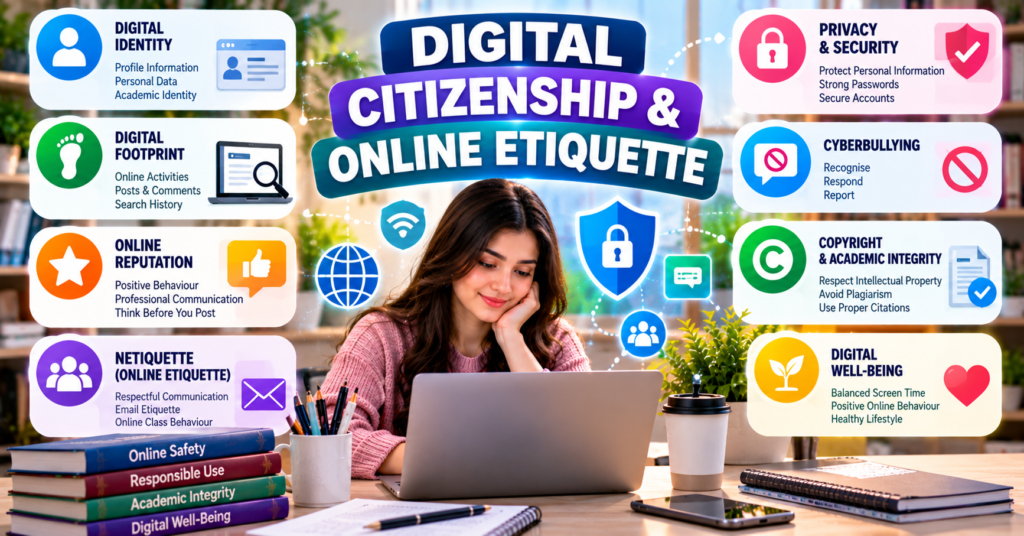
Digital citizenship means using digital technologies, online platforms and internet services safely, responsibly, ethically and respectfully.
A good digital citizen understands:
- How to protect personal information
- How to communicate respectfully
- How online activities affect reputation
- How to recognise false information
- How to respect copyright
- How to respond to cyberbullying
- How to secure digital accounts
- How to behave responsibly in online classes and groups
Online etiquette, also called netiquette, refers to the rules of polite and appropriate behaviour when communicating through the internet.
For BS Chemistry students, digital citizenship is important when using:
- Learning Management Systems
- Google Classroom
- Microsoft Teams
- WhatsApp groups
- Social media
- Online research databases
- Video-conferencing platforms
- Shared documents
- Virtual laboratories
2. Importance of Digital Citizenship
Digital technology is now part of education, employment, communication and everyday life. A person’s online behaviour can affect academic performance, relationships and future employment.
Digital citizenship helps students:
- Protect their personal information.
- Communicate professionally.
- Build a positive online reputation.
- Avoid online conflicts.
- Recognise cyberbullying.
- Respect intellectual property.
- Verify online information.
- Participate responsibly in digital communities.
- Protect academic and research data.
- Understand their digital rights and responsibilities.
3. Elements of Digital Citizenship
The major elements of digital citizenship include:
- Digital identity
- Digital reputation
- Digital communication
- Digital literacy
- Online safety
- Privacy
- Security
- Netiquette
- Digital rights
- Digital responsibilities
- Academic integrity
- Digital well-being
4. Digital Identity
4.1 Definition
Digital identity is the collection of information that represents a person on the internet.
A digital identity may include:
- Name
- Username
- Profile picture
- Email address
- Social-media accounts
- Online comments
- Photographs
- Videos
- Academic profiles
- Professional qualifications
- Location information
- Online purchases
- Search and browsing activities
A person may intentionally provide some of this information, while websites and applications may collect other information automatically.
4.2 Components of Digital Identity
4.2.1 Personal Information
This may include:
- Full name
- Date of birth
- Gender
- Address
- Mobile number
- Email address
- CNIC or identity information
Sensitive personal information should not be shared publicly.
4.2.2 Profile Information
Profile information may include:
- Username
- Biography
- Profile photograph
- Educational institution
- Workplace
- Skills
- Interests
4.2.3 Online Activities
Online activities may include:
- Posts
- Likes
- Comments
- Searches
- Reviews
- Shared links
- Group memberships
- Online purchases
4.2.4 Academic Identity
A student’s academic digital identity may include:
- University email
- Learning-platform profile
- Online assignments
- Research work
- Certificates
- Academic presentations
- Professional networking profile
4.3 Real and Anonymous Identities
Some online platforms require users to provide their actual identity. Others allow usernames or anonymous participation.
Anonymity does not remove responsibility. A user must still follow laws, platform rules and ethical standards.
4.4 Multiple Digital Identities
A person may use different online identities for different purposes.
For example:
- Personal social-media profile
- University account
- Professional LinkedIn profile
- Research-platform account
- Online-shopping account
These identities should be managed carefully and consistently.
5. Digital Footprint
5.1 Definition
A digital footprint is the record or trail of information created by a person’s online activities.
It may include:
- Social-media posts
- Comments
- Uploaded photographs
- Website visits
- Search history
- Online forms
- Email messages
- App activity
- Online purchases
- Location records
5.2 Active Digital Footprint
An active digital footprint is created when a user intentionally shares information.
Examples include:
- Posting a photograph
- Writing a comment
- Sending an email
- Uploading an assignment
- Completing an online form
- Creating a profile
5.3 Passive Digital Footprint
A passive digital footprint is created when information is collected without the user actively posting it.
Examples include:
- Location data
- Website cookies
- Device information
- Browsing behaviour
- Application usage
- IP address records
5.4 Importance of Digital Footprint
A digital footprint may be viewed by:
- Teachers
- Universities
- Employers
- Professional organisations
- Friends and family
- Online platforms
- Law-enforcement authorities
Information deleted from one account may still exist in screenshots, backups, archives or other users’ devices.
6. Online Reputation
6.1 Definition
Online reputation is the public opinion or impression created by a person’s digital identity and online behaviour.
A positive online reputation may show that a person is:
- Responsible
- Respectful
- Honest
- Skilled
- Professional
- Academically active
A negative online reputation may result from:
- Offensive posts
- False information
- Cyberbullying
- Public arguments
- Inappropriate photographs
- Plagiarism
- Fake qualifications
- Disrespectful comments
6.2 Importance for Students
Online reputation can affect:
- University admission
- Scholarships
- Internships
- Employment
- Professional relationships
- Research opportunities
- Personal relationships
6.3 Building a Positive Online Reputation
Students should:
- Use an appropriate profile photograph.
- Provide accurate educational information.
- Share useful and respectful content.
- Avoid offensive comments.
- Show academic achievements honestly.
- Check grammar and spelling in professional posts.
- Participate positively in academic discussions.
- Remove unnecessary public information.
- Review old posts regularly.
- Separate professional and private content where appropriate.
6.4 Repairing a Negative Online Reputation
A person may:
- Delete inappropriate content where possible.
- Request others to remove harmful posts.
- Correct false information.
- Apologise for inappropriate behaviour.
- Adjust privacy settings.
- Report impersonation.
- Publish accurate and constructive information.
- Seek institutional or legal help when necessary.
Repair may take time because some online content cannot be completely removed.
7. Managing Digital Identity
7.1 Privacy Settings
Students should review privacy settings on:
- Social media
- Cloud storage
- Learning platforms
- Mobile applications
- Online-shopping accounts
7.2 Information That Should Not Be Publicly Shared
Users should avoid publicly sharing:
- Passwords
- One-time passwords
- CNIC photographs
- Bank details
- Home address
- Private medical records
- Examination login details
- Student portal passwords
- Live travel location
- Confidential research data
7.3 Strong Passwords
A strong password should:
- Be long
- Be difficult to guess
- Contain different character types
- Be unique for each important account
- Avoid names and dates of birth
A password manager may help users create and store unique passwords securely.
7.4 Multi-Factor Authentication
Multi-Factor Authentication (MFA) requires an additional verification step besides a password.
Examples include:
- One-time code
- Authentication application
- Fingerprint
- Facial recognition
- Security key
7.5 Regular Account Review
Users should regularly:
- Check active login sessions.
- Remove unknown devices.
- Update recovery information.
- Delete unused accounts.
- Review connected applications.
- Change compromised passwords.
8. Identity Theft and Impersonation
8.1 Identity Theft
Identity theft occurs when someone steals and uses another person’s personal information without permission.
The criminal may use stolen information to:
- Access accounts
- Create fake profiles
- Conduct financial fraud
- Damage reputation
- Send harmful messages
- Obtain services in another person’s name
8.2 Online Impersonation
Online impersonation means pretending to be another person on the internet.
An impersonator may copy:
- Name
- Photograph
- Biography
- Social-media content
- Academic information
8.3 Signs of Impersonation
Signs may include:
- Friends receiving strange messages
- A duplicate profile
- Unknown posts appearing
- Unexpected password-reset messages
- Login alerts from unfamiliar devices
8.4 Response to Impersonation
The affected person should:
- Take screenshots.
- Copy the profile link.
- Report the fake account.
- Inform friends and contacts.
- Change passwords.
- Enable MFA.
- Check email and account security.
- Contact the institution if an academic identity is involved.
- Seek legal help if serious harm occurs.
9. Netiquette
9.1 Definition
Netiquette is a combination of the words “network” and “etiquette.” It refers to the accepted rules of polite, respectful and responsible behaviour in digital communication.
Netiquette applies to:
- Social media
- Discussion forums
- Online classes
- Group chats
- Video conferences
- Shared documents
- Learning platforms
9.2 Basic Principles
Good netiquette requires users to:
- Respect other people
- Use polite language
- Think before posting
- Avoid unnecessary arguments
- Protect privacy
- Give credit to sources
- Follow group rules
- Communicate clearly
- Avoid spreading misinformation
- Accept differences of opinion
10. Respectful Online Communication
10.1 Use Clear Language
Messages should be easy to understand. Users should avoid unclear abbreviations in formal communication.
Poor:
Sir assignment send krden plz.
Better:
Dear Sir, could you please share the assignment instructions? Thank you.
10.2 Use a Respectful Tone
Written communication does not include facial expressions or tone of voice. A short message may sound rude even when the sender did not intend it.
Students should use:
- Please
- Thank you
- Kindly
- Could you please clarify?
- I respectfully disagree.
10.3 Avoid Writing in All Capital Letters
Writing an entire message in capital letters can appear as shouting.
Poor:
SEND ME THE NOTES NOW.
Better:
Could you please share the notes when convenient?
10.4 Check Before Sending
Before sending a message, check:
- Recipient
- Tone
- Grammar
- Spelling
- Attachments
- Personal information
- Accuracy
10.5 Avoid Unnecessary Messages
Students should not repeatedly send:
- “Hello?”
- “Are you there?”
- “Reply.”
- Unrelated stickers
- Chain messages
- Repeated reminders
A complete and polite message is more effective.
11. Email Netiquette
11.1 Use a Professional Email Address
An academic email should contain an appropriate version of the student’s name.
Appropriate:
noor.fatima25@example.com
Inappropriate:
crazygirl786@example.com
11.2 Write a Clear Subject
Good subject:
Submission of Chemistry Laboratory Report
Poor subject:
Important
11.3 Begin with a Greeting
Examples include:
- Dear Sir,
- Dear Madam,
- Dear Professor Ahmed,
- Respected Sir/Madam,
11.4 Introduce Yourself
If the teacher may not recognise the email address, include:
- Full name
- Class
- Semester
- Roll number
11.5 State the Purpose Clearly
The reason for writing should appear early in the message.
11.6 Use a Formal Closing
Suitable closings include:
- Regards,
- Kind regards,
- Sincerely,
11.7 Mention Attachments
Write:
Please find attached my laboratory report.
Before sending, confirm that the correct file is attached.
11.8 Example of a Formal Email
Subject: Request for Clarification About Chemistry Assignment
Dear Madam,
I am Noor Fatima from BS Chemistry, First Semester. I would be grateful if you could clarify whether the assignment should be submitted in Word or PDF format.
Thank you for your guidance.
Regards,
Noor Fatima
Roll Number: 25
12. Online-Class Netiquette
Students should:
- Join on time.
- Use their correct name.
- Keep the microphone muted when not speaking.
- Use the camera according to class rules.
- Select a suitable background.
- Avoid eating or performing unrelated activities.
- Use the raise-hand feature.
- Do not interrupt.
- Use chat only for relevant discussion.
- Do not share the meeting link publicly.
- Do not record without permission.
- Avoid taking or sharing screenshots without consent.
- Leave the meeting properly.
- Follow the teacher’s instructions.
13. Group-Chat Netiquette
Academic WhatsApp, Teams or other group chats should be used responsibly.
Students should:
- Follow the purpose of the group.
- Avoid unrelated content.
- Do not send messages late at night unless urgent.
- Avoid large unnecessary files.
- Do not share unverified news.
- Respect administrators.
- Avoid personal arguments.
- Ask permission before adding new members.
- Do not forward private messages.
- Read earlier messages before asking repeated questions.
13.1 Appropriate Academic Group Message
Dear classmates, the deadline shown on Google Classroom is Monday at 5:00 p.m. Please check the platform for complete instructions.
13.2 Inappropriate Academic Group Message
Nobody knows anything here. Send me the assignment now!
14. Discussion-Forum Netiquette
In online academic forums, students should:
- Read the question carefully.
- Stay on topic.
- Support claims with evidence.
- Respect different opinions.
- Avoid personal attacks.
- Cite sources.
- Do not copy another student’s answer.
- Write meaningful responses.
- Avoid posting the same content repeatedly.
A good response may respectfully disagree with an idea without insulting the person.
Example:
I understand your point; however, the experimental evidence suggests a different conclusion because the reaction rate increased with temperature.
15. Social-Media Netiquette
Students should:
- Think before posting.
- Avoid insulting comments.
- Verify information.
- Respect other people’s photographs.
- Avoid sharing private conversations.
- Credit original creators.
- Do not tag people unnecessarily.
- Avoid public arguments.
- Report harmful content.
- Follow platform rules.
Before posting, ask:
- Is it true?
- Is it respectful?
- Is it necessary?
- Could it harm someone?
- Would I be comfortable if a teacher or employer saw it?
16. Respectful Academic Disagreement
Students may disagree with classmates or teachers, but disagreement should remain respectful.
Appropriate expressions include:
- “I understand your point, but I interpret the result differently.”
- “Could you please explain the evidence supporting this conclusion?”
- “According to the reference I consulted, another explanation may be possible.”
- “I respectfully disagree because the experimental data show a different trend.”
Inappropriate communication includes:
- Insults
- Mockery
- Threats
- Personal attacks
- Offensive jokes
- Public humiliation
17. Cultural Sensitivity
Online communication may involve people from different:
- Countries
- Languages
- Religions
- Cultures
- Social backgrounds
- Abilities
- Age groups
Students should:
- Avoid stereotypes.
- Respect religious and cultural differences.
- Avoid discriminatory jokes.
- Use inclusive language.
- Ask politely when uncertain.
- Avoid assuming that everyone has the same experiences.
18. Emojis, Abbreviations and Humour
18.1 Emojis
Emojis can express emotion in informal communication, but they should be limited in formal academic messages.
18.2 Abbreviations
Informal abbreviations such as “u,” “plz,” “ASAP” and “thx” may be unsuitable in formal emails.
18.3 Humour
Humour can be misunderstood online because tone and facial expressions are absent.
Students should avoid jokes involving:
- Religion
- Race
- Gender
- Disability
- Appearance
- Illness
- Personal difficulties
19. Privacy and Consent in Online Communication
19.1 Consent
Consent means freely giving permission for something.
Students should obtain permission before:
- Posting another person’s photograph
- Sharing a private message
- Recording a video call
- Uploading a group presentation
- Tagging someone in sensitive content
- Sharing personal information
19.2 Confidentiality
Confidentiality means protecting information that should not be shared publicly.
Confidential information may include:
- Examination material
- Student records
- Medical information
- Research data
- Account passwords
- Unpublished experimental results
- Private messages
20. Copyright and Intellectual Property
20.1 Copyright
Copyright legally protects original creative work.
Protected work may include:
- Books
- Articles
- Photographs
- Videos
- Presentations
- Software
- Diagrams
- Research papers
20.2 Intellectual Property
Intellectual property refers to creations of the mind, such as inventions, written work, designs and scientific discoveries.
20.3 Responsible Use
Students should:
- Cite sources.
- Use quotation marks for exact words.
- Obtain permission where required.
- Use openly licensed material when possible.
- Avoid copying entire articles.
- Credit photographs and diagrams.
- Follow institutional referencing rules.
21. Plagiarism
21.1 Definition
Plagiarism means presenting another person’s words, ideas, data or work as one’s own.
21.2 Forms of Plagiarism
Plagiarism includes:
- Copying text without citation
- Submitting another student’s assignment
- Using an image without acknowledgement
- Presenting another person’s data as one’s own
- Rewording material without citing the source
- Submitting AI-generated content against institutional rules
21.3 Avoiding Plagiarism
Students should:
- Understand the source.
- Write in their own words.
- Cite the source.
- Use quotation marks for exact wording.
- Include a reference list.
- Keep careful research notes.
- Follow the required citation style.
22. Cyberbullying
22.1 Definition
Cyberbullying is the repeated use of digital technologies to threaten, embarrass, humiliate, frighten or harm another person.
It can occur through:
- Social media
- Messaging applications
- Online games
- Group chats
- Discussion forums
- Video platforms
- Fake profiles
22.2 Examples
Cyberbullying may include:
- Sending insulting messages
- Spreading rumours
- Posting embarrassing photographs
- Creating fake profiles
- Excluding someone from online groups
- Sharing private information
- Repeatedly mocking someone
- Sending threats
- Encouraging others to attack a person
- Editing photographs to humiliate someone
22.3 Characteristics
Cyberbullying may be:
- Repeated
- Public
- Anonymous
- Continuous
- Difficult to escape
- Rapidly spread
- Preserved through screenshots
22.4 Cyberbullying and Disagreement
Not every online disagreement is cyberbullying.
| Online disagreement | Cyberbullying |
|---|---|
| May happen once | Often repeated or part of continuing harm |
| Focuses on an issue | Targets a person |
| Can remain respectful | Involves humiliation, threats or abuse |
| May be resolved through discussion | Often requires reporting or intervention |
A single serious threat or harmful act should still be reported even if it is not repeated.
23. Forms of Cyberbullying
23.1 Harassment
Repeatedly sending insulting, abusive or threatening messages.
23.2 Denigration
Spreading false or harmful information to damage a person’s reputation.
23.3 Impersonation
Pretending to be another person online to damage their reputation or deceive others.
23.4 Outing
Sharing someone’s secrets, private messages, photographs or personal information without permission.
23.5 Exclusion
Intentionally leaving someone out of an online group to embarrass or isolate them.
23.6 Cyberstalking
Repeatedly monitoring, contacting, threatening or frightening someone through digital technology.
23.7 Doxxing
Publishing someone’s private identifying information, such as address or telephone number, without permission.
23.8 Trolling
Posting provocative or offensive content to upset people or create conflict.
23.9 Flaming
A hostile online argument involving angry, insulting or abusive messages.
24. Online Harassment
24.1 Definition
Online harassment is unwanted digital behaviour that causes fear, distress, humiliation or discomfort.
It may include:
- Repeated unwanted messages
- Sexual comments
- Threats
- Discriminatory language
- Pressure to share photographs
- Unwanted calls
- Monitoring someone’s online activity
- Sharing private information
- Blackmail
24.2 Cyberbullying and Online Harassment
| Cyberbullying | Online harassment |
|---|---|
| Commonly discussed in student and peer contexts | Can occur in any personal, academic or professional context |
| Often involves repeated humiliation or intimidation | Includes a wider range of unwanted harmful behaviour |
| May occur between classmates | May involve strangers, colleagues or other individuals |
| Often aims to embarrass or exclude | May involve threats, stalking or sexual harassment |
25. Causes of Cyberbullying
Possible causes include:
- Desire for attention
- Peer pressure
- Anger or jealousy
- Revenge
- Lack of empathy
- Desire for control
- Misuse of anonymity
- Personal prejudice
- Poor understanding of consequences
- Group conflict
- Belief that online behaviour is not serious
No cause justifies cyberbullying.
26. Effects of Cyberbullying
Cyberbullying can affect:
26.1 Emotional Health
It may cause:
- Sadness
- Fear
- Anger
- Shame
- Anxiety
- Loss of confidence
- Emotional distress
26.2 Academic Performance
A student may experience:
- Difficulty concentrating
- Low attendance
- Missed assignments
- Reduced class participation
- Falling grades
- Avoidance of online learning
26.3 Social Life
It may lead to:
- Isolation
- Loss of friendships
- Fear of communication
- Withdrawal from groups
- Distrust of others
26.4 Physical Health
Stress may contribute to:
- Headaches
- Sleep disturbance
- Fatigue
- Appetite changes
- Physical discomfort
Severe distress, self-harm thoughts or immediate danger requires urgent help from trusted adults, qualified professionals or emergency services.
27. Recognising Cyberbullying
Possible warning signs include:
- Sudden avoidance of devices
- Fear after receiving messages
- Deleting social-media accounts
- Withdrawing from friends
- Refusing to attend classes
- Sudden mood changes
- Poor academic performance
- Difficulty sleeping
- Secrecy about online activities
- Repeated unknown messages or calls
These signs do not always prove cyberbullying, but they may indicate that support is needed.
28. Responding to Cyberbullying
28.1 Do Not Respond Emotionally
An angry response may increase the conflict.
28.2 Preserve Evidence
Save:
- Screenshots
- Usernames
- Profile links
- Dates and times
- Messages
- Emails
- Audio or video evidence
- Witness information
Evidence should be stored securely and should not be publicly reposted.
28.3 Block the Offender
Blocking can prevent further direct communication.
28.4 Report the Content
Use the platform’s reporting tools for:
- Harassment
- Threats
- Fake accounts
- Hate speech
- Private-image sharing
- Impersonation
28.5 Adjust Privacy Settings
Limit who can:
- Message
- Comment
- Tag
- Follow
- View posts
- See personal information
28.6 Tell a Trusted Person
Students should inform:
- Parent or guardian
- Teacher
- Class adviser
- Department head
- Counsellor
- Trusted friend
- University administration
28.7 Seek Professional or Legal Help
Serious threats, blackmail, stalking, identity theft or distribution of private material may require professional or legal assistance.
29. What Not to Do After Cyberbullying
A victim should avoid:
- Deleting all evidence immediately
- Responding with threats
- Publicly revealing the offender’s private information
- Forwarding humiliating content
- Meeting the offender alone
- Paying blackmail demands
- Sharing passwords
- Remaining completely silent when safety is at risk
30. Supporting a Victim of Cyberbullying
If a classmate reports cyberbullying:
- Listen without blaming.
- Take the complaint seriously.
- Do not spread the content.
- Help preserve evidence.
- Encourage reporting.
- Offer emotional support.
- Inform a responsible authority if safety is threatened.
- Respect the victim’s privacy.
- Do not confront the offender aggressively.
- Continue checking on the person’s well-being.
31. Role of Bystanders
A bystander is a person who sees harmful behaviour but is not directly involved.
Bystanders should:
- Avoid liking or sharing harmful content.
- Refuse to join abusive conversations.
- Report the content.
- Support the victim privately.
- Save evidence where appropriate.
- Inform a teacher or authority.
- Challenge harmful behaviour safely.
A person who supports the victim and takes safe action is sometimes called an upstander.
32. Preventing Cyberbullying
Educational institutions can:
- Develop anti-bullying policies.
- Provide reporting procedures.
- Teach digital citizenship.
- Train teachers and students.
- Protect complainants’ privacy.
- Investigate reports fairly.
- Apply appropriate disciplinary measures.
- Provide counselling.
- Promote respectful communication.
- Monitor official digital platforms responsibly.
Students can help prevention by refusing to participate in harmful online behaviour.
33. Cyberbullying in Academic Settings
Cyberbullying in a university environment may include:
- Mocking a student in a class group
- Sharing a laboratory mistake to embarrass someone
- Posting a classmate’s photograph without consent
- Excluding someone from a project group
- Spreading false rumours
- Creating fake academic profiles
- Insulting someone’s presentation
- Sharing private grades
- Misusing recorded lectures or screenshots
Academic criticism should focus on work, not the person.
Appropriate:
The calculation in Table 2 needs correction.
Inappropriate:
You are too stupid to understand this experiment.
34. Responsible Use of Class Groups
Students should not use academic groups to:
- Shame classmates
- Share grades
- Post private messages
- Spread rumours
- Share examination material illegally
- Upload embarrassing images
- Pressure others
- Conduct personal attacks
Administrators should establish clear rules and respond to serious violations.
35. Fake News and Misinformation
35.1 Misinformation
Misinformation is incorrect information shared without necessarily intending harm.
35.2 Disinformation
Disinformation is false information deliberately created or shared to mislead people.
35.3 Checking Information
Before sharing, ask:
- Who published it?
- Is the author qualified?
- Is evidence provided?
- Is the date current?
- Do reliable sources confirm it?
- Is the headline misleading?
- Is the image genuine?
- Is the content satire?
35.4 Scientific Misinformation
Chemistry students may encounter false claims about:
- Medicines
- Chemicals
- Food additives
- Vaccines
- Cosmetics
- Environmental pollution
- Household products
- Laboratory procedures
Scientific claims should be checked using reliable textbooks, peer-reviewed research and recognised institutions.
36. Digital Academic Integrity
Students must use digital technology honestly.
Academic misconduct may include:
- Copying online assignments
- Sharing answers during a test
- Using unauthorised websites during an examination
- Falsifying data
- Editing experimental results
- Inventing references
- Submitting another student’s file
- Misusing AI tools
- Hiding group members’ contributions
36.1 Responsible Use of AI
Students should:
- Follow university rules.
- Verify generated information.
- Check references.
- Acknowledge AI use when required.
- Avoid submitting generated work without understanding it.
- Never enter confidential research data into unapproved tools.
37. Digital Rights
Digital citizens have rights such as:
- Right to privacy
- Right to security
- Right to access information
- Right to express opinions lawfully
- Right to report abuse
- Right to control personal information
- Right to receive credit for original work
- Right to access digital services fairly
Rights must be exercised without violating the rights of others.
38. Digital Responsibilities
Digital citizens are responsible for:
- Respecting others
- Protecting passwords
- Following laws
- Respecting copyright
- Verifying information
- Reporting harmful activity
- Maintaining academic honesty
- Protecting confidential data
- Using secure platforms
- Accepting responsibility for online actions
39. Freedom of Expression and Its Limits
Freedom of expression allows people to share ideas and opinions. It does not justify:
- Threats
- Defamation
- Harassment
- Hate speech
- Disclosure of private information
- Incitement to violence
- Copyright violation
- Academic dishonesty
A responsible digital citizen expresses disagreement without harming others.
40. Digital Well-Being
40.1 Definition
Digital well-being means maintaining a healthy and balanced relationship with technology.
40.2 Signs of Unhealthy Technology Use
- Excessive screen time
- Loss of sleep
- Neglect of studies
- Anxiety when offline
- Constant notification checking
- Reduced physical activity
- Online arguments
- Difficulty concentrating
40.3 Healthy Practices
Students should:
- Take regular screen breaks.
- Maintain a sleep schedule.
- Turn off unnecessary notifications.
- Avoid phones during focused study.
- Limit social-media time.
- Engage in physical activity.
- Avoid screens immediately before sleep.
- Seek support when online activity affects mental health.
41. Netiquette Checklist
Before posting or sending anything, check:
- Is the information accurate?
- Is the message necessary?
- Is the tone respectful?
- Does it contain private information?
- Do I have permission to share it?
- Have I credited the source?
- Could it harm or embarrass someone?
- Would I say the same thing face-to-face?
- Would I be comfortable if a teacher saw it?
- Have I checked spelling and attachments?
42. Examples of Good and Poor Netiquette
| Situation | Poor netiquette | Good netiquette |
|---|---|---|
| Asking for notes | “Send notes now.” | “Could you please share today’s notes when convenient?” |
| Disagreeing | “You are completely wrong.” | “I understand your view, but the evidence suggests another conclusion.” |
| Email subject | “Hello” | “Question About Chemistry Assignment” |
| Group chat | Sending repeated unrelated messages | Sharing only relevant academic information |
| Using an image | Copying without credit | Mentioning the creator and source |
| Online class | Keeping the microphone on in noise | Muting when not speaking |
| Private content | Sharing a screenshot publicly | Requesting permission before sharing |
43. Digital Citizenship in Chemistry Education
BS Chemistry students should apply digital citizenship when:
- Searching for scientific information
- Using chemical databases
- Preparing laboratory reports
- Sharing experimental results
- Attending virtual classes
- Communicating with teachers
- Working on group projects
- Uploading laboratory photographs
- Using AI tools
- Publishing research
43.1 Protecting Research Data
Research data should be:
- Stored securely
- Shared only with authorised people
- Backed up
- Labelled accurately
- Protected from unauthorised editing
- Reported honestly
43.2 Laboratory Photography
Before taking or sharing laboratory photographs, students should:
- Obtain permission.
- Avoid showing confidential information.
- Follow laboratory safety rules.
- Avoid photographing people without consent.
- Avoid sharing unsafe practices as entertainment.
43.3 Scientific Communication
Scientific posts should:
- Use correct terminology.
- Provide evidence.
- Avoid exaggerated claims.
- Mention limitations.
- Cite reliable sources.
- Distinguish facts from opinions.
44. Example Scenario: Inappropriate Class-Group Message
A student makes an error during an experiment. Another student takes a photograph and shares it in the class group with an insulting caption.
This behaviour is inappropriate because:
- The photograph was shared without consent.
- The message humiliates the student.
- It may damage the student’s reputation.
- It discourages learning.
- It may be considered cyberbullying.
The correct response is to:
- Avoid forwarding the image.
- Ask the sender to remove it.
- Support the affected student.
- Save evidence if necessary.
- Report serious or repeated behaviour.
- Discuss laboratory mistakes respectfully and educationally.
45. Example Scenario: Respectful Academic Correction
A student enters an incorrect formula in a shared report.
An appropriate comment would be:
Please review the molarity formula in Section 3. The volume should be converted from millilitres to litres before calculation.
An inappropriate comment would be:
You clearly know nothing about chemistry.
The first statement focuses on correcting the work. The second attacks the person.
46. Difference Between Digital Identity and Digital Footprint
| Digital identity | Digital footprint |
|---|---|
| Represents who a person is online | Records what a person does online |
| Includes profiles, names and accounts | Includes posts, searches and activities |
| Can be deliberately created | Can be active or passive |
| May be managed to present a professional image | May continue to exist after content is deleted |
47. Difference Between Netiquette and Digital Citizenship
| Netiquette | Digital citizenship |
|---|---|
| Focuses on polite online behaviour | Covers responsible use of technology generally |
| Mainly concerns communication | Includes safety, privacy, ethics and rights |
| Applies to messages, email and discussions | Applies to all digital activities |
| Is one part of digital citizenship | Is the broader concept |
48. Difference Between Cyberbullying and Trolling
| Cyberbullying | Trolling |
|---|---|
| Aims to harm, humiliate or threaten a person | Often aims to provoke reactions or conflict |
| May repeatedly target one person | May target individuals or entire groups |
| Can seriously affect the victim | May range from irritating to seriously harmful |
| Requires evidence, reporting and support | Should be ignored, blocked or reported when abusive |
49. Important Terms
Digital citizenship: Safe, responsible, ethical and respectful use of technology.
Digital identity: Information that represents a person online.
Digital footprint: Record of a person’s online activities.
Online reputation: Public impression created by online behaviour.
Netiquette: Rules of polite and respectful online communication.
Privacy: Control over personal information.
Consent: Permission freely given for an action.
Confidentiality: Protection of information from unauthorised disclosure.
Identity theft: Unauthorised use of another person’s personal information.
Impersonation: Pretending to be another person online.
Cyberbullying: Use of digital technologies to repeatedly harm, threaten or humiliate someone.
Online harassment: Unwanted online behaviour causing distress or fear.
Cyberstalking: Repeated online monitoring, contact or threats.
Doxxing: Publishing private identifying information without consent.
Trolling: Posting provocative content to upset others or create conflict.
Flaming: Hostile online argument involving abusive messages.
Phishing: Attempting to steal information through fake digital communication.
Plagiarism: Presenting another person’s work or ideas as one’s own.
Copyright: Legal protection of original creative work.
Misinformation: Incorrect information shared without necessarily intending harm.
Disinformation: False information deliberately shared to mislead.
Digital well-being: Maintaining a healthy and balanced relationship with technology.
50. Short Questions for Examination Preparation
- Define digital citizenship.
- What is online etiquette?
- Define digital identity.
- What is a digital footprint?
- Differentiate between active and passive digital footprints.
- Define online reputation.
- How can students build a positive online reputation?
- What is identity theft?
- Define online impersonation.
- What is netiquette?
- State five rules of email netiquette.
- State five rules of online-class etiquette.
- Why should students avoid writing in all capital letters?
- What is consent in online communication?
- Define copyright.
- What is plagiarism?
- Define cyberbullying.
- Name four forms of cyberbullying.
- What is online harassment?
- Define cyberstalking.
- What is doxxing?
- Differentiate between cyberbullying and trolling.
- What should a victim do after cyberbullying?
- What is the role of a bystander?
- Define digital well-being.
51. Possible Long Questions
- Explain digital citizenship and its major elements.
- Discuss digital identity, digital footprint and online reputation.
- Explain how students can build and protect a positive online identity.
- Discuss netiquette and the rules of respectful online communication.
- Explain email, group-chat and virtual-classroom etiquette.
- Define cyberbullying and discuss its major forms.
- Explain the effects, prevention and reporting of cyberbullying.
- Discuss online harassment, cyberstalking, impersonation and doxxing.
- Explain digital rights and responsibilities.
- Discuss privacy, consent and confidentiality in digital communication.
- Explain copyright, plagiarism and digital academic integrity.
- Discuss the application of digital citizenship in chemistry education.
52. Summary
Digital citizenship means using technology safely, responsibly, ethically and respectfully. It includes managing digital identity, protecting privacy, maintaining a positive online reputation, following netiquette and respecting the rights of others.
A digital identity is the information that represents a person online, while a digital footprint is the record created through online activity. Posts, comments and photographs can affect education, relationships and future employment.
Netiquette requires clear, polite and respectful communication through email, online classes, discussion forums, social media and academic groups. Students should think before posting, respect privacy and avoid offensive or misleading content.
Cyberbullying and online harassment can cause serious emotional, academic and social harm. Victims should preserve evidence, block and report offenders, adjust privacy settings and seek support. Bystanders should not share harmful content and should safely support the victim.
For BS Chemistry students, good digital citizenship is essential when sharing laboratory data, communicating with teachers, preparing assignments, using scientific sources and participating in digital learning environments.