
Table of Contents
1. Introduction
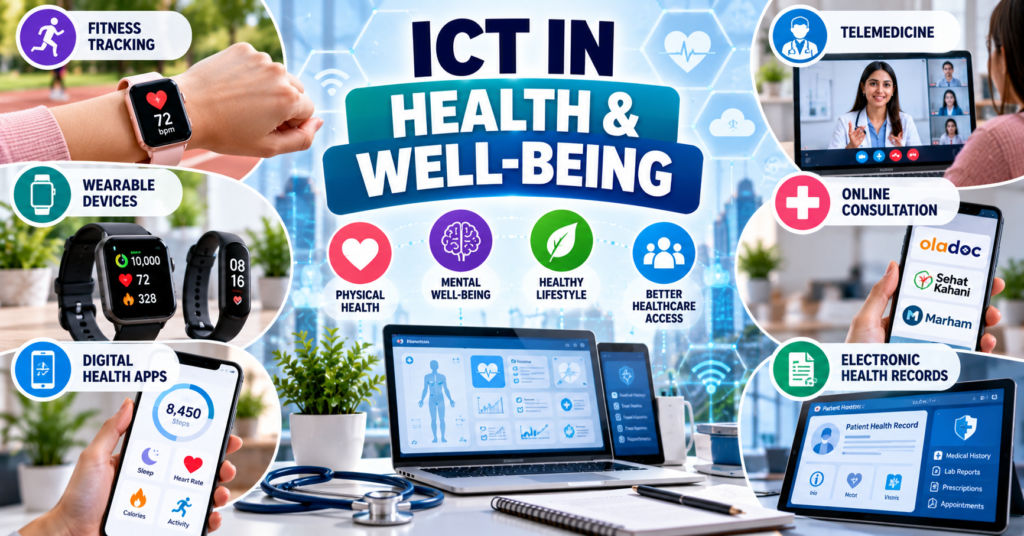
ICT in health and well-being refers to the use of computers, smartphones, wearable devices, internet services and digital platforms to support physical health, mental well-being, fitness and healthcare delivery.
ICT allows users to:
- Record physical activity
- Monitor exercise routines
- Track sleep and fitness goals
- Maintain health records
- Receive reminders
- Book medical appointments
- Consult doctors online
- Access laboratory reports
- Receive electronic prescriptions
- Obtain health education
- Communicate with healthcare professionals
Important applications include:
- Health and fitness-tracking devices
- Health and fitness mobile applications
- Wearable sensors
- Telemedicine
- Online medical consultations
- Electronic health records
- Remote patient monitoring
- Digital health education
For BS Chemistry students, this topic is relevant because healthcare technologies depend on sensors, biochemistry, pharmaceuticals, laboratory testing and accurate analysis of health-related data.
2. Meaning of Health and Well-Being
2.1 Health
Health is not simply the absence of disease. It includes the proper physical, mental and social functioning of an individual.
2.2 Well-Being
Well-being refers to a person’s overall quality of life and ability to function positively.
It may include:
- Physical fitness
- Mental wellness
- Emotional stability
- Healthy sleep
- Good nutrition
- Social connection
- Stress management
- Work-life balance
2.3 Digital Health
Digital health is the use of digital technologies to support health services and individual well-being.
Examples include:
- Fitness applications
- Smartwatches
- Online consultations
- Electronic health records
- Medicine-reminder applications
- Health information websites
- Remote monitoring devices
3. Role of ICT in Health and Well-Being
ICT supports healthcare in several ways:
- It provides quick access to health information.
- It connects patients with healthcare professionals.
- It allows continuous tracking of physical activity.
- It supports remote monitoring of patients.
- It reduces unnecessary travel.
- It helps organise health records.
- It supports health education.
- It can provide reminders for exercise or medicines.
- It helps healthcare professionals analyse data.
- It can improve access for people living in remote areas.
ICT can support healthcare decisions, but it does not replace the professional judgment of a qualified doctor.
4. Health and Fitness-Tracking Technology
4.1 Definition
Health and fitness tracking means using digital devices or applications to collect and display information about physical activity and certain health-related measurements.
Tracking may include:
- Steps
- Walking distance
- Running distance
- Exercise duration
- Heart rate
- Calories burned
- Sleep duration
- Workout type
- Body weight
- Water intake
- Menstrual-cycle information
4.2 Fitness-Tracking Application
A fitness-tracking application is a mobile or web-based program used to record, organise and display activity-related information.
Examples include:
- Google Fit
- Samsung Health
- Apple Health
- Runkeeper
4.3 Fitness-Tracking Device
A fitness-tracking device is an electronic device containing sensors that collect information about movement or selected body functions.
Examples include:
- Xiaomi Smart Band, commonly called Mi Band
- Smartwatches
- Fitness bands
- Heart-rate monitors
- Smart rings
- GPS sports watches
5. How Fitness Trackers Work
5.1 Sensors
Fitness devices use electronic sensors to collect information.
Common sensors include:
5.1.1 Accelerometer
An accelerometer detects movement and changes in speed or direction.
It can help estimate:
- Steps
- Movement
- Activity duration
- Sleep movement
5.1.2 Gyroscope
A gyroscope detects orientation and rotational movement.
It may help identify particular exercises or movement patterns.
5.1.3 Optical Heart-Rate Sensor
An optical heart-rate sensor uses light to estimate blood-flow changes beneath the skin.
The device uses these changes to estimate heart rate.
5.1.4 Global Positioning System
GPS uses satellite signals to determine location and route.
It can measure:
- Running route
- Cycling route
- Distance
- Speed
- Pace
5.1.5 Altimeter
An altimeter estimates changes in elevation. It may be used to estimate stairs climbed or height gained during hiking.
5.1.6 Blood-Oxygen Sensor
Some wearable devices estimate blood oxygen saturation using optical sensing.
Consumer wearables are not automatically equivalent to medical diagnostic instruments. Measurements may be affected by device quality, movement, skin contact and other conditions.
5.2 Data Processing
The device or application processes sensor readings through algorithms. It converts raw measurements into understandable information, such as:
- 7,000 steps
- 4.5 kilometres walked
- 30 minutes of activity
- Average heart rate
- Estimated calories burned
5.3 Data Display
The results may be presented through:
- Numbers
- Graphs
- Charts
- Progress rings
- Daily summaries
- Weekly reports
- Notifications
5.4 Data Synchronisation
Wearable devices can transfer information to smartphones through technologies such as Bluetooth.
The application may then store the information locally or in the cloud.
6. Google Fit
6.1 Introduction
Google Fit is a health and fitness platform developed by Google. It can collect activity information from a phone, smartwatch and compatible applications.
Google Fit can monitor activity and show progress through a phone or smartwatch. Its activity measurements include steps and Heart Points. Google Fit Help
6.2 Main Functions
Google Fit may be used to:
- Record steps
- Track walks and runs
- Record workouts
- Display activity history
- Monitor progress
- Set activity goals
- Connect compatible applications and devices
6.3 Heart Points
Google Fit may award Heart Points for physical activities. The number of points depends on the duration and intensity of the activity.
6.4 Application for Students
A student may use Google Fit to:
- Set a daily activity goal.
- Carry a smartphone while walking.
- Allow the application to record steps.
- Review daily or weekly progress.
- Identify days with low activity.
- Develop a more regular exercise routine.
6.5 Limitations
- The accuracy depends on available sensors and permissions.
- Not every movement is detected correctly.
- Estimated calories may differ from actual energy use.
- It should not be used to diagnose disease.
7. Samsung Health
7.1 Introduction
Samsung Health is a health and fitness application associated with Samsung devices and compatible wearables.
7.2 Possible Uses
Depending on the connected device, region and application version, it may help users record or review:
- Steps
- Walking
- Running
- Workouts
- Sleep
- Heart rate
- Food information
- Water intake
- Weight
- Exercise goals
7.3 Advantages
- It can integrate with compatible Samsung wearables.
- It presents health information through summaries and graphs.
- It can combine several fitness records in one application.
- It supports personal exercise monitoring.
7.4 Limitations
- Some features require compatible devices.
- Availability may differ by country and model.
- Sensor readings are estimates.
- Health decisions should not be based on one application reading alone.
8. Apple Health
8.1 Introduction
Apple Health is a health-information application available on compatible Apple devices.
It can collect and organise health and activity information from:
- The iPhone
- Apple Watch
- Connected applications
- Compatible healthcare services and devices
8.2 Types of Information
Depending on the connected services and permissions, Apple Health may organise information related to:
- Steps
- Walking distance
- Exercise
- Heart rate
- Sleep
- Nutrition
- Body measurements
- Mobility
- Medication records
- Menstrual-cycle tracking
8.3 Health Data Permissions
Users can control which applications may read or add information.
This is important because health information is personal and sensitive.
8.4 Limitations
- Some functions require additional Apple devices.
- Feature availability may vary.
- Incorrect permissions may expose personal information.
- Fitness information is not a substitute for medical examination.
9. Xiaomi Smart Band or Mi Band
9.1 Introduction
The Xiaomi Smart Band, often referred to as a Mi Band, is a wearable fitness-tracking device.
Xiaomi’s wearable product range includes smart bands and other connected devices. mi.com
9.2 Common Functions
Functions depend on the exact model, but may include:
- Step counting
- Heart-rate estimation
- Sleep tracking
- Workout recording
- Activity reminders
- Notifications
- Alarm
- Timer
- Exercise modes
9.3 Working Method
A smart band uses sensors to collect activity information. It can synchronise the information with a compatible mobile application.
9.4 Advantages
- Small and portable
- Convenient for daily activity monitoring
- Can provide reminders
- Usually has longer battery life than a smartphone
- Helps users observe fitness patterns
9.5 Limitations
- Accuracy may vary by activity and device model.
- Poor skin contact can affect readings.
- It is not a replacement for hospital equipment.
- Continuous tracking may create privacy concerns.
10. Runkeeper
10.1 Introduction
Runkeeper is a fitness application mainly used for recording outdoor physical activities.
10.2 Common Uses
It may be used to track:
- Running
- Walking
- Cycling
- Distance
- Route
- Pace
- Duration
- Exercise history
10.3 GPS-Based Tracking
Runkeeper can use GPS to record a user’s route. After the activity, the application may display a map and performance information.
10.4 Application for Students
Students can use it to:
- Set a walking or running goal.
- Monitor improvement over time.
- Review distance and pace.
- Develop a regular exercise routine.
10.5 Limitations
- GPS use can increase battery consumption.
- Location data is sensitive.
- GPS accuracy can be affected by buildings or weak signals.
- The application does not provide medical diagnosis.
11. Comparison of Health and Fitness Tools
| Tool | Type | Main use |
|---|---|---|
| Google Fit | Fitness application | Activity and goal tracking |
| Samsung Health | Health and fitness application | Organising activity and wellness information |
| Apple Health | Health-data platform | Collecting information from compatible devices and apps |
| Xiaomi Smart Band | Wearable device | Recording movement and selected fitness measurements |
| Runkeeper | Fitness application | GPS-based walking and running records |
Features may vary according to the device, operating system, region and current software version.
12. Benefits of Health and Fitness-Tracking Tools
12.1 Increased Awareness
Fitness tools help users understand how active or inactive they are.
12.2 Goal Setting
Users can create targets, such as:
- Walking a particular number of steps
- Exercising for a set time
- Running a certain distance
- Maintaining a regular sleep schedule
12.3 Motivation
Progress indicators, reminders and activity records may encourage users to remain active.
12.4 Long-Term Tracking
Daily and weekly records can show changes in behaviour over time.
12.5 Personal Organisation
Applications can organise fitness information in one location.
12.6 Communication with Professionals
Some users may share selected records with a qualified health or fitness professional.
The professional should interpret the information within its limitations.
13. Limitations of Health and Fitness Trackers
13.1 Measurement Errors
Consumer devices may provide approximate rather than perfectly accurate values.
Errors may result from:
- Incorrect placement
- Loose wristbands
- Rapid movement
- Sensor limitations
- Software problems
- Individual physical differences
13.2 False Reassurance
A normal reading from a wearable device does not prove that a person is free from disease.
13.3 Unnecessary Anxiety
Users may become worried by small changes in readings that are normal or caused by measurement error.
13.4 Privacy Risks
Applications may collect sensitive information about:
- Location
- Physical activity
- Sleep
- Heart rate
- Health conditions
13.5 Overdependence
Technology should support healthy behaviour, not create unhealthy obsession with numbers.
13.6 Internet and Device Dependence
Some features require:
- A compatible smartphone
- Bluetooth
- Internet access
- A user account
- Regular charging
14. Safe Use of Fitness Applications and Devices
Users should:
- Use a strong password.
- Enable multi-factor authentication where available.
- Review privacy settings.
- Limit unnecessary location sharing.
- Grant only required permissions.
- Keep the application updated.
- Avoid sharing health records publicly.
- Clean wearable devices regularly.
- Wear the device according to its instructions.
- Consult a doctor about concerning symptoms.
Health-tracking applications should not be used for self-diagnosis or to change prescribed treatment without medical advice.
15. Telemedicine
15.1 Definition
Telemedicine is the delivery of clinical healthcare services over distance through information and communication technologies.
It allows a patient and healthcare professional to communicate without being physically present in the same room.
Communication may occur through:
- Video calls
- Audio calls
- Secure text messages
- Mobile applications
- Web portals
- Remote-monitoring devices
15.2 Telehealth and Telemedicine
The terms are related but not identical.
| Telemedicine | Telehealth |
|---|---|
| Mainly refers to remote clinical services | Broader term covering clinical and non-clinical health services |
| Includes online diagnosis and follow-up | Includes education, administration and public-health communication |
| Example: video consultation with a doctor | Example: online health-awareness session |
16. Types of Telemedicine
16.1 Synchronous Telemedicine
Synchronous telemedicine takes place in real time.
Examples include:
- Live video consultation
- Telephone consultation
- Real-time discussion between doctors
16.2 Asynchronous Telemedicine
Asynchronous telemedicine does not require both parties to communicate at the same time.
A patient may submit:
- Medical history
- Photographs
- Laboratory reports
- Previous prescriptions
- Recorded information
The healthcare professional reviews the material later and responds.
This is sometimes called store-and-forward telemedicine.
16.3 Remote Patient Monitoring
Remote patient monitoring uses digital devices to collect health information from a patient at home.
Depending on the medical requirement and approved equipment, information may include:
- Blood pressure
- Blood glucose
- Heart rate
- Body temperature
- Oxygen saturation
- Body weight
16.4 Doctor-to-Doctor Consultation
One healthcare professional may consult another specialist remotely.
This is useful when a specialist is not available at the patient’s location.
17. Requirements for an Online Health Consultation
An online consultation generally requires:
- Smartphone, tablet or computer
- Stable internet connection
- Camera and microphone for video consultation
- Registered account
- Appointment booking
- Patient’s medical information
- Previous prescriptions where relevant
- Laboratory or imaging reports
- A quiet and private location
- Digital payment method if required
18. General Procedure for an Online Consultation
A patient may follow these steps:
- Open the official website or application.
- Create an account.
- Search for a doctor by speciality, name or condition.
- Review professional information and availability.
- Select a suitable doctor.
- Choose an appointment time.
- Select video, audio or another available consultation method.
- Pay the consultation fee if required.
- Upload relevant reports or prescriptions.
- Join the consultation at the scheduled time.
- Explain symptoms clearly.
- Answer the doctor’s questions accurately.
- Receive medical advice or an electronic prescription where appropriate.
- Save the consultation record.
- Arrange follow-up if recommended.
19. Preparing for an Online Consultation
Before the consultation, the patient should prepare:
- A list of symptoms
- Date when symptoms started
- Current medicines
- Known allergies
- Relevant medical history
- Previous prescriptions
- Laboratory reports
- Temperature or other available readings
- Questions to ask the doctor
The patient should also test the internet connection, camera and microphone.
20. Communication During an Online Consultation
The patient should:
- Speak clearly.
- Give accurate information.
- Avoid hiding important symptoms.
- Show medicine packaging when necessary.
- Ask for clarification if instructions are unclear.
- Write down medicine names and doses.
- Confirm when follow-up is required.
- Inform the doctor if pregnancy, allergy or a chronic condition is relevant.
Patients should not demand antibiotics or other medicines without a proper medical assessment.
21. OLADOC
21.1 Introduction
OLADOC is a Pakistan-based digital healthcare platform that allows users to search for doctors and book healthcare appointments.
Its website provides options for finding doctors, booking in-person appointments and arranging online video consultations. oladoc.com
21.2 Common Uses
Depending on the available service, users may:
- Search for doctors
- Search by speciality
- View appointment availability
- Book in-person appointments
- Book online consultations
- Search for healthcare services
- Arrange selected laboratory or diagnostic services
21.3 Advantages
- Reduces the time needed to locate a doctor
- Provides appointment information
- Supports remote consultation
- Helps users compare available options
- May reduce unnecessary travel
21.4 Limitations
- Doctor and service availability may differ by location.
- Online information must be reviewed carefully.
- Some conditions still require physical examination.
- Internet or payment problems may interrupt booking.
22. Sehat Kahani
22.1 Introduction
Sehat Kahani is a Pakistani digital-health platform that provides online access to healthcare professionals.
Its consumer service allows users to select doctors according to factors such as availability, speciality, symptoms or name. 24/7 Best Doctor Consultation
22.2 Common Uses
The application may help users:
- Consult a doctor online
- Choose a healthcare professional
- Access consultation history
- Obtain health guidance
- Reduce travel and waiting time
22.3 Importance
Digital-health platforms can be particularly useful where:
- Specialists are not easily available.
- Patients live far from major hospitals.
- Travel is difficult.
- A follow-up consultation is required.
- Basic medical guidance is needed.
22.4 Limitations
- Not every condition can be assessed online.
- Physical tests may still be required.
- Digital access and literacy are necessary.
- Users must protect their health information.
23. Marham
23.1 Introduction
Marham is a Pakistani digital healthcare platform used to find doctors and arrange healthcare consultations.
23.2 Common Uses
Depending on currently available services, users may:
- Search for doctors
- Select a medical speciality
- Book appointments
- Request online consultations
- Review doctor profiles
- Access health information
23.3 Advantages
- Provides a digital method for locating doctors
- May support appointment booking
- Can connect patients with specialists
- May reduce travel for suitable consultations
23.4 Limitations
- Online consultation is not suitable for every illness.
- Users should confirm the identity and qualifications of professionals.
- Availability and charges may change.
- Emergency care cannot depend on an ordinary online booking.
24. Comparison of Pakistani Telemedicine Platforms
| Platform | General purpose | Common service |
|---|---|---|
| OLADOC | Finding doctors and healthcare services | In-person and online appointment booking |
| Sehat Kahani | Digital access to healthcare professionals | Online health consultation |
| Marham | Finding doctors and arranging consultations | Appointment booking and online consultation |
Exact services, fees, availability and consultation methods can change. Users should confirm current information through the platform’s official application or website.
25. Benefits of Telemedicine
25.1 Improved Access
Patients in remote or underserved areas may communicate with healthcare professionals without travelling long distances.
25.2 Convenience
Patients may attend suitable consultations from home.
25.3 Reduced Travel Cost
Online consultation can reduce transportation expenses and travel time.
25.4 Reduced Waiting Time
Digital booking may reduce time spent waiting at a clinic.
25.5 Access to Specialists
Patients may consult specialists who are not available locally.
25.6 Continuity of Care
Telemedicine can support follow-up consultations for an existing condition.
25.7 Reduced Exposure
For suitable cases, online consultation may reduce unnecessary exposure to infectious environments.
25.8 Health Education
Digital platforms can provide reliable health-awareness material.
26. Limitations of Telemedicine
26.1 Lack of Physical Examination
A doctor may be unable to:
- Examine the affected area properly
- Listen to the heart or lungs
- Check reflexes
- Perform palpation
- Conduct immediate laboratory tests
26.2 Technical Problems
Poor internet, electricity interruption or device failure may disturb the consultation.
26.3 Privacy Concerns
Sensitive medical information may be exposed if the platform or user account is not secure.
26.4 Digital Divide
Some patients may not have:
- A smartphone
- Internet access
- Digital skills
- Online payment facilities
26.5 Diagnostic Limitations
Incomplete information or poor-quality video may affect medical assessment.
26.6 Regulatory and Ethical Issues
Telemedicine requires:
- Patient consent
- Confidentiality
- Secure records
- Professional responsibility
- Compliance with relevant laws
27. Conditions Suitable for Telemedicine
Telemedicine may be helpful for:
- Follow-up appointments
- Discussion of laboratory reports
- General health guidance
- Medication review
- Nutrition counselling
- Mental-health support
- Minor symptoms suitable for remote assessment
- Management of some stable chronic conditions
The doctor decides whether online assessment is sufficient.
28. When Telemedicine Is Not Enough
Telemedicine may not be suitable when a patient needs:
- Physical examination
- Emergency treatment
- Surgery
- Immediate diagnostic tests
- Hospital admission
- Treatment of a serious injury
- Urgent pregnancy-related assessment
- Management of severe breathing difficulty
- Immediate care for heavy bleeding
A person with a medical emergency should seek urgent in-person care or contact local emergency services.
Possible emergency warning signs include:
- Severe chest pain
- Severe difficulty breathing
- Unconsciousness
- Seizure
- Sudden weakness on one side
- Heavy bleeding
- Serious injury
- Severe allergic reaction
- Suicidal thoughts or immediate risk of self-harm
29. Online Prescription and Medical Records
29.1 Electronic Prescription
An electronic prescription, or e-prescription, is a prescription created and transmitted digitally.
It may contain:
- Patient’s name
- Medicine name
- Dose
- Frequency
- Duration
- Doctor’s details
- Special instructions
29.2 Electronic Health Record
An Electronic Health Record (EHR) is a digital collection of a patient’s health information.
It may include:
- Medical history
- Diagnosis
- Prescriptions
- Allergies
- Laboratory reports
- Imaging reports
- Vaccination history
- Consultation notes
29.3 Advantages
- Faster access to records
- Better organisation
- Reduced risk of losing paper documents
- Easier sharing with authorised professionals
- Improved continuity of care
29.4 Risks
- Unauthorised access
- Data theft
- Incorrect records
- Accidental sharing
- Dependence on software systems
30. Privacy and Confidentiality in Digital Healthcare
30.1 Health Data
Health data is sensitive personal information.
It may include:
- Symptoms
- Diagnosis
- Prescriptions
- Laboratory results
- Location
- Pregnancy information
- Mental-health information
- Fitness measurements
30.2 Safety Practices
Users should:
- Use the official application or website.
- Create a strong and unique password.
- Enable multi-factor authentication.
- Avoid public Wi-Fi for sensitive consultations.
- Use a private location.
- Do not share prescriptions publicly.
- Review application permissions.
- Keep devices locked.
- Log out from shared devices.
- Report suspicious messages.
30.3 Patient Consent
Patients should understand:
- What information is being collected
- Why it is required
- Who may access it
- How it will be stored
- Whether the consultation will be recorded
A consultation should not normally be recorded without proper permission.
31. Advantages of ICT in Health and Well-Being
ICT provides the following advantages:
- Faster access to health information
- Convenient appointment booking
- Remote consultation
- Continuous fitness tracking
- Improved health awareness
- Better organisation of records
- Support for healthy routines
- Access to specialists
- Reduced travel and waiting time
- Easier follow-up care
- Remote monitoring
- Digital health education
32. Challenges of ICT in Health and Well-Being
Major challenges include:
- Inaccurate consumer-device readings
- Weak internet connection
- Electricity interruptions
- Lack of digital skills
- Privacy concerns
- Cybersecurity threats
- False online information
- Self-diagnosis
- Excessive dependence on applications
- Inequality in access
- Lack of physical examination
- Unregulated health advice
33. Misinformation and Online Health Advice
Not every website, social-media post or video provides reliable medical information.
Health misinformation may include:
- False cures
- Unsafe home remedies
- Incorrect medicine doses
- Misleading supplement claims
- Unproven weight-loss methods
- Anti-scientific claims
- Advice from unqualified individuals
Students should evaluate:
- Author’s qualifications
- Scientific evidence
- Publication date
- References
- Purpose of the content
- Whether the claim is supported by recognised health authorities
A popular post is not necessarily medically correct.
34. ICT, Chemistry and Healthcare
Chemistry is closely connected with digital health.
34.1 Biosensors
Biosensors use chemical or biological reactions to detect particular substances.
Examples include devices designed to measure:
- Glucose
- Oxygen
- Specific biomarkers
- Chemical components in samples
34.2 Pharmaceutical Information
ICT is used to manage information about:
- Medicines
- Chemical composition
- Dosage
- Drug interactions
- Stability
- Storage conditions
- Adverse effects
34.3 Laboratory Testing
Digital systems support:
- Sample registration
- Instrument control
- Result calculation
- Quality control
- Report generation
- Electronic delivery of results
34.4 Chemical Analysis of Body Samples
Clinical chemistry examines substances in blood, urine and other biological samples.
Common measurements include:
- Glucose
- Cholesterol
- Urea
- Creatinine
- Electrolytes
- Enzymes
ICT systems help laboratory instruments record, process, store and communicate these results.
34.5 Data Interpretation
Chemistry students should understand that a digital result depends on:
- Correct sample collection
- Proper instrument calibration
- Accurate chemical analysis
- Correct data entry
- Reliable software
- Professional interpretation
35. Example: ICT-Based Health Monitoring Process
A simplified health-monitoring process may be:
Sensor collects data → Device processes data → Application displays data → Cloud stores data → User or professional reviews data
For example:
- A fitness band detects movement.
- The band estimates the number of steps.
- Data is sent to a smartphone.
- The application creates a daily summary.
- The user reviews progress.
- The user may discuss relevant information with a professional.
36. Example: Online Medical Consultation Process
A simplified telemedicine process may be:
Patient registers → Selects doctor → Books appointment → Uploads reports → Joins consultation → Receives advice → Arranges follow-up
This example shows how hardware, software, communication networks and digital platforms work together in healthcare.
37. Difference Between Fitness Tracking and Medical Diagnosis
| Fitness tracking | Medical diagnosis |
|---|---|
| Monitors activity and general wellness information | Identifies a disease or medical condition |
| Often uses consumer devices | Requires professional medical assessment |
| Provides estimates and trends | Uses history, examination and diagnostic tests |
| May encourage healthy behaviour | Determines treatment or further investigation |
| Cannot confirm that a person is healthy | Must be conducted by qualified professionals |
38. Difference Between Fitness Application and Wearable Device
| Fitness application | Wearable device |
|---|---|
| A software program | A physical electronic device |
| Runs on a phone or computer | Worn on the body |
| Organises and displays information | Collects data through sensors |
| Example: Google Fit | Example: Xiaomi Smart Band |
| May use phone sensors | May transfer data to an application |
39. Difference Between In-Person and Online Consultation
| In-person consultation | Online consultation |
|---|---|
| Patient and doctor meet physically | Patient and doctor communicate remotely |
| Physical examination is possible | Physical examination is limited |
| Travel is usually required | Travel may not be required |
| Suitable for complex and urgent assessments | Suitable for selected consultations and follow-ups |
| Immediate physical tests may be available | Tests usually require a separate physical facility |
40. Responsible Use of Digital Health Technologies
Users should:
- Treat fitness readings as estimates.
- Seek professional advice for symptoms.
- Never stop prescribed medicine based only on an application.
- Avoid self-diagnosis.
- Use verified telemedicine platforms.
- Check a doctor’s professional information.
- Protect medical records.
- Do not publicly share consultation links.
- Verify online health information.
- Seek emergency care when required.
41. Important Terms
ICT in health: Use of digital technologies to support health services and well-being.
Digital health: Application of digital technology to health and healthcare.
Fitness tracker: A device or application used to record physical activity.
Wearable device: An electronic device worn on the body.
Sensor: A component that detects or measures a physical condition.
Accelerometer: A sensor that detects movement and changes in speed.
GPS: A satellite-based system used to determine location.
Heart-rate sensor: A sensor that estimates the number of heartbeats per minute.
Telemedicine: Delivery of clinical healthcare services over distance through ICT.
Telehealth: A broader term covering clinical and non-clinical remote health services.
Synchronous consultation: A real-time online consultation.
Asynchronous consultation: A consultation in which information is sent and reviewed at different times.
Remote patient monitoring: Collection and transmission of a patient’s health information from a distance.
Electronic prescription: A prescription produced and transmitted digitally.
Electronic Health Record: A digital record of a patient’s medical information.
Health data: Personal information related to a person’s health or healthcare.
Phishing: A fraudulent attempt to steal personal or account information.
42. Short Questions for Examination Preparation
- Define ICT in health and well-being.
- What is digital health?
- What is a fitness tracker?
- Define a wearable device.
- What is an accelerometer?
- What is the function of GPS in a fitness application?
- State four uses of Google Fit.
- What is Samsung Health?
- What is Apple Health?
- What is a Xiaomi Smart Band?
- What is Runkeeper used for?
- State four advantages of fitness trackers.
- State four limitations of health-tracking devices.
- Define telemedicine.
- Differentiate between telemedicine and telehealth.
- What is synchronous telemedicine?
- What is store-and-forward telemedicine?
- Define remote patient monitoring.
- What is an electronic prescription?
- What is an Electronic Health Record?
- Name three telemedicine platforms used in Pakistan.
- State four benefits of telemedicine.
- Why is telemedicine not suitable for every medical condition?
- What is health-data privacy?
- Differentiate between fitness tracking and medical diagnosis.
43. Possible Long Questions
- Explain health and fitness-tracking devices and applications with examples.
- Discuss the working, benefits and limitations of wearable fitness devices.
- Explain Google Fit, Samsung Health, Apple Health, Xiaomi Smart Band and Runkeeper.
- Define telemedicine and discuss its major types.
- Explain the general procedure for obtaining an online health consultation.
- Discuss OLADOC, Sehat Kahani and Marham as examples of telemedicine platforms.
- Explain the advantages and limitations of telemedicine.
- Discuss privacy, confidentiality and security in digital healthcare.
- Explain the relationship between ICT, chemistry and healthcare.
- Compare in-person and online medical consultations.
- Discuss the responsible use of health-tracking applications.
- Explain the role of ICT in improving health and well-being.
44. Summary
ICT supports health and well-being through fitness applications, wearable devices, telemedicine platforms, electronic records and remote monitoring.
Applications such as Google Fit, Samsung Health, Apple Health and Runkeeper help users organise activity information. Wearable devices such as Xiaomi Smart Bands use sensors to estimate movement, exercise and selected wellness measurements.
Telemedicine enables patients to communicate with healthcare professionals through video, audio and secure digital platforms. Pakistani services such as OLADOC, Sehat Kahani and Marham provide digital options for finding doctors and arranging selected consultations.
These technologies can improve convenience, health awareness and access to healthcare. However, fitness readings may contain errors, online consultations cannot replace every physical examination, and health data must be protected carefully. Digital health technologies should therefore support—not replace—qualified medical advice and appropriate in-person care.