Ethical Considerations in ICT: Copyright, Plagiarism & Responsible Use
Table of Contents
1. Introduction
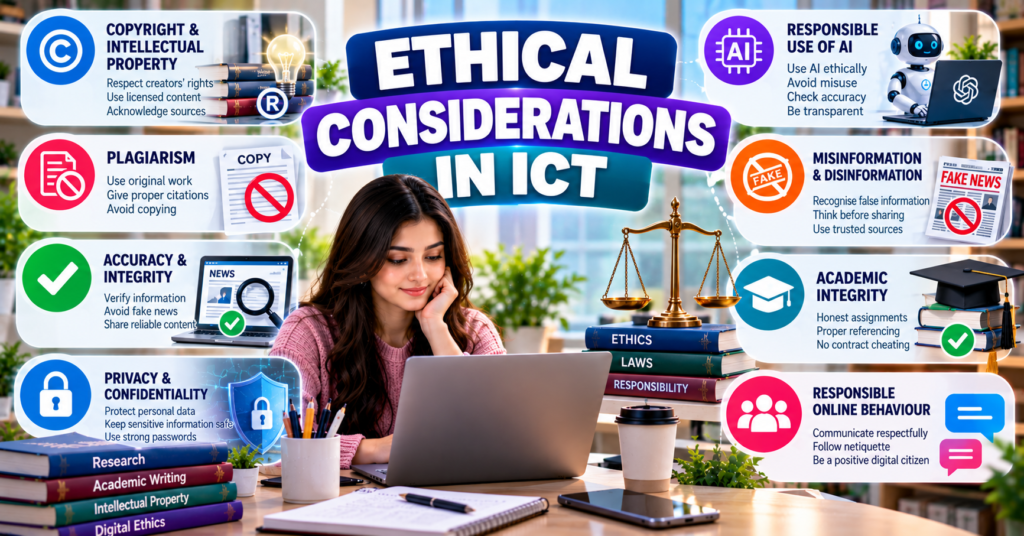
Ethical considerations in the use of ICT platforms and tools are the moral principles and standards that guide people when they create, access, modify, store and share digital information.
Ethical use of ICT requires users to:
- Respect intellectual property
- Follow copyright rules
- Avoid plagiarism
- Acknowledge information sources
- Create original content
- Verify information before sharing
- Avoid misinformation and fake news
- Maintain accuracy and integrity
- Protect confidential information
- Use artificial intelligence responsibly
- Avoid manipulating data
- Accept responsibility for digital actions
For BS Chemistry students, ICT ethics is important when preparing assignments, laboratory reports, presentations, research projects and scientific content.
2. Meaning of Ethics
2.1 Definition
Ethics refers to principles that help people decide what is right, fair, honest and responsible.
An action may be technically possible but ethically unacceptable.
For example, a student may be able to copy an online assignment, but doing so is dishonest and unethical.
2.2 ICT Ethics
ICT ethics, also called digital ethics, refers to responsible behaviour when using computers, mobile devices, software, networks, digital information and online platforms.
ICT ethics applies to:
- Websites
- Social media
- Learning Management Systems
- Artificial intelligence tools
- Cloud storage
- Scientific databases
- Online journals
- Shared documents
- Digital laboratories
2.3 Legal and Ethical Issues
Legal and ethical issues are related but not identical.
| Legal issue | Ethical issue |
|---|---|
| Determined by law | Determined by principles of right and responsible behaviour |
| Violation may result in legal punishment | Violation may result in loss of trust or academic discipline |
| Example: copyright infringement | Example: taking credit for another person’s idea |
| Laws differ among countries | Ethical values may be broader than legal requirements |
An action may not lead to legal punishment but may still be academically or professionally unethical.
3. Importance of Ethics in ICT
Ethical use of ICT is important because digital information can be copied, changed and distributed rapidly.
ICT ethics helps:
- Protect creators’ rights.
- Maintain academic honesty.
- Improve trust in digital information.
- Prevent misinformation.
- Protect research data.
- Respect privacy.
- Encourage original work.
- Prevent unfair academic advantage.
- Support responsible scientific communication.
- Protect individuals and institutions from harm.
4. Intellectual Property
4.1 Definition
Intellectual property (IP) refers to creations of the human mind that may receive legal protection.
Examples include:
- Books
- Research papers
- Inventions
- Software
- Photographs
- Videos
- Music
- Designs
- Scientific diagrams
- Chemical processes
- Databases
- Educational presentations
4.2 Intellectual Property Rights
Intellectual Property Rights (IPR) are the legal rights given to creators or owners of intellectual work.
These rights allow the owner to control how the work is:
- Used
- Copied
- Modified
- Published
- Distributed
- Sold
- Licensed
4.3 Importance in Education
Intellectual property rights encourage:
- Creativity
- Research
- Innovation
- Publication
- Investment in new technologies
- Fair recognition of creators
Students should respect the work of authors, researchers, teachers, software developers and other creators.
5. Major Types of Intellectual Property
5.1 Copyright
Copyright protects original creative and intellectual works.
5.2 Patent
A patent provides legal protection for a new and useful invention or process for a limited period, subject to applicable law.
5.3 Trademark
A trademark protects a name, symbol, design, word or sign used to identify a business, product or service.
5.4 Trade Secret
A trade secret is valuable confidential information that gives an organisation a business advantage.
Examples include:
- Manufacturing methods
- Industrial formulas
- Chemical processes
- Customer information
- Business strategies
5.5 Industrial Design
An industrial design protects the visual appearance or design of a product.
6. Copyright
6.1 Definition
Copyright is the legal protection given to the creator or owner of an original work.
Copyright may protect:
- Books
- Articles
- Research papers
- Photographs
- Videos
- Audio recordings
- Presentations
- Diagrams
- Computer programs
- Websites
- Databases
- Educational notes
6.2 Rights of a Copyright Owner
The copyright owner may control the right to:
- Copy the work
- Publish it
- Distribute it
- Display it publicly
- Perform it
- Adapt or modify it
- Translate it
- Permit others to use it
6.3 Copyright Symbol
The copyright symbol is:
©
It may appear with:
- Owner’s name
- Year of publication
- Rights statement
Example:
© 2026 Author Name. All rights reserved.
6.4 Copyright and Online Content
The availability of content on the internet does not automatically make it free to copy.
Copyright can apply to:
- Google Images results
- YouTube videos
- Online articles
- Blog posts
- Social-media photographs
- PDF books
- Digital illustrations
- Online course materials
7. Copyright Issues in ICT
7.1 Unauthorised Copying
Copying digital content without permission may violate copyright.
Examples include:
- Downloading a paid book illegally
- Copying an entire article
- Reposting a photograph without permission
- Sharing paid course videos
- Installing unauthorised software copies
7.2 Unauthorised Distribution
A person may have lawful access to a digital resource but may not have permission to distribute it.
For example, a student may access an article through the university library but may not be permitted to upload it publicly.
7.3 Unauthorised Modification
Changing another person’s content does not automatically make it original.
Examples include:
- Changing colours in an image
- Removing a watermark
- Rewording a few sentences
- Cropping a copyrighted photograph
- Translating content without permission
7.4 Piracy
Digital piracy means illegally copying, downloading, using or distributing protected digital material.
It may involve:
- Software
- E-books
- Films
- Music
- Online courses
- Subscription content
7.5 Software Licence Violation
Computer software is normally used under a licence.
Licence violations may include:
- Installing one-user software on many devices
- Sharing activation keys
- Using cracked software
- Removing licence protection
- Distributing licensed software without permission
8. Copyright Ownership in Academic Work
8.1 Student Work
A student’s original assignment, photograph, presentation or research writing may be protected as intellectual work.
However, institutional rules may affect how university-related work can be used or published.
8.2 Teacher’s Material
Lecture slides, recorded classes and course notes may belong to the teacher or institution.
Students should not publicly upload them without permission.
8.3 Group Projects
In a group project, ownership may be shared among group members.
The group should agree on:
- Contribution
- Authorship
- Use of files
- Publication
- Presentation
- Credit
8.4 Research-Supervisor Relationship
Students should follow institutional rules when publishing research conducted under supervision.
The work may involve rights belonging to:
- Student
- Supervisor
- University
- Research funder
- Laboratory
- Industry partner
9. Fair Use and Educational Use
9.1 General Idea
Some legal systems allow limited use of copyrighted work for purposes such as:
- Education
- Research
- Criticism
- Review
- Reporting
However, educational use does not mean unlimited copying.
9.2 Factors to Consider
The acceptability of limited use may depend on:
- Purpose of use
- Nature of the original work
- Amount copied
- Effect on the original work’s market
- National copyright laws
- Institutional policies
9.3 Important Precaution
Students should not assume that adding a citation makes every form of copying legally acceptable.
Citation acknowledges the source, but permission may still be required for extensive reproduction.
10. Public Domain
10.1 Definition
A work is in the public domain when copyright protection does not apply or has expired under the relevant law.
Public-domain works may generally be used without requesting copyright permission.
10.2 Attribution
Even when a work is in the public domain, academic practice may still require acknowledgement of the original creator or source.
11. Open Licences and Creative Commons
11.1 Open Licence
An open licence allows others to use a work under stated conditions.
11.2 Creative Commons
Creative Commons (CC) licences provide standard ways for creators to permit particular uses of their work.
Common licence conditions include:
11.2.1 Attribution
The user must credit the creator.
11.2.2 ShareAlike
Modified work must be distributed under the same or a compatible licence.
11.2.3 NonCommercial
The work cannot be used for commercial purposes without additional permission.
11.2.4 NoDerivatives
The work may be shared but cannot be modified without permission.
11.3 Checking a Licence
Before using content, students should check:
- Licence type
- Attribution requirement
- Permission to modify
- Permission for commercial use
- Required link to the licence
- Name of the creator
12. Proper Attribution
12.1 Definition
Attribution means giving proper credit to the creator or source of information.
12.2 Basic Attribution Elements
An attribution may include:
- Author or creator
- Title
- Source
- Publication date
- Website or publisher
- Licence
- Link
- Date accessed, where required
12.3 Attribution and Citation
| Attribution | Citation |
|---|---|
| Gives credit to a creator | Identifies the academic source of information |
| Commonly used for media and licensed content | Commonly used in assignments and research |
| May include licence details | Follows a referencing style |
| Example: image credit | Example: in-text research citation |
13. Plagiarism
13.1 Definition
Plagiarism is presenting another person’s words, ideas, data, images or work as one’s own without proper acknowledgement.
Plagiarism is an ethical and academic violation.
13.2 Why Plagiarism Is Wrong
Plagiarism:
- Is dishonest
- Denies credit to the original creator
- Misleads the reader
- Produces an unfair academic advantage
- Damages trust
- Prevents genuine learning
- Can damage academic and professional reputation
14. Types of Plagiarism
14.1 Direct Plagiarism
Copying text word for word without quotation marks or citation.
14.2 Mosaic Plagiarism
Combining copied phrases from different sources while making only small changes.
It is also called patchwork plagiarism.
14.3 Paraphrasing Plagiarism
Changing some words or sentence structure but using the original idea without citation.
14.4 Self-Plagiarism
Reusing one’s own previously submitted work without permission or acknowledgement.
14.5 Accidental Plagiarism
Failing to cite correctly because of carelessness or poor understanding.
Accidental plagiarism may still be treated as an academic violation.
14.6 Source-Based Plagiarism
Providing false, incomplete or misleading source information.
Examples include:
- Inventing a reference
- Citing a source that was not consulted
- Citing a secondary source as if it were the original
14.7 Data Plagiarism
Using another person’s experimental data without permission or acknowledgement.
14.8 Image Plagiarism
Using photographs, graphs, diagrams or scientific images without credit or permission.
14.9 Idea Plagiarism
Using another person’s original idea, theory or research proposal without acknowledgement.
14.10 Contract Cheating
Paying or asking another person to produce an assignment and submitting it as one’s own.
15. Plagiarism in Chemistry
Chemistry students may commit plagiarism by:
- Copying laboratory reports
- Using another group’s observations
- Reusing graphs without credit
- Copying reaction mechanisms
- Submitting another student’s calculations
- Taking experimental photographs without permission
- Copying research discussions
- Inventing or copying references
- Using published chemical structures without acknowledgement where required
15.1 Similar Results Are Not Automatically Plagiarism
Different students may obtain similar numerical results from the same experiment.
Plagiarism occurs when a student copies another person’s:
- Data
- Explanation
- Calculation steps
- Graph
- Discussion
- Conclusion
Students should record and report their own observations honestly.
16. Paraphrasing
16.1 Definition
Paraphrasing means expressing information from a source in one’s own words and sentence structure while preserving the original meaning.
A citation is still required.
16.2 Correct Paraphrasing Process
- Read the original source carefully.
- Understand the main idea.
- Close or set aside the source.
- Write the idea in your own words.
- Compare it with the original.
- Ensure the wording and structure are different.
- Add an appropriate citation.
16.3 Poor Paraphrasing
Poor paraphrasing involves replacing only a few words with synonyms while keeping the original sentence structure.
16.4 Paraphrasing and Summary
| Paraphrasing | Summary |
|---|---|
| Restates a specific idea in new words | Presents the main points briefly |
| May have a similar length to the source passage | Is normally shorter |
| Requires citation | Requires citation |
| Preserves detailed meaning | Focuses on central meaning |
17. Quotations
17.1 Direct Quotation
A direct quotation uses the exact words of a source.
Exact words should normally be placed within quotation marks and followed by a citation.
17.2 When to Quote
A quotation may be used when:
- The original wording is important.
- A definition is being discussed.
- A short authoritative statement is required.
- The exact language is being analysed.
17.3 Avoid Excessive Quotation
An assignment should not consist mainly of quotations. Students must demonstrate their own understanding and analysis.
18. Citation and Referencing
18.1 Citation
A citation identifies the source of information within the text.
18.2 Reference
A reference provides complete publication information so that readers can locate the source.
18.3 Bibliography
A bibliography is a list of sources used or consulted in preparing a document.
18.4 Common Referencing Styles
Common styles include:
- APA
- Harvard
- MLA
- Chicago
- Vancouver
- ACS
The American Chemical Society (ACS) style is commonly associated with chemistry publications.
Students should use the style required by their teacher or institution.
19. When Citation Is Required
Citation is generally required for:
- Direct quotations
- Paraphrased ideas
- Summarised information
- Statistics
- Research results
- Theories
- Methods from another source
- Images
- Tables
- Graphs
- Diagrams
- Chemical data obtained from a database
Citation may not be required for widely known facts, but students should be careful about what counts as common knowledge.
20. Reference-Management Tools
Students can use reference-management applications such as:
- Zotero
- Mendeley
- EndNote
These tools can help:
- Store reference details
- Organise research papers
- Insert citations
- Create bibliographies
- Change referencing styles
- Attach PDF files
Automatically generated references must still be checked for accuracy.
21. Plagiarism-Detection Tools
21.1 Purpose
Plagiarism-detection software compares submitted writing with available sources and identifies matching text.
21.2 Similarity Report
A similarity report shows text that matches other sources.
A similarity percentage does not automatically prove plagiarism.
Matched content may include:
- Correctly quoted text
- References
- Common phrases
- Standard terminology
- Improperly copied material
21.3 Student Responsibility
Students should not try to “beat” a plagiarism checker through:
- Hidden characters
- Unnatural paraphrasing
- Replacing letters
- Translating copied work
- Using automatic rewriting tools
The goal should be originality and honest citation.
22. Ensuring Originality in Content Creation
Original content reflects the student’s:
- Understanding
- Analysis
- Reasoning
- Interpretation
- Experimental work
- Writing style
- Conclusions
22.1 Steps for Original Academic Work
- Understand the assignment.
- Collect information from reliable sources.
- Keep complete source details.
- Make notes in your own words.
- Separate quotations from personal notes.
- Create an original outline.
- Write the first draft independently.
- Cite borrowed ideas.
- Add your own analysis.
- Check references.
- Review the similarity report if available.
- Revise before submission.
22.2 Originality in Group Work
Group members should clearly identify:
- Assigned tasks
- Individual contributions
- Shared data
- Final authorship
- Responsibility for editing
- Approved use of group files
One student should not take full credit for work completed by the entire group.
23. Unauthorised Use of Information Sources
23.1 Definition
Unauthorised use means accessing, copying, sharing or modifying information without permission or beyond the permitted conditions.
Examples include:
- Downloading subscription content illegally
- Sharing paid course material
- Using another student’s login
- Copying confidential research
- Accessing restricted university files
- Removing watermarks
- Distributing examination material
- Reposting private messages
23.2 Password Sharing
Students should not share:
- LMS passwords
- University portal passwords
- Journal database credentials
- Email passwords
- Software licence keys
Shared credentials can result in security breaches and violations of institutional agreements.
23.3 Unauthorised Database Access
Scientific databases may be licensed to a university. Students should use them according to institutional rules.
They should not:
- Share access with unauthorised users.
- Automatically download excessive content.
- Upload subscription articles publicly.
- Sell downloaded material.
24. Responsible Use of Images and Multimedia
Before using an image, video, diagram or audio file, students should:
- Identify the creator.
- Check copyright status.
- Review the licence.
- Request permission when required.
- Provide attribution.
- Avoid removing watermarks.
- Avoid misleading edits.
- Use the content only for the permitted purpose.
24.1 Scientific Images
Scientific images include:
- Microscopy images
- Spectra
- Chromatograms
- Molecular structures
- Experimental photographs
- Graphs
- Instrument diagrams
These images should not be copied, modified or presented without proper acknowledgement.
25. Content Accuracy
25.1 Definition
Content accuracy means that information is correct, precise, evidence-based and free from avoidable errors.
Accurate content should:
- Use correct facts
- Provide reliable data
- Use correct terminology
- Represent sources fairly
- Include appropriate units
- Distinguish facts from opinions
- Mention uncertainty where necessary
25.2 Accuracy in Chemistry
Chemistry content should correctly report:
- Chemical names
- Formulas
- Equations
- Units
- Concentrations
- Experimental conditions
- Observations
- Calculations
- Safety information
- References
A small error can completely change the scientific meaning.
For example:
- CO is carbon monoxide.
- CO₂ is carbon dioxide.
These are different compounds with different properties.
26. Content Integrity
26.1 Definition
Content integrity means that information remains complete, consistent, authentic and free from unauthorised or misleading changes.
Integrity requires:
- Honest reporting
- Accurate records
- Proper source acknowledgement
- Protection against unauthorised editing
- Clear separation of facts and opinions
- Preservation of original meaning
26.2 Data Integrity
Data integrity means that data remains accurate, complete and reliable throughout collection, processing, storage and sharing.
Data integrity can be damaged by:
- Incorrect entry
- Accidental deletion
- Unauthorised modification
- Software errors
- Fabrication
- Poor file management
- Lack of backup
27. Scientific Integrity
27.1 Definition
Scientific integrity means conducting and communicating scientific work honestly, accurately and transparently.
It includes:
- Accurate observations
- Honest calculations
- Proper methods
- Reliable records
- Fair interpretation
- Correct authorship
- Disclosure of limitations
- Proper citation
27.2 Fabrication
Fabrication means inventing data or results that were never obtained.
Example:
A student did not complete an experiment but creates false titration readings.
27.3 Falsification
Falsification means changing, omitting or manipulating data to create a misleading result.
Example:
A student removes readings that do not support the expected conclusion without scientific justification.
27.4 Selective Reporting
Selective reporting means presenting only the data that support a desired conclusion while hiding relevant conflicting results.
27.5 Duplication
Duplication means publishing or submitting the same work more than once without proper disclosure.
28. Difference Between Fabrication, Falsification and Plagiarism
| Fabrication | Falsification | Plagiarism |
|---|---|---|
| Inventing data or results | Manipulating real data or methods | Taking another person’s work |
| Data never existed | Data existed but was improperly changed | Source existed but was not credited |
| Example: creating fake readings | Example: deleting inconvenient readings | Example: copying a report |
All three are serious forms of academic and research misconduct.
29. Misinformation
29.1 Definition
Misinformation is incorrect or misleading information shared without necessarily intending to cause harm.
Examples include:
- Sharing an outdated safety procedure
- Posting an incorrect chemical formula
- Forwarding an unverified health claim
- Misunderstanding a research result
- Sharing a false message believed to be true
29.2 Causes
Misinformation may result from:
- Lack of knowledge
- Poor source evaluation
- Misreading scientific results
- Outdated information
- Translation errors
- Careless sharing
- AI-generated errors
- Misleading headlines
30. Disinformation
30.1 Definition
Disinformation is false or misleading information deliberately created or shared to deceive people.
Examples include:
- Fabricated scientific claims
- Deliberately edited images
- False information about a product
- Fake medical advice
- Invented research findings
- Manipulated statistics
30.2 Misinformation and Disinformation
| Misinformation | Disinformation |
|---|---|
| Incorrect information | Incorrect or misleading information |
| May be shared accidentally | Shared deliberately |
| Sender may believe it is true | Sender intends to deceive |
| Corrected through education and verification | May require investigation and reporting |
31. Fake News
31.1 Definition
Fake news is false or misleading content presented in a way that resembles genuine news.
It may be created to:
- Attract attention
- Earn advertising income
- Influence opinions
- Damage reputations
- Promote products
- Create fear
- Cause confusion
31.2 Signs of Fake News
Possible warning signs include:
- Shocking headline
- No named author
- Unknown website
- No evidence
- Emotional language
- Spelling mistakes
- Manipulated photograph
- Missing publication date
- Requests to share urgently
- Claims that reliable organisations are hiding the truth
32. Manipulated Digital Content
32.1 Edited Images
Images may be:
- Cropped
- Retouched
- Combined
- Recoloured
- Removed from context
- Given a false caption
32.2 Edited Videos
Video clips may be shortened or rearranged to change their meaning.
32.3 Deepfakes
A deepfake is synthetic or manipulated media created using artificial intelligence to make a person appear to say or do something that did not occur.
32.4 Manipulated Graphs
Graphs may mislead readers through:
- Incorrect scales
- Missing labels
- Unequal intervals
- Selective data
- Truncated axes
- Misleading colours
- Three-dimensional effects
32.5 Manipulated Scientific Images
Scientific images may be improperly altered by:
- Removing unwanted features
- Copying areas
- Changing contrast selectively
- Combining results without disclosure
- Hiding experimental errors
Adjustments must follow scientific and publication standards and should not change the meaning of the data.
33. Evaluating Information Sources
Students should evaluate sources before using or sharing information.
33.1 Authority
Ask:
- Who is the author?
- What are the author’s qualifications?
- Which institution published the content?
- Is the author experienced in the field?
33.2 Accuracy
Ask:
- Is evidence provided?
- Are references included?
- Can the claims be verified?
- Are chemical names, values and units correct?
33.3 Currency
Ask:
- When was it published?
- Has it been updated?
- Is recent information required?
33.4 Relevance
Ask:
- Does the source answer the research question?
- Is it suitable for university-level work?
- Is it directly related to the topic?
33.5 Purpose
Ask:
- Is the content educational?
- Is it advertising something?
- Is it trying to persuade?
- Is it expressing an opinion?
- Is there a conflict of interest?
34. Reliable Sources for Chemistry
Reliable sources may include:
- Peer-reviewed journals
- University publications
- Scientific textbooks
- Government institutions
- Recognised scientific organisations
- Official chemical databases
- Research institutions
- Safety Data Sheets from reliable suppliers
Less reliable sources may include:
- Anonymous social-media posts
- Unreferenced blogs
- Viral videos
- Promotional content
- AI-generated text without verification
- Screenshots without context
- Unverified online notes
35. Primary and Secondary Sources
35.1 Primary Source
A primary source presents original research or first-hand information.
Examples include:
- Original research article
- Experimental report
- Thesis
- Patent
- Laboratory record
- Original dataset
35.2 Secondary Source
A secondary source analyses, interprets or summarises primary sources.
Examples include:
- Review article
- Textbook
- Encyclopedia
- Literature review
35.3 Use in Academic Work
Primary sources are useful for detailed research evidence, while secondary sources help students understand the wider topic.
36. Peer Review
36.1 Definition
Peer review is the evaluation of academic work by qualified experts in the same field before publication.
36.2 Importance
Peer review may help identify:
- Methodological weaknesses
- Incorrect interpretation
- Missing evidence
- Ethical problems
- Writing problems
Peer review improves quality but does not guarantee that every published statement is completely correct.
37. Fact-Checking Process
Before sharing information, students should:
- Read beyond the headline.
- Identify the original source.
- Check the author.
- Check the publication date.
- Examine supporting evidence.
- Compare with reliable sources.
- Check images and graphs.
- Distinguish fact from opinion.
- Identify possible bias.
- Avoid sharing if verification is not possible.
37.1 Cross-Verification
Cross-verification means confirming information through more than one reliable and independent source.
38. Verifying Scientific Claims
When evaluating a scientific claim, ask:
- Was an experiment conducted?
- Is the method explained?
- Was the sample size sufficient?
- Were results peer-reviewed?
- Are limitations mentioned?
- Can the result be repeated?
- Is the conclusion supported by data?
- Do other studies report similar findings?
- Is the claim being exaggerated?
One study does not always provide a final scientific conclusion.
39. Statistics and Misleading Claims
Statistical information can be misleading when:
- Sample size is too small.
- Percentages are given without actual numbers.
- Correlation is presented as causation.
- Negative results are hidden.
- Only selected time periods are shown.
- Important variables are ignored.
- Graphs use misleading scales.
39.1 Correlation and Causation
Correlation means two factors change together.
Causation means one factor directly causes another.
A correlation does not automatically prove causation.
40. Content Accuracy on Social Media
Before sharing scientific information on social media:
- Verify the claim.
- Read the complete source.
- Avoid sensational language.
- Mention uncertainty.
- Provide a reliable reference.
- Do not present personal opinion as fact.
- Correct mistakes openly.
- Avoid giving professional medical advice without qualification.
A short video or attractive infographic is not automatically scientifically accurate.
41. Responsible Use of Artificial Intelligence
41.1 AI-Generated Content
AI tools can generate:
- Text
- Images
- Presentations
- Summaries
- Computer code
- References
- Data interpretations
41.2 Ethical Risks
AI-generated content may:
- Contain factual errors
- Invent references
- Reproduce bias
- Produce copied or similar wording
- Misinterpret scientific data
- Create false images
- Reveal confidential information
- Reduce genuine learning
41.3 Responsible Student Use
Students should:
- Follow institutional rules.
- Use AI as a support tool.
- Verify all scientific information.
- Check every reference.
- Rewrite only after understanding.
- Acknowledge AI assistance where required.
- Avoid uploading confidential data.
- Maintain personal responsibility for the final work.
- Never use AI to fabricate experimental results.
- Avoid submitting AI output as personal work where prohibited.
41.4 Responsibility Cannot Be Transferred
A student remains responsible for submitted content even if an AI system created part of it.
Saying “the AI made the error” does not remove academic responsibility.
42. AI-Generated Images and Manipulation
AI-generated images should not be presented as real scientific evidence.
Students should clearly label images as:
- AI-generated
- Illustration
- Simulation
- Artist’s representation
- Edited image
An AI-generated laboratory image should never be used as proof that an experiment was performed.
43. Ethical Data Collection
When collecting data through digital tools, students should:
- Obtain necessary permission.
- Explain the purpose.
- Collect only relevant information.
- Protect participants’ identities.
- Store data securely.
- Avoid unauthorised sharing.
- Report results honestly.
- Delete data according to applicable rules.
43.1 Informed Consent
Informed consent means a participant agrees after understanding:
- Purpose of the activity
- Information being collected
- How it will be used
- Possible risks
- Right to withdraw
- Privacy arrangements
44. Privacy and Confidentiality
44.1 Privacy
Privacy is a person’s right to control access to personal information.
44.2 Confidentiality
Confidentiality is the responsibility to protect information shared in confidence.
44.3 Confidential Academic Information
Examples include:
- Student records
- Grades
- Examination material
- Research proposals
- Unpublished data
- Personal details
- Medical information
- Account passwords
44.4 Ethical Practices
Students should:
- Use secure passwords.
- Share files only with authorised users.
- Check cloud-sharing permissions.
- Avoid public links for confidential documents.
- Remove personal identifiers where appropriate.
- Log out from shared computers.
- Avoid sharing screenshots containing private data.
45. Authorship and Contribution
45.1 Authorship
Authorship means being recognised as a creator or contributor to academic work.
45.2 Ethical Authorship
Only people who made meaningful contributions should receive authorship credit.
45.3 Unethical Authorship Practices
These include:
- Adding a person who did not contribute
- Excluding a genuine contributor
- Taking full credit for group work
- Listing names without permission
- Hiding the use of hired writers
45.4 Contribution Statement
A contribution statement may explain who:
- Collected data
- Performed experiments
- Analysed results
- Prepared figures
- Wrote the report
- Reviewed the final document
46. Conflict of Interest
46.1 Definition
A conflict of interest exists when personal, financial or professional interests may influence a person’s judgment.
Example:
A researcher evaluates a chemical product while receiving money from its manufacturer.
46.2 Ethical Requirement
Conflicts of interest should be disclosed so that readers can evaluate possible bias.
47. Correcting Digital Content
If incorrect information has been shared:
- Do not hide the mistake.
- Correct it quickly.
- Explain what was wrong.
- Provide accurate information.
- Add a reliable source.
- Notify affected users where necessary.
- Remove harmful content if appropriate.
- Keep a record of major corrections.
Correcting a mistake protects trust and content integrity.
48. Ethical Sharing of Chemistry Information
Before sharing chemistry-related information, students should check:
- Chemical name
- Molecular formula
- Reaction equation
- Units
- Concentration
- Safety instructions
- Source reliability
- Copyright status
- Possible hazards
- Intended audience
Dangerous experimental procedures should not be shared without proper safety context and supervision.
49. Safety Data Sheets and Ethical Use
A Safety Data Sheet (SDS) provides information about a chemical’s:
- Hazards
- Safe handling
- Storage
- First aid
- Fire response
- Disposal
- Personal protective equipment
Students should use current and reliable Safety Data Sheets.
Editing an SDS or removing warnings is dangerous and unethical.
50. Ethical Laboratory Reporting
A laboratory report should contain:
- Actual observations
- Correct calculations
- Honest limitations
- Proper citations
- Original discussion
- Correct units
- Accurate graphs
- Reliable references
Students should not:
- Copy readings
- Invent data
- Change results to match theory
- Hide failed trials
- Copy conclusions
- Use another group’s photographs
- Fabricate references
Unexpected results should be discussed, not hidden.
51. Example: Ethical Use of an Online Source
A student finds an explanation of acid-base titration on a scientific website.
The ethical process is:
- Check the author and institution.
- Confirm that the information is accurate.
- Understand the explanation.
- Write it in original words.
- Cite the source.
- Add the source to the reference list.
- Use any image only according to its licence.
52. Example: Unethical Use of an Online Source
A student:
- Copies three paragraphs
- Changes a few words
- Removes the author’s name
- Submits the content as original work
This is plagiarism because the wording and ideas were taken without proper acknowledgement.
53. Example: Misinformation in Chemistry
A social-media post claims that mixing two common household chemicals creates a completely safe cleaning solution.
The student should not immediately share the post.
Instead, the student should:
- Identify the chemicals.
- Check reliable chemical-safety sources.
- Examine possible reactions.
- Review hazard information.
- Avoid testing the mixture without supervision.
- Correct the false claim if necessary.
Some household chemical combinations can release dangerous gases.
54. Example: Manipulation of Experimental Data
A student obtains the following titration readings:
- 24.7 mL
- 24.8 mL
- 27.5 mL
The student deletes 27.5 mL only because it does not match the other readings and gives no explanation.
This may be unethical selective reporting.
The correct approach is to:
- Record all readings.
- Examine whether a procedural error occurred.
- Identify the reading as an outlier only with scientific justification.
- Explain the decision in the report.
- Repeat the experiment when possible.
55. Benefits of Ethical ICT Use
Ethical use of ICT:
- Builds trust
- Protects creators
- Promotes original work
- Improves information quality
- Supports academic honesty
- Protects privacy
- Reduces misinformation
- Strengthens scientific research
- Improves professional reputation
- Encourages responsible innovation
56. Consequences of Unethical ICT Use
Possible consequences include:
- Loss of marks
- Assignment rejection
- Course failure
- Disciplinary action
- Loss of degree or position
- Copyright complaints
- Legal consequences
- Damage to reputation
- Withdrawal of a publication
- Loss of public trust
- Harm to individuals or society
57. Ethical Content-Creation Checklist
Before publishing or submitting digital content, check:
- Is the work original?
- Have all sources been cited?
- Do I have permission to use the images?
- Is the information accurate?
- Are the references genuine?
- Have I verified AI-generated content?
- Is the data complete and honest?
- Have I disclosed important limitations?
- Is confidential information protected?
- Could the content mislead or harm someone?
- Are facts separated from opinions?
- Have all contributors received credit?
58. Differences Between Important Concepts
58.1 Copyright and Plagiarism
| Copyright infringement | Plagiarism |
|---|---|
| Legal issue involving protected work | Ethical and academic issue involving lack of credit |
| Concerns permission to use content | Concerns presenting content as one’s own |
| Can occur even when the creator is credited | Can occur even when copyright has expired |
| May result in legal action | May result in academic discipline |
58.2 Plagiarism and Paraphrasing
| Plagiarism | Correct paraphrasing |
|---|---|
| Copies ideas or wording without credit | Restates the idea genuinely |
| Hides the original source | Clearly cites the source |
| Is academically dishonest | Is an accepted academic practice |
| May make only minor word changes | Uses original wording and structure |
58.3 Accuracy and Integrity
| Accuracy | Integrity |
|---|---|
| Information is correct | Information is complete, authentic and honestly maintained |
| Focuses on factual correctness | Focuses on trustworthiness throughout the information process |
| Example: correct chemical formula | Example: formula was not improperly changed |
| May involve correcting errors | Includes prevention of unauthorised manipulation |
58.4 Misinformation and Fake News
| Misinformation | Fake news |
|---|---|
| Any incorrect or misleading information | False content presented like genuine news |
| May be shared accidentally | Often designed to attract attention or influence opinion |
| Can occur in an assignment or post | Commonly distributed through media platforms |
59. Important Terms
Ethics: Principles used to determine right and responsible behaviour.
ICT ethics: Ethical use of digital technologies and information.
Intellectual property: Creations of the mind protected through legal rights.
Copyright: Protection given to original creative work.
Patent: Protection for an eligible invention or process.
Trademark: Protection for a brand name, sign or symbol.
Trade secret: Valuable confidential business information.
Public domain: Works not protected by copyright or whose protection has expired.
Open licence: Permission to use content under stated conditions.
Attribution: Giving credit to a creator.
Plagiarism: Presenting another person’s work as one’s own.
Paraphrasing: Restating information in original words while citing the source.
Citation: Identification of a source within academic work.
Reference: Complete information about a source.
Data integrity: Maintenance of accurate, complete and reliable data.
Scientific integrity: Honest and responsible scientific research and communication.
Fabrication: Inventing data or results.
Falsification: Manipulating methods, data or results.
Misinformation: Incorrect information shared without necessarily intending deception.
Disinformation: False information deliberately shared to deceive.
Fake news: False or misleading content presented as genuine news.
Deepfake: AI-generated or manipulated media that falsely represents a person or event.
Peer review: Evaluation of academic work by experts in the field.
Conflict of interest: A personal or financial interest that may influence judgment.
60. Short Questions for Examination Preparation
- Define ethics.
- What is ICT ethics?
- Define intellectual property.
- Name four types of intellectual property.
- What is copyright?
- What is digital piracy?
- Define public domain.
- What is an open licence?
- What is Creative Commons?
- Define attribution.
- What is plagiarism?
- Name five types of plagiarism.
- Define self-plagiarism.
- What is correct paraphrasing?
- Differentiate between quotation and paraphrasing.
- What is a citation?
- What is a reference?
- What is a similarity report?
- Define data integrity.
- What is scientific integrity?
- Define fabrication.
- Define falsification.
- Differentiate between misinformation and disinformation.
- What is fake news?
- Define a deepfake.
- What is peer review?
- What is cross-verification?
- What is a conflict of interest?
- State five rules for responsible AI use.
- Why is accuracy important in chemistry content?
61. Possible Long Questions
- Explain ethical considerations in the use of ICT platforms and tools.
- Discuss intellectual property and copyright issues in digital education.
- Define plagiarism and explain its major types.
- Explain how students can ensure originality in academic content.
- Discuss citation, referencing, paraphrasing and quotation.
- Explain misinformation, disinformation, fake news and manipulated content.
- Discuss methods for evaluating the accuracy and reliability of online sources.
- Explain scientific integrity, fabrication and falsification.
- Discuss the ethical use of AI in academic content creation.
- Explain copyright, open licences and Creative Commons.
- Discuss data accuracy and integrity in chemistry.
- Explain ethical laboratory reporting with suitable examples.
- Differentiate between copyright infringement and plagiarism.
- Discuss the consequences of unethical ICT use.
- Explain how BS Chemistry students can use ICT platforms ethically.
62. Summary
Ethical use of ICT requires honesty, responsibility, accuracy and respect for other people’s rights. Intellectual property protects creations such as books, software, research papers, images and inventions. Copyright gives creators control over the use and distribution of their original work.
Students must ensure originality by avoiding plagiarism, unauthorised copying and dishonest use of information sources. Proper paraphrasing, citation, referencing and attribution allow students to use existing knowledge while giving credit to its creators.
Content shared through ICT platforms must be accurate, complete and free from deliberate manipulation. Students should verify authors, evidence, publication dates and references before sharing information. They should distinguish misinformation from deliberate disinformation and should recognise fake news, deepfakes and manipulated graphs.
In chemistry, ethical ICT use is especially important because incorrect formulas, unsafe procedures, fabricated data and misleading scientific claims can cause serious academic and practical harm. Students must report actual observations, preserve data integrity, acknowledge sources and verify AI-generated content. Ethical digital behaviour builds trust and supports reliable education, research and scientific progress.
Ethical Considerations in ICT: Copyright, Plagiarism & Responsible Use Read More »