Table of Contents
1. Introduction
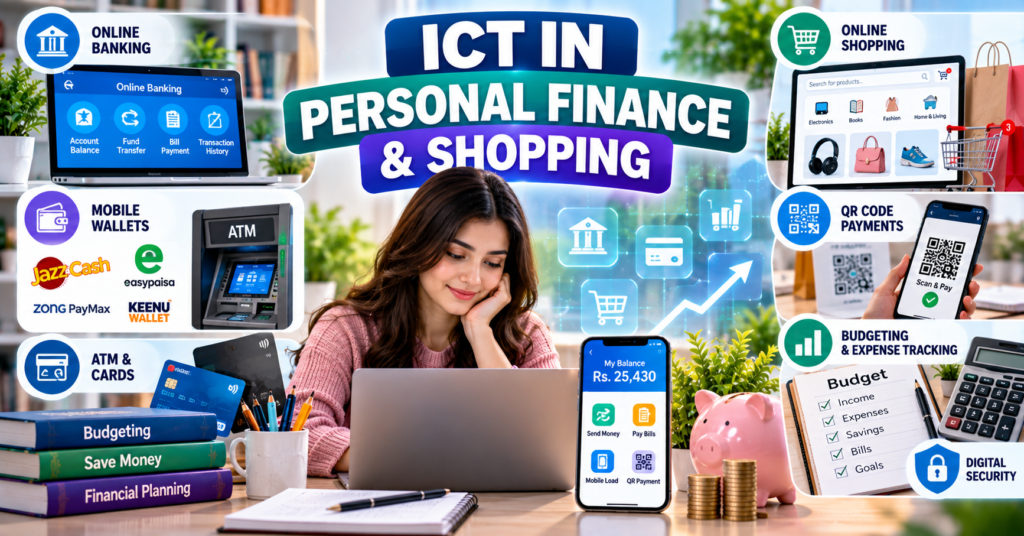
ICT in personal finance and shopping refers to the use of computers, smartphones, internet services, banking networks and digital-payment platforms to manage money and purchase goods or services.
ICT allows users to:
- Check account balances
- Send and receive money
- Pay utility bills
- Recharge mobile accounts
- Make QR-code payments
- Purchase products online
- Pay educational fees
- View transaction histories
- Prepare personal budgets
- Receive payment notifications
- Withdraw money through ATMs
- Transfer funds between banks and mobile wallets
In Pakistan, common financial ICT services include:
- JazzCash
- Easypaisa
- Zong PayMax and related wallet services
- 1LINK
- Keenu Wallet
- Bank mobile applications
- ATM networks
- Online-shopping platforms
For BS Chemistry students, these tools can be used to pay university fees, purchase books, order laboratory supplies, receive funds and manage educational expenses.
2. Personal Finance
2.1 Definition
Personal finance refers to how an individual earns, spends, saves, borrows and manages money.
The major areas of personal finance include:
- Income
- Expenses
- Saving
- Budgeting
- Banking
- Borrowing
- Investment
- Insurance
- Financial planning
2.2 Financial Management
Financial management means planning and controlling the use of money.
For a student, financial management may include:
- Recording monthly income
- Controlling unnecessary expenses
- Saving for educational needs
- Paying university fees
- Managing transport costs
- Purchasing books
- Paying mobile and internet bills
3. Role of ICT in Personal Finance
ICT has changed how people access and use financial services.
It supports:
- Mobile banking
- Internet banking
- Digital wallets
- Electronic funds transfer
- ATM services
- Online bill payment
- Online shopping
- Budgeting applications
- Digital receipts
- Transaction alerts
- Electronic statements
Before digital finance, customers usually had to visit a bank branch to perform many transactions. ICT now allows several services to be completed remotely.
4. Online Banking
4.1 Definition
Online banking means accessing banking services through the internet.
It is also called:
- Internet banking
- Digital banking
- Electronic banking
- E-banking
4.2 Common Online-Banking Services
Online banking may allow customers to:
- Check account balances
- View statements
- Transfer money
- Pay bills
- Manage debit or credit cards
- Request a cheque book
- Pay fees
- Receive transaction alerts
- Change account settings
- Download records
4.3 Mobile Banking
Mobile banking means using a bank’s mobile application or mobile service to access an account.
A mobile-banking application usually requires:
- A registered account
- A mobile number
- A password or PIN
- Identity verification
- Internet access
- One-time password verification for selected activities
4.4 Internet Banking and Mobile Banking
| Internet banking | Mobile banking |
|---|---|
| Commonly accessed through a web browser | Accessed through a mobile application |
| Can be used on a computer | Mainly used on smartphones or tablets |
| May provide detailed account-management options | Designed for quick and convenient transactions |
| Requires a secure banking website | Requires an official banking application |
5. Digital Wallets
5.1 Definition
A digital wallet, also called an electronic wallet or e-wallet, is an application or digital account used to store payment information and perform electronic transactions.
A wallet may allow users to:
- Send money
- Receive money
- Pay bills
- Purchase mobile balance
- Make merchant payments
- Pay through QR codes
- Review transaction history
5.2 Mobile Wallet
A mobile wallet is a digital wallet accessed mainly through a mobile phone.
Examples in Pakistan include:
- JazzCash
- Easypaisa
- PayMax or related Zong wallet services
- Keenu Wallet
5.3 Bank Account and Mobile Wallet
| Bank account | Mobile wallet |
|---|---|
| Provided by a licensed banking institution | Provided through an authorised digital financial service |
| May provide a wider range of banking products | Mainly focuses on payments and transfers |
| Often includes branch, ATM and card services | Mainly accessed through a mobile phone |
| May require detailed account-opening procedures | Often provides simplified digital registration, subject to regulations |
| Can hold and transfer money | Can also hold and transfer money within applicable limits |
Services and regulatory classifications may differ between providers.
6. Basic Components of a Digital Financial System
6.1 User Account
A user account identifies the customer and records transactions.
6.2 Mobile Application
The application provides the interface through which the user performs transactions.
6.3 Payment Network
A payment network carries transaction instructions between financial institutions.
6.4 Bank or Electronic Money Institution
The regulated institution manages accounts, funds and financial services.
6.5 Merchant
A merchant is a business or individual accepting payment for goods or services.
6.6 Agent
An agent may provide services such as:
- Cash deposit
- Cash withdrawal
- Account assistance
- Bill payment
6.7 Authentication System
Authentication confirms that the person requesting a transaction is authorised.
It may use:
- Password
- PIN
- One-time password
- Biometric verification
- Device verification
- Facial recognition
7. JazzCash
7.1 Introduction
JazzCash is a Pakistani digital-wallet and mobile financial service.
Its official platform provides services for sending and receiving money, paying bills and managing a digital wallet. jazzcash.com.pk
7.2 Common Services
Depending on current availability and account type, JazzCash may provide:
- Wallet-to-wallet transfer
- Transfer to bank accounts
- Money receipt
- Utility-bill payment
- Mobile balance recharge
- Mobile-package purchase
- Merchant payments
- QR-code payments
- Online payments
- Cash deposit and withdrawal through agents
- Transaction history
7.3 Opening an Account
The exact procedure can change, but it may generally involve:
- Downloading the official application.
- Entering a mobile number.
- Providing required identity information.
- Completing verification.
- Creating a secure PIN.
- Accepting the terms and conditions.
A user should only follow instructions provided by the official application or authorised service representative.
7.4 Sending Money
The general process may include:
- Open the official application.
- Select “Send Money.”
- Choose the destination, such as a wallet or bank account.
- Enter the recipient’s details.
- Enter the amount.
- Check the recipient’s name and number.
- Review fees and transaction details.
- Enter the PIN or required verification.
- Save the receipt or transaction ID.
7.5 Paying a Bill
A user may:
- Select “Bill Payment.”
- Choose the bill category.
- Select the service provider.
- Enter the consumer or reference number.
- Check the customer’s name and amount.
- Confirm the transaction.
- Save the digital receipt.
7.6 Advantages
- Convenient money transfer
- Access through a mobile phone
- Bill-payment facility
- Agent network for selected cash services
- Digital record of transactions
- Reduced need to visit a bank branch
7.7 Limitations
- Transactions may involve charges.
- Limits may apply.
- Internet or network problems may delay a transaction.
- Incorrect recipient details can cause loss.
- Fraudulent calls and messages may target users.
8. Easypaisa
8.1 Introduction
Easypaisa is a digital financial service in Pakistan that provides mobile-based money-transfer and payment facilities.
Its application supports transfers to bank accounts, Easypaisa accounts and other eligible wallets or payment channels. Apps on Google Play
8.2 Common Services
Depending on the user’s account, verification level and current service availability, Easypaisa may support:
- Sending and receiving money
- Bank transfers
- Wallet transfers
- Bill payments
- Mobile recharge
- Merchant payments
- QR-code payments
- Digital transaction records
- Cash deposit or withdrawal through authorised agents
8.3 General Registration Process
Registration may require:
- Mobile number
- CNIC information
- Identity verification
- Secure PIN
- Acceptance of terms and conditions
Users should never allow an unknown person to create or control an account on their behalf.
8.4 Applications for Students
Students may use Easypaisa to:
- Receive money from family
- Pay mobile and internet bills
- Transfer shared project expenses
- Pay selected fees
- Purchase online services
- Keep a record of payments
8.5 Advantages
- Convenient financial access
- Quick money transfer
- Digital receipt generation
- Availability of agent-based services
- Useful for people without easy access to bank branches
8.6 Limitations
- Account and transaction limits may apply.
- Charges can vary by service.
- Users require a secure phone and account.
- Scam messages may imitate the service.
- Some transactions cannot be reversed easily.
9. Zong PayMax and Related Wallet Services
9.1 Introduction
PayMax was introduced as a Zong-associated digital-payment solution designed to support mobile financial services.
Official Zong information described PayMax as offering digital payments and instant transfers to bank accounts. zong.com.pk
Because financial services can be renamed, integrated or updated, users should confirm the currently available Zong wallet service through Zong’s official website or application.
9.2 Possible Services
Depending on the active service and account type, features may include:
- Wallet-to-wallet transfer
- Bank transfer
- QR payment
- Bill payment
- Mobile recharge
- Merchant payment
- Transaction history
- Debit-card-related services
Zong’s current self-service application lists functions such as wallet and bank transfers, QR payments, bill payments and recharge options. zong.com.pk
9.3 Benefits
- Mobile access
- Digital money transfer
- Integration with telecommunications services
- Convenient payment options
- Electronic transaction records
9.4 Precautions
Users should:
- Confirm the official name of the service.
- Download only the official application.
- Read the current terms and charges.
- Verify the recipient before transferring money.
- Never share a wallet PIN or one-time password.
10. 1LINK
10.1 Introduction
1LINK is a major electronic-payment network and switch system in Pakistan. It connects participating financial institutions and supports the processing of electronic transactions.
1LINK describes itself as Pakistan’s licensed Payment System Operator and Payment Service Provider and a major national payment gateway and switch system. 1link.net.pk
10.2 Payment Switch
A payment switch is a system that directs transaction information between:
- ATMs
- Banks
- Cards
- Payment gateways
- Bill-payment services
- Other financial institutions
10.3 Shared ATM Network
A shared ATM network allows a customer of one member bank to use the ATM of another participating bank.
For example, the system may:
- Read the customer’s card.
- identify the issuing bank.
- Send the withdrawal request to that bank.
- Receive an approval or rejection.
- Allow or decline the cash withdrawal.
- Record the transaction.
10.4 Services Supported by Payment Networks
Depending on participating institutions, such networks may support:
- ATM withdrawals
- Balance enquiries
- Interbank transactions
- Bill payments
- Funds transfers
- Card-payment processing
- Shared banking infrastructure
1LINK officially lists shared-ATM and bill-payment services among its payment-network services. 1LINK
10.5 Importance
1LINK helps:
- Connect financial institutions
- Process transactions in real time
- Expand ATM access
- Support electronic payments
- Reduce dependence on individual bank networks
- Improve interoperability
11. MNET
11.1 Historical Role
MNET was an interbank connectivity and transaction-processing network in Pakistan.
Historically, it supported services such as:
- Interbank connectivity
- ATM transaction processing
- Card-related services
- Mobile-payment support
- ATM and point-of-sale hosting
11.2 MNET and 1LINK
Pakistan previously had two commonly discussed major ATM-switching networks:
- 1LINK
- MNET
They were interconnected so that customers of participating banks could perform transactions across networks.
11.3 Current Status
MNET should now be understood mainly in its historical context. It was amalgamated into MCB Bank, with the effective amalgamation date reported as April 30, 2019, while MCB became part of the 1LINK network. en.wikipedia.org
Therefore, course material that lists MNET may be describing the historical development of Pakistan’s electronic banking infrastructure.
11.4 Importance in ICT History
MNET is important for understanding:
- Development of interbank connectivity
- Growth of shared ATM services
- Early online transaction processing
- Evolution of Pakistan’s payment networks
12. Keenu Wallet
12.1 Introduction
Keenu Wallet is a digital-payment application in Pakistan.
Its official website describes it as a wallet application supporting fund transfers and bill payments. Simplifying Digital Payments
12.2 Common Services
Depending on current availability, Keenu Wallet may allow users to:
- Transfer funds
- Pay bills
- Make merchant payments
- Use digital-payment facilities
- View transaction records
- Manage money through an application
12.3 Registration
The registration process may require:
- Mobile number
- CNIC
- Identity verification
- Secure password or PIN
- Acceptance of terms
12.4 Regulation
Keenu states that its wallet service is operated by an Electronic Money Institution regulated under the relevant State Bank of Pakistan framework. keenu.pk
12.5 Benefits
- Digital fund transfer
- Convenient bill payment
- Merchant-payment support
- Electronic records
- Mobile access
12.6 Limitations
- Service availability may vary.
- Verification and transaction limits may apply.
- Users need suitable devices and network access.
- Accounts must be protected against unauthorised use.
13. Comparison of Major Financial ICT Tools
| Service | General type | Major purpose |
|---|---|---|
| JazzCash | Mobile wallet and financial platform | Transfers, bills and digital payments |
| Easypaisa | Digital financial service | Transfers, payments and wallet services |
| Zong PayMax/related wallet | Telecom-associated financial service | Transfers and digital payments |
| 1LINK | Interbank payment switch | Connecting banks, ATMs and payment services |
| MNET | Historical interbank network | Earlier interbank connectivity and processing |
| Keenu Wallet | Digital wallet | Fund transfers, bills and merchant payments |
The exact features, charges and limits of these services may change.
14. Interbank Funds Transfer
14.1 Definition
Interbank Funds Transfer (IBFT) is the electronic transfer of money from an account in one bank to an account in another bank.
14.2 Information Required
A transfer may require:
- Bank name
- Account title
- Account number
- IBAN
- Recipient’s mobile number
- Transfer amount
- Purpose of payment
14.3 IBAN
IBAN stands for International Bank Account Number.
It is a standardised format used to identify a bank account for electronic transactions.
14.4 General Process
- Select bank transfer.
- Choose the destination bank.
- Enter the account or IBAN.
- Enter the amount.
- Review the account title.
- Check applicable charges.
- Confirm through PIN or OTP.
- Save the transaction receipt.
14.5 Important Precaution
The user should verify the recipient’s name and account details before confirmation. A completed digital transfer may be difficult to reverse.
15. Raast
15.1 Definition
Raast is Pakistan’s instant digital-payment system designed to support fast electronic payments between participating financial institutions.
15.2 Possible Uses
Depending on the participating service, users may transfer money using:
- Bank-account details
- IBAN
- Registered mobile number or Raast ID
- Other supported payment identifiers
15.3 Advantages
- Fast payment processing
- Interoperability between participating institutions
- Convenient person-to-person transfer
- Support for digital financial inclusion
15.4 Precaution
The recipient’s registered identity should be checked before confirming a transfer.
16. Automated Teller Machines
16.1 Definition
An Automated Teller Machine (ATM) is an electronic banking machine that provides selected banking services without a bank employee.
16.2 Common ATM Services
ATMs may provide:
- Cash withdrawal
- Balance inquiry
- Mini statement
- PIN change
- Funds transfer
- Bill payment
- Cash deposit on supported machines
16.3 Basic ATM Components
An ATM may contain:
- Card reader
- Screen
- Keypad or touchscreen
- Cash dispenser
- Receipt printer
- Security camera
- Network connection
16.4 Safe ATM Use
Users should:
- Inspect the card slot.
- Cover the keypad while entering the PIN.
- Do not accept help from strangers.
- Collect the card, cash and receipt.
- Avoid counting cash openly.
- Report suspicious activity.
- Block the card immediately if lost.
- Review transaction alerts.
17. Debit Cards, Credit Cards and ATM Cards
17.1 Debit Card
A debit card uses money available in the linked bank account.
It may be used for:
- ATM withdrawal
- Point-of-sale payment
- Online payment
- Contactless payment
17.2 Credit Card
A credit card allows the customer to borrow money from the card issuer within an approved limit.
The borrowed amount must be repaid according to the card’s terms.
17.3 ATM Card
An ATM card is mainly used to access ATM services. Some bank cards may combine ATM and debit-card functions.
17.4 Comparison
| Debit card | Credit card |
|---|---|
| Uses money from the user’s account | Uses borrowed funds within a limit |
| Amount is deducted from the account | Amount is added to the card bill |
| Usually does not create debt by itself | Can create debt and interest charges |
| Spending is limited by available funds and limits | Spending is limited by credit limit and rules |
18. Point-of-Sale Systems
18.1 Definition
A Point-of-Sale (POS) system is used by a merchant to process a customer’s payment.
Payment may be made through:
- Debit card
- Credit card
- Contactless card
- Mobile wallet
- QR code
18.2 General Process
- Merchant enters the amount.
- Customer presents the payment method.
- The system sends the payment request.
- The financial institution checks the account.
- The transaction is approved or rejected.
- A receipt is generated.
18.3 Benefits
- Fast payment
- Less need to carry cash
- Digital transaction record
- Improved business record management
- Support for online or physical shopping
19. QR-Code Payments
19.1 Definition
A QR code is a two-dimensional code that can store payment-related information.
19.2 Payment Process
- Open the wallet or banking application.
- Select “Scan and Pay.”
- Scan the merchant’s QR code.
- Enter or confirm the amount.
- Check the merchant’s name.
- Confirm the payment through the PIN.
- Save the receipt.
19.3 Static and Dynamic QR Codes
19.3.1 Static QR Code
A static QR code may identify the merchant, but the customer may need to enter the amount manually.
19.3.2 Dynamic QR Code
A dynamic QR code can contain both merchant information and transaction-specific details such as the amount.
19.4 Safety
Users should confirm:
- Merchant name
- Amount
- Currency
- Payment status
Fake QR codes may redirect payments to an unauthorised account.
20. Online Shopping
20.1 Definition
Online shopping means purchasing goods or services through a website or mobile application.
Products may include:
- Books
- Clothing
- Electronics
- Food
- Laboratory equipment
- Educational courses
- Software
- Travel tickets
20.2 Basic Process
- Open a trusted website or application.
- Search for the product.
- Review the product description.
- Compare prices.
- Check the seller and reviews.
- Add the product to the cart.
- Enter the delivery address.
- Choose a payment method.
- Confirm the order.
- Save the order number.
- Track delivery.
- Check the item after receiving it.
21. Online-Shopping Payment Methods
Common payment methods include:
- Cash on delivery
- Debit card
- Credit card
- Bank transfer
- Mobile wallet
- QR payment
- Digital-payment gateway
21.1 Cash on Delivery
The customer pays when the product is delivered.
21.2 Card Payment
The customer enters card information on a secure payment page.
21.3 Wallet Payment
The customer pays through a digital wallet such as JazzCash, Easypaisa or another supported service.
21.4 Bank Transfer
The customer transfers money directly to the seller’s account.
This method should be used carefully because buyer protection may be limited when transferring directly to an unknown seller.
22. Safe Online Shopping
Students should:
- Shop from trusted websites.
- Check the complete website address.
- Look for secure
httpsconnections. - Read product descriptions carefully.
- Check seller ratings and reviews.
- Compare prices.
- Read return and refund policies.
- Avoid offers that appear unrealistically cheap.
- Never share an OTP with the seller.
- Keep digital receipts.
- Avoid payment through unknown links.
- Inspect delivered products promptly.
- Report suspicious transactions immediately.
23. Online-Shopping Fraud
23.1 Fake Websites
A fake website may copy the appearance of a known store to steal money or card details.
23.2 Fake Sellers
A seller may receive payment but fail to deliver the product.
23.3 Counterfeit Products
A product may be falsely presented as genuine.
23.4 Misleading Reviews
Some reviews may be fake or paid.
23.5 Non-Delivery Scam
The customer makes an advance payment, but the product is never delivered.
23.6 False Refund Message
A criminal may pretend to issue a refund and ask the customer for an OTP, PIN or card information.
24. Personal Budgeting with ICT
24.1 Budget
A budget is a plan showing expected income and expenses over a particular period.
24.2 Basic Budget Formula
\[ \text{Savings}=\text{Total Income}-\text{Total Expenses} \]
If expenses are greater than income, the person has a budget deficit.
24.3 Digital Budgeting Tools
A budget can be prepared using:
- Microsoft Excel
- Google Sheets
- Mobile finance applications
- Banking transaction history
- Digital-wallet statements
24.4 Student Budget Example
| Item | Monthly amount (PKR) |
|---|---|
| Family support or income | 25,000 |
| Transport | 6,000 |
| Food | 7,000 |
| Mobile and internet | 2,000 |
| Books and stationery | 3,000 |
| Personal expenses | 4,000 |
| Total expenses | 22,000 |
| Savings | 3,000 |
24.5 Spreadsheet Formula
If income is entered in cell B2 and total expenses in B8:
=B2-B8This formula calculates monthly savings.
25. Managing Transactions Digitally
25.1 Transaction History
A transaction history may show:
- Date
- Time
- Recipient
- Amount
- Charges
- Transaction ID
- Status
25.2 Digital Receipt
A digital receipt provides evidence of payment.
It should contain:
- Amount
- Date
- Recipient or merchant
- Reference number
- Payment status
25.3 Reconciliation
Reconciliation means comparing personal records with bank or wallet statements to identify differences.
For example, a student may compare:
- Spreadsheet records
- Wallet history
- Bank statement
- Online-shopping receipts
25.4 Benefits
Regular review helps users:
- Detect incorrect charges
- Identify fraud early
- Control spending
- Prepare a budget
- Confirm payments
- Maintain evidence of transactions
26. Transaction Status
26.1 Successful
The transaction has been completed.
26.2 Pending
The transaction is still being processed.
26.3 Failed
The system did not complete the transaction.
26.4 Reversed
The transaction amount has been returned after an unsuccessful or cancelled process.
26.5 Duplicate Transaction
The same payment appears to have been processed more than once.
26.6 What to Do After a Problem
The user should:
- Avoid repeating the transaction immediately.
- Check balance and transaction history.
- Save screenshots and transaction IDs.
- Wait for the provider’s stated processing period.
- Contact the official helpline.
- Submit a complaint if necessary.
- Never provide a PIN or OTP to someone claiming to resolve the issue.
27. Charges and Transaction Limits
Digital financial services may apply:
- Transfer fees
- Withdrawal charges
- Card charges
- Merchant-payment charges
- Taxes
- Daily limits
- Monthly limits
- Balance limits
Charges and limits can change. Users should review the provider’s current official schedule before making a transaction.
A service advertised as “free” may still involve charges at another stage, such as cash withdrawal.
28. Authentication and Financial Security
28.1 Personal Identification Number
A PIN is a secret numerical code used to authorise access or transactions.
28.2 One-Time Password
An OTP is a temporary security code sent for identity verification.
An OTP should never be shared with:
- Bank employees
- Wallet agents
- Merchants
- Friends
- Callers
- Social-media users
A genuine support representative should not need the customer’s full PIN or OTP.
28.3 Biometric Authentication
Biometric authentication uses physical characteristics such as:
- Fingerprint
- Face
- Voice
28.4 Multi-Factor Authentication
Multi-Factor Authentication (MFA) requires more than one method of verification.
For example:
- Password plus OTP
- PIN plus fingerprint
- Password plus device confirmation
29. Common Digital-Finance Frauds
29.1 Phishing
Phishing is an attempt to steal information through fake messages, emails or websites.
29.2 Vishing
Vishing is voice-call fraud.
A caller may pretend to be:
- A bank officer
- A wallet representative
- A government official
- A prize representative
29.3 Smishing
Smishing is phishing conducted through SMS or text messages.
29.4 SIM-Swap Fraud
In SIM-swap fraud, criminals attempt to take control of a victim’s mobile number.
This may allow them to receive verification codes.
29.5 Fake Prize Scam
The user is falsely told that they have won a prize and must pay a fee or share an OTP.
29.6 Screen-Sharing Fraud
A criminal asks the victim to install a remote-access or screen-sharing application and then observes account information.
29.7 Social-Engineering Fraud
Social engineering means manipulating a person into revealing secret information or authorising a transaction.
30. Safety Rules for Digital Finance
Users should:
- Never share a PIN.
- Never share an OTP.
- Use a strong device password.
- Enable biometric or multi-factor security.
- Use only official applications.
- Avoid unknown payment links.
- Check the recipient before confirmation.
- Do not perform financial transactions on public Wi-Fi.
- Keep the mobile operating system updated.
- Review transaction alerts.
- Set reasonable transaction limits.
- Block lost cards or SIMs immediately.
- Report unauthorised transactions promptly.
- Never store a PIN in an obvious note.
- Avoid using the same PIN for different services.
- Do not allow strangers to operate the application.
31. Privacy in Digital Finance
Financial applications may collect:
- Name
- CNIC information
- Mobile number
- Device details
- Location
- Transaction records
- Recipient information
- Biometric information
Users should:
- Read privacy policies.
- Review application permissions.
- Avoid unnecessary access to contacts or location.
- Use screen locks.
- Hide sensitive notifications on the lock screen.
- Avoid sharing transaction screenshots publicly.
- Delete financial information from devices before selling them.
32. Financial Inclusion
32.1 Definition
Financial inclusion means making useful and affordable financial services available to individuals and communities.
32.2 Role of Mobile Wallets
Mobile wallets can support financial inclusion by helping people:
- Send money without visiting a distant branch
- Receive payments
- Pay bills
- Use merchant services
- Maintain digital transaction records
- Access services through agent networks
32.3 Limitations
Financial inclusion may still be affected by:
- Lack of smartphones
- Poor internet coverage
- Limited digital literacy
- Lack of identification documents
- Fear of fraud
- Limited accessibility
- Language barriers
33. Advantages of ICT in Personal Finance
The major advantages include:
- Fast transactions
- Access at different times and locations
- Reduced need to carry cash
- Easy bill payment
- Digital transaction history
- Convenient online shopping
- Easier budgeting
- Immediate payment notifications
- Access to interbank transfers
- Support for financial inclusion
- Reduced travel to branches
- Better expense monitoring
34. Limitations of ICT in Personal Finance
The major limitations include:
- Cybercrime
- Internet dependence
- Electricity problems
- Technical errors
- Transaction charges
- Account limits
- Privacy concerns
- Digital illiteracy
- Risk of sending money to the wrong person
- Online-shopping fraud
- Device theft
- SIM-swap attacks
- Excessive spending due to easy payments
Digital convenience can encourage impulsive purchases. Users should follow a budget before spending.
35. Applications for BS Chemistry Students
Students can use financial ICT tools to:
- Pay university fees
- Buy chemistry books
- Purchase stationery
- Order approved laboratory materials
- Pay internet bills
- Receive money from family
- Share group-project expenses
- Register for online courses
- Pay conference fees
- Maintain a monthly budget
- Save digital receipts
- Purchase scientific software where required
35.1 Laboratory Purchasing Precaution
Chemicals, laboratory reagents and controlled substances should not be purchased casually from unverified online sellers.
Students should consider:
- Institutional approval
- Chemical purity
- Safety Data Sheet
- Storage requirements
- Legal restrictions
- Supplier reliability
- Expiry date
- Hazardous-material delivery rules
36. Responsible Online Purchasing of Scientific Materials
Before ordering scientific materials, students or laboratories should verify:
- Supplier identity
- Product name
- Chemical formula
- Required purity
- Concentration
- Quantity
- Safety information
- Storage conditions
- Expiry or retest date
- Return policy
- Delivery restrictions
- Institutional permission
Incorrect or counterfeit chemicals may produce inaccurate experimental results or create safety hazards.
37. Example of a Digital Financial Transaction
A student wants to pay an internet bill through a mobile wallet:
- The student opens the official wallet application.
- The application authenticates the user.
- The student selects bill payment.
- The student enters the consumer number.
- The system retrieves the bill.
- The student verifies the customer name and amount.
- The student confirms through a PIN.
- The payment network processes the request.
- The service provider receives confirmation.
- The student receives a digital receipt.
The process can be summarised as:
User request → Authentication → Payment network → Service provider → Confirmation
38. Difference Between Cash and Digital Payment
| Cash payment | Digital payment |
|---|---|
| Uses physical currency | Uses electronic systems |
| May not automatically create a record | Usually creates a digital record |
| Does not require internet | May require a network or internet |
| Can be lost or stolen physically | Account may be targeted by cybercrime |
| Immediate physical exchange | Electronic confirmation is generated |
| Privacy is relatively high | Transaction data may be stored |
39. Difference Between 1LINK and a Mobile Wallet
| 1LINK | Mobile wallet |
|---|---|
| A payment network and switch | A customer-facing financial account or application |
| Connects participating financial institutions | Allows users to perform payments and transfers |
| Works behind many transactions | Provides a visible interface to the customer |
| Supports network infrastructure | Supports everyday financial activities |
| Example: shared ATM processing | Example: JazzCash or Easypaisa |
40. Difference Between Digital Wallet and Payment Gateway
| Digital wallet | Payment gateway |
|---|---|
| Holds or accesses a user’s payment value or information | Processes payment requests between customer and merchant |
| Used directly by the customer | Often works behind an online checkout |
| May support transfers and bill payments | Mainly authorises and routes merchant payments |
| Example: a mobile wallet | Example: an online checkout processing service |
41. Important Terms
Personal finance: Management of an individual’s income, expenses, saving and financial planning.
Online banking: Accessing banking services through the internet.
Mobile banking: Using a mobile application to perform banking activities.
Digital wallet: An electronic account or application used for digital payments.
Electronic payment: Transfer of money through a digital system.
IBFT: Electronic transfer between accounts at different banks.
IBAN: A standardised number used to identify a bank account.
Payment switch: A system that directs transaction messages between financial institutions.
1LINK: A major interbank payment network and switch in Pakistan.
MNET: A historical Pakistani interbank transaction network later amalgamated into MCB Bank.
ATM: An electronic machine providing selected banking services.
POS: A system used by merchants to process customer payments.
QR code: A two-dimensional code that can contain payment information.
PIN: A secret numerical code used for authentication.
OTP: A temporary password used once for verification.
Phishing: Fraud through fake messages, emails or websites.
Vishing: Fraud conducted through voice calls.
Smishing: Fraud conducted through text messages.
Digital receipt: Electronic proof of a transaction.
Financial inclusion: Availability of useful and affordable financial services to all sections of society.
Reconciliation: Comparing financial records to confirm accuracy.
42. Short Questions for Examination Preparation
- Define personal finance.
- What is ICT in personal finance?
- Define online banking.
- Differentiate between internet banking and mobile banking.
- What is a digital wallet?
- Name four digital financial services used in Pakistan.
- What is JazzCash?
- State four uses of Easypaisa.
- What is PayMax?
- Explain the role of 1LINK.
- What was MNET?
- What is Keenu Wallet?
- Define interbank funds transfer.
- What does IBAN stand for?
- What is an ATM?
- Differentiate between a debit card and credit card.
- What is a POS system?
- Explain QR-code payment.
- What is a digital receipt?
- What is transaction reconciliation?
- Define PIN and OTP.
- What is phishing?
- Differentiate between vishing and smishing.
- State five safety rules for online banking.
- What is financial inclusion?
43. Possible Long Questions
- Explain the role of ICT in personal finance and shopping.
- Discuss the features, uses and limitations of JazzCash and Easypaisa.
- Explain Zong PayMax and Keenu Wallet as digital-payment tools.
- Discuss the role of 1LINK in Pakistan’s electronic-payment system.
- Explain the historical role of MNET and its relationship with interbank connectivity.
- Discuss online banking and mobile-wallet services.
- Explain the process and safety requirements of an interbank funds transfer.
- Discuss the advantages and limitations of digital payments.
- Explain online shopping and the precautions required for safe purchasing.
- Discuss common digital-finance frauds and methods of prevention.
- Explain the use of ICT in personal budgeting and transaction management.
- Compare mobile wallets, payment networks and payment gateways.
- Discuss the applications of digital finance for BS Chemistry students.
- Explain responsible online purchasing of laboratory and scientific materials.
44. Summary
ICT has changed personal finance and shopping by making money transfers, bill payments, banking services and online purchases faster and more convenient.
JazzCash, Easypaisa, Zong-associated wallet services and Keenu Wallet provide customer-facing digital-payment facilities. 1LINK operates as an important interbank payment network connecting financial institutions and supporting services such as shared ATM and bill-payment processing. MNET is important mainly in the historical development of Pakistan’s interbank infrastructure.
Digital financial services provide convenience, transaction records and wider access to payments. However, they also create risks such as phishing, fake calls, account theft, incorrect transfers and online-shopping fraud.
Users must protect their PINs, OTPs, passwords, devices and personal information. They should verify all recipient and merchant details before confirming a payment. BS Chemistry students can use these tools for educational fees, books, laboratory needs and personal budgeting, but scientific materials should only be purchased from reliable suppliers with proper institutional approval.