
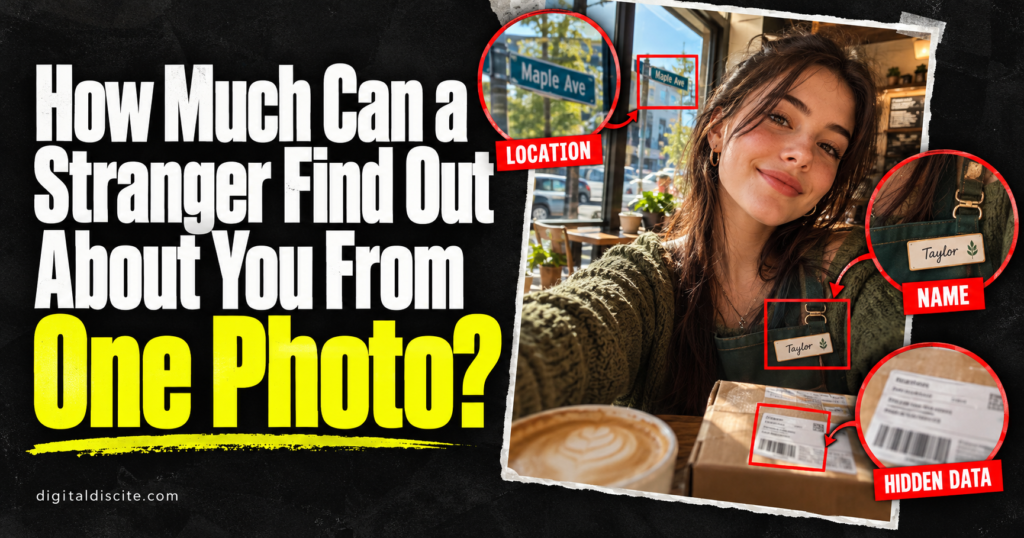
You checked your outfit, fixed the lighting, and posted the photo. But did you check the delivery label on the table behind you?
A picture you share for one reason can reveal information you never meant to publish. Sometimes it is a name on a badge. Sometimes it is a recognizable building. In an original photo file, it could even be saved location coordinates.
One photo can sometimes reveal where it was taken, connect to your public profiles, or expose personal details in the background. But it cannot reliably reveal your whole life. What someone can learn depends on the image, the file they receive, and the information already available elsewhere.
Here is what deserves a second look before you post.
Table of Contents
The Three Ways a Photo Can Reveal Personal Information
Photo privacy is easier to understand when you separate three sources of information:
| Source | What it might reveal | Important limit |
|---|---|---|
| Visible details | A name, workplace, school, address, or recognizable place | The detail must be visible and readable enough |
| File metadata | Capture time, device information, or saved GPS coordinates | The information must exist and survive sharing |
| Connections to other content | A public profile or webpage using the same image | The relevant content must be accessible and discoverable |
A stranger viewing a social media post does not necessarily receive the original file. Someone receiving an original attachment may have access to information that is absent from a displayed social media copy.
1. Where the Photo Was Taken
The most obvious location clue is a landmark. But smaller details can matter too: a restaurant sign, a school entrance, a street name, or a distinctive view from a window.
A recognizable place may identify a venue or neighborhood. A generic wall or café interior may reveal very little.
Google explicitly warns that people may infer a photo’s location from landmarks even when shared location information is excluded.
Removing GPS information does not remove the location clues inside the picture.
Also, where a photo was taken is not necessarily where you live. A hotel selfie, for example, does not establish your home address or prove you are still at the hotel.
2. Your Name, Workplace, or School
A workday selfie might include an employee badge. A graduation photo may show a university name. A child’s uniform may display a school crest.
These details can provide context that you did not mention in the caption.
Pay attention to:
- Name badges and lanyards.
- Certificates and documents on walls.
- Uniform logos.
- Work email addresses on screens.
- Event passes showing names and organizations.
None of these clues automatically proves someone’s current employment or enrollment. An old event photo may be outdated. However, it can still expose information you intended to keep separate from your public account.
3. An Address or Other Private Information in the Background
Sometimes the revealing detail is something you stopped noticing.
A parcel label may show a name and delivery address. An open laptop may display a private message. A document on the desk may contain contact details.
Mirrors and reflective surfaces can also show parts of a room that were outside your intended composition.
Before posting, inspect the image at full size. Focus on the edges and background, where your attention probably was not when taking it.
You do not have to be the main subject of a photo for your information to appear in it. Check other people’s documents and screens too.
4. Hidden Information in the Photo File
Photo files can contain metadata: information describing the image and how it was created. EXIF is a common form of photo metadata.
Depending on the device, settings, and file, this may include:
- The recorded capture date and time.
- Camera or phone model.
- Exposure and other camera settings.
- GPS coordinates, if location recording was enabled.
Apple warns that recipients of photos containing location metadata may be able to learn where those images were taken.
However, not every photo contains GPS data, and not every sharing method preserves it. A location displayed in a photo app may also be an app-generated estimate rather than coordinates embedded in the file.
Metadata is not unquestionable evidence. Dates and other fields can be edited or inaccurate.
5. Another Public Profile Using the Same Picture
Reusing a profile photo across accounts can make those accounts easier to connect.
Reverse image search services can locate matching images on indexed webpages. Google says its image search results may include similar images and websites containing the image. TinEye focuses on matching copies, including some cropped, resized, or edited versions.
For example, the same portrait might appear on a public professional biography and a personal profile. A match could connect information that was previously on separate pages.
There are limits. Search engines do not cover every website, and an image match does not automatically verify the identity of everyone pictured.
Reverse image search is also different from facial recognition. Finding another copy of a photograph is not the same as identifying any person from any selfie.
6. A Moment in Your Day—But Not Necessarily Your Routine
A photo may show that you visited a gym, attended an event, or traveled somewhere. A live caption or location tag can make the timing more revealing.
But one image rarely establishes a reliable routine. A claim that someone visits a place every morning usually needs more evidence than one post.
The larger privacy concern is accumulation. Separate posts can gradually reveal patterns that no single photo proves.
If you prefer to keep your current location private, consider posting after you leave rather than sharing an identifiable location in real time.
Can AI Find Your Exact Location From a Photo?
Sometimes image analysis can help recognize a landmark, read visible text, or suggest a place. Results depend heavily on the available clues.
A distinctive landmark is very different from an ordinary bedroom or an unmarked road. An AI tool may give a confident answer even when it is wrong.
Treat an AI location suggestion as a hypothesis that needs verification.
Likewise, AI enhancement cannot guarantee recovery of unreadable text. An enlarged or generated detail can look convincing without accurately representing the original.
If you explore image-analysis services through our AI tools pricing database, review their image retention and privacy policies before uploading personal photos.
Does Instagram Remove Photo Metadata?
Do not assume every app or sharing route handles metadata the same way.
A displayed social media image, an original file sent as an attachment, and a photo shared through a cloud link can expose different information. Platform behavior can also change.
The practical approach is to remove information you do not want to share before uploading, then check the actual shared copy where possible.
Even if location metadata is absent, the picture, caption, tags, and associated profile may still reveal a place.
How to Make a Photo Safer Before Sharing
Check the background
Look for addresses, badges, documents, screens, and recognizable views. Include reflections in your review.
Crop out unnecessary details
When possible, remove sensitive areas entirely. If covering information, use a fully opaque block and export a new copy.
Inspect the final image to ensure the text is no longer readable. Do not rely on a decorative sticker or light blur without checking the result.
Review location information
On iPhone, open the photo in Photos and swipe up or tap the Info button to inspect its information.
When sharing from Photos, use the sharing Options to turn off Location. To stop Camera collecting location for future photos, Apple documents this route:
Settings → Privacy & Security → Location Services → Camera → Never
On Android, camera settings vary by manufacturer. Look for options such as location tags, save location, or GPS tags. Disabling future location recording does not automatically remove information from existing photos.
If using Google Photos, review location-sharing controls for the relevant album or sharing method. Google distinguishes camera-recorded locations from estimated locations; its estimated locations are not shared.
Choose the audience deliberately
Some photos are suitable for a public account. Others belong in a smaller group.
A private audience reduces exposure, but recipients may still save or forward an image.
Use different pictures when account separation matters
Using separate profile images can reduce one obvious connection between accounts. It does not guarantee anonymity, because usernames, biographies, and other details may still connect them.
Avoid creating a new exposure while checking privacy
Uploading a sensitive photo to an unfamiliar “privacy scanner” means giving another service access to it. Prefer built-in or trusted local tools when they meet your needs.
Our guide to the best AI browsers discusses related questions about the information AI services can access.
A Simple Example: The Birthday Selfie
Imagine a fictional birthday selfie taken at home.
The person’s face is in focus. Behind them is a parcel label, and a work badge rests on the table.
The label might expose a delivery address. The badge might reveal an employer. If an original shared file also contains location coordinates, that could add another location clue.
Now change the picture: crop out the label and badge, exclude location information, and share it with a chosen audience.
The memory remains. Several unnecessary disclosures are reduced.
This example illustrates possible exposure; it does not mean every selfie contains enough information to identify someone’s home.
Frequently Asked Questions
Can someone get my IP address from a photo?
A normal image file does not inherently reveal the uploader’s IP address. That is different from visiting a website or opening a tracking link, which may expose connection information to the service operating it.
Does a screenshot remove location metadata?
A screenshot normally creates a new image rather than preserving the original photo’s full metadata. However, it can contain its own metadata and still show every visible clue on the screen. Inspect it before sharing.
Can someone find my address from a selfie?
Sometimes, if it contains a readable address, useful location data, or other strong clues. A face alone does not automatically reveal a home address.
Is blurring my face enough?
It may reduce facial visibility, but it does not conceal a badge, address label, location clue, caption, or file metadata.
Can a photo reveal my passwords or bank details?
Not simply because it is a photo. It could expose those details if they are visible on a screen or document in the image. Posting an ordinary selfie does not automatically grant access to your accounts.
Should I stop posting personal photos?
You can make deliberate sharing choices without abandoning photography. Check what is visible, what the file contains, and who can access it.
Before You Tap Share
One photo may reveal very little. Another may contain a readable address or a precise location tag.
The useful habit is to review the whole image, not just how you look in it.
Check the background. Check the location information. Check the audience.
For more guides on technology and digital privacy, visit Digital Discite.