
AI agents are becoming one of the biggest AI trends of 2026.
Unlike a normal chatbot that simply answers questions, an AI agent can take a goal, decide what steps are needed, use tools, access information, and complete parts of the task automatically.
The good news is that you do not always need an expensive subscription to try them.
Several powerful platforms now provide permanent free plans, free credits, or open-source versions that let you experiment with agentic AI without paying a monthly subscription.
In this guide, we compare 10 of the best free AI agents you can use in 2026, including their free-plan limits, ideal use cases, advantages, and disadvantages.
If you are comparing the wider cost of artificial intelligence software, also see Digital Discite’s AI Tools Pricing Database 2026.
Table of Contents
Best Free AI Agents in 2026: Quick Comparison
| AI Agent | Best For | Free Access | Coding Required? |
|---|---|---|---|
| Manus | General autonomous tasks | Free plan with daily credits | No |
| Zapier Agents | Business automation | 400 activities/month | No |
| Make AI Agents | Visual automation | Free plan with 1,000 credits/month | No |
| MindStudio | Building custom AI agents | 1 agent + up to 1,000 runs/month | No |
| Dify | Custom AI apps and agents | Free Sandbox plan | Low |
| Flowise | Visual AI agent building | 2 flows/assistants + 100 predictions/month | Low |
| n8n | Advanced automation | Free self-hosted Community Edition | Low–Medium |
| CrewAI | Multi-agent systems | Open-source options | Yes |
| Relevance AI | Business AI workforce | Limited free access | No/Low |
| OpenHands | AI coding agents | Open source | Yes |
Important: “Free” does not mean unlimited. Some platforms provide monthly allowances, some provide daily credits, and open-source agents can still require paid API models or hosting.
What Is an AI Agent?
An AI agent is an artificial intelligence system designed to complete tasks with some degree of autonomy.
For example, you could tell an AI agent:
“Research five competitors, compare their prices, summarize their strengths, and prepare the results in a table.”
A normal chatbot may explain how to perform the task.
An AI agent can potentially break the job into steps, search for information, process the results, use connected tools, and return a completed output.
Depending on the platform, AI agents can:
- Search the web
- Analyze documents
- Research competitors
- Send or prepare emails
- Update spreadsheets
- Work with CRM systems
- Generate reports
- Automate repetitive workflows
- Write and test code
- Schedule tasks
- Connect multiple apps
- Monitor information
That ability to take action is what makes agents different from ordinary AI chatbots.
You can explore more artificial intelligence software in Digital Discite’s AI Tools section.
1. Manus — Best Free General-Purpose AI Agent
Best for: Research, reports, planning, web tasks, and general autonomous work
Manus is one of the most interesting general-purpose AI agents available in 2026.
Instead of only chatting with you, Manus is designed to work through multi-step tasks and produce a finished result.
You might ask it to research a market, compare products, analyze information, prepare a document, or work through another complex assignment.
Its biggest advantage is accessibility.
You do not need to build workflows or understand programming before using it.
What Can Manus Do?
Manus can be useful for:
- Web research
- Competitive analysis
- Reports
- Data organization
- Planning
- Content research
- Document creation
- Multi-step online tasks
Manus Free Plan
Manus currently provides a $0 free plan.
The free tier includes access to Chat Mode and the Lite version of Manus in Agent Mode. Manus says free users receive 300 daily refresh credits, can run one task concurrently, and can maintain up to two scheduled tasks.
That makes Manus particularly attractive for people who want to experience autonomous AI without first building an agent themselves.
Pros
- Beginner-friendly
- No coding required
- General-purpose agent
- Can handle multi-step tasks
- Daily free credits
- Useful for research
Cons
- Free users receive the lighter agent model
- Complex tasks can consume credits quickly
- Only one concurrent task on the free plan
Best For
Students, researchers, marketers, freelancers, creators, and professionals who want a ready-made AI agent.
2. Zapier Agents — Best for Business Automation
Best for: Automating work across different apps
Zapier has long been known for connecting applications.
Zapier Agents takes that idea further by allowing AI agents to perform tasks using connected data and software.
For example, an agent could research a prospect, access information from connected tools, summarize the findings, and help trigger another workflow.
Zapier is especially useful when your work already involves several cloud applications.
Free Plan
Zapier currently offers an Agents Free plan with 400 activities per month.
The free plan also includes live data sources, web browsing, and access through its Chrome extension. Zapier counts actions performed by the agent as activities, so complex workflows can consume multiple activities.
Pros
- Permanent free tier
- No coding required
- Excellent app ecosystem
- Web browsing
- Live data sources
- Easy for business users
Cons
- 400 activities can disappear quickly with complex agents
- Testing can count toward the free allowance
- Advanced automation may require paid services
Best For
Small businesses, marketers, sales teams, freelancers, and anyone already using multiple SaaS tools.
3. Make — Best Free Visual Automation Platform
Best for: Visual AI automation and multi-app workflows
Make is another strong choice for people who prefer visual automation.
Instead of writing code, you create workflows by connecting modules on a visual canvas.
This makes it easier to understand what happens at every stage of an automation.
Make has also expanded its platform around AI and agentic workflows, making it useful for building systems that combine AI with business applications.
Make Free Plan
Make currently provides up to 1,000 credits per month on its free plan.
Free users also get its visual workflow builder, access to thousands of applications, routers, filters, and other core automation features. The free tier has a 15-minute minimum interval between scheduled runs.
Pros
- 1,000 free credits per month
- Excellent visual interface
- Thousands of app integrations
- No-code friendly
- Powerful workflow logic
Cons
- More complicated than simple chat-based agents
- Credit usage increases with automation activity
- Some advanced capabilities require paid plans
Best For
Marketers, automation enthusiasts, small businesses, and people who want visual control over their AI workflows.
4. MindStudio — Best for Building an AI Agent Without Coding
Best for: Beginners creating custom agents
MindStudio provides a visual environment for creating AI-powered applications and agents.
Instead of developing an AI system from scratch, you can define its instructions, connect models and data, and design how the agent behaves.
Its free allowance makes it especially interesting for experimentation.
MindStudio Free Plan
MindStudio’s free offering currently includes:
- One AI agent
- Up to 1,000 runs per month
- Access to its platform features
- Connections to 200+ AI models through its service router
- Option to bring your own API keys
The pricing page lists the platform at $0 for one agent, although usage-related costs can still apply depending on how you configure it.
Pros
- Generous run allowance
- No-code approach
- Many AI models available
- Good learning resources
- Build your own specialized agent
Cons
- Free tier is limited to one agent
- External model or API usage may cost money
- More setup than a ready-made agent such as Manus
Best For
Entrepreneurs, marketers, creators, agencies, and beginners experimenting with custom AI agents.
5. Dify — Best Free Platform for Custom AI Applications
Best for: Building AI apps, assistants, workflows, and agents
Dify is a flexible platform for building AI applications.
It allows you to connect large language models with tools, workflows, knowledge bases, and external services.
This means you can build far more than a basic chatbot.
For example, you could create an internal knowledge assistant that searches company documents and then calls external tools when necessary.
Dify Free Plan
Dify’s cloud Sandbox plan is free.
At the time of writing, it includes:
- 200 message credits
- One team workspace
- One team member
- Five apps
- 50 knowledge documents
- 50 MB of knowledge storage
Once included model credits are exhausted, users can configure their own model-provider API keys.
Pros
- Powerful agent-building environment
- Knowledge-base support
- Multiple model providers
- Custom tools
- Workflow creation
- Free cloud tier
Cons
- Only 200 included message credits
- More technical than Manus or Zapier
- External API usage may cost money
Best For
Developers, startups, SaaS builders, researchers, and businesses building customized AI applications.
6. Flowise — Best Free Visual AI Agent Builder
Best for: Visually building LLM workflows and AI assistants
Flowise is another excellent choice if you want to understand how AI agents actually work.
It uses a visual builder where components can be connected to create AI workflows and assistants.
This approach makes complex LLM systems easier to understand than building everything manually with code.
Flowise Free Plan
Flowise currently offers a cloud free plan with:
- Two flows and assistants
- 100 predictions per month
- 5 MB storage
- Evaluations and metrics
- Custom embedded chatbot branding
- Community support
The platform also has a strong open-source community.
Pros
- Visual agent building
- Beginner-friendly compared with coding frameworks
- Free cloud plan
- Open-source ecosystem
- Useful for prototypes
Cons
- Only 100 cloud predictions per month
- Some technical understanding helps
- Production-scale projects may require paid infrastructure
Best For
Developers, students, AI enthusiasts, and startups learning how agentic systems are constructed.
7. n8n — Best Free AI Agent for Advanced Automation
Best for: Technical users who want powerful self-hosted automation
n8n is one of the most powerful tools on this list.
It combines workflow automation with AI capabilities, allowing users to connect applications, APIs, databases, AI models, and agent nodes.
You could create an AI agent that receives a customer inquiry, analyzes it, searches a database, generates a response, updates a CRM, and triggers another workflow.
Is n8n Really Free?
The self-hosted Community Edition can be used without paying a normal n8n Cloud subscription.
That is important because hosted AI-agent platforms normally impose monthly limits.
However, self-hosting does not mean the entire setup costs nothing.
You may still need:
- A server or computer
- Hosting
- AI API access
- Database resources
- Technical maintenance
So n8n is better described as free self-hosted software rather than a completely zero-cost AI service.
Pros
- Extremely flexible
- Self-hosting available
- Advanced automation
- AI Agent nodes
- API integrations
- Suitable for sophisticated workflows
Cons
- Learning curve
- Self-hosting requires technical knowledge
- Model APIs may cost money
- Maintenance is your responsibility
Best For
Developers, agencies, automation professionals, startups, and technical users.
8. CrewAI — Best for Multi-Agent AI Systems
Best for: Developers creating teams of specialized AI agents
Most tools on this list focus on one agent.
CrewAI takes a different approach.
It is designed around multiple AI agents working together.
Imagine creating:
- A research agent
- A writing agent
- A fact-checking agent
- An SEO agent
You could assign each one a different role and let them collaborate on a larger task.
That is why CrewAI is particularly interesting for developers experimenting with multi-agent systems.
Is CrewAI Free?
CrewAI has open-source components that developers can use to build agentic systems.
However, this is another case where free software does not necessarily mean free operation.
Your agents may rely on paid language-model APIs, hosting, databases, or external tools.
Pros
- Built for multi-agent workflows
- Open-source ecosystem
- Highly customizable
- Excellent for experimentation
- Useful for complex agent architectures
Cons
- Coding knowledge recommended
- API costs can apply
- Not ideal for complete beginners
- Requires more setup than hosted agents
Best For
Developers, AI engineers, startups, researchers, and technical teams.
9. Relevance AI — Best for Business AI Workforces
Best for: Sales, marketing, research, operations, and business agents
Relevance AI focuses heavily on the idea of building an AI workforce.
Instead of simply chatting with AI, businesses can create agents for particular jobs.
These might include agents for:
- Lead research
- Sales
- Customer support
- Market research
- Marketing
- Data enrichment
- Operations
Its visual approach makes agent creation more accessible to non-developers than traditional frameworks.
Free Access
Relevance AI provides entry-level access for experimenting with agents, although usage allowances and available features can change.
Because agent platforms are changing their credit systems rapidly in 2026, check the current allowance before designing a production workflow around the free tier.
Pros
- Business-focused agents
- No-code/low-code approach
- Agent teams
- Integrations
- Good for sales and marketing automation
Cons
- Free usage is limited
- Complex business workflows may require upgrading
- Credit consumption varies by task
Best For
Sales teams, agencies, marketers, startups, and small businesses.
10. OpenHands — Best Free Open-Source Coding Agent
Best for: Developers and autonomous coding tasks
OpenHands is different from the business automation platforms above.
It is focused on software development.
AI coding agents can go beyond traditional autocomplete. They can inspect a codebase, modify files, run commands, debug problems, and work through development tasks.
OpenHands is open source, making it especially attractive to developers who want greater control over their coding-agent environment.
What Can OpenHands Help With?
Depending on the configuration, coding agents can assist with:
- Writing code
- Fixing bugs
- Understanding repositories
- Editing multiple files
- Running commands
- Testing software
- Working through development tasks
Is OpenHands Free?
The software is open source, but running an autonomous coding agent still requires computing resources and usually access to an AI model.
Therefore, your final operating cost depends on your model and hosting setup.
Pros
- Open source
- Developer-focused
- Autonomous coding capabilities
- Highly customizable
- Greater control over your setup
Cons
- Technical setup required
- AI model costs may apply
- Not intended for everyday non-technical automation
Best For
Programmers, software engineers, AI developers, and technical teams.
For more developer-focused software, browse Digital Discite’s Coding Tools section.
Which Free AI Agent Should You Choose?
The right option depends heavily on what you actually want the agent to do.
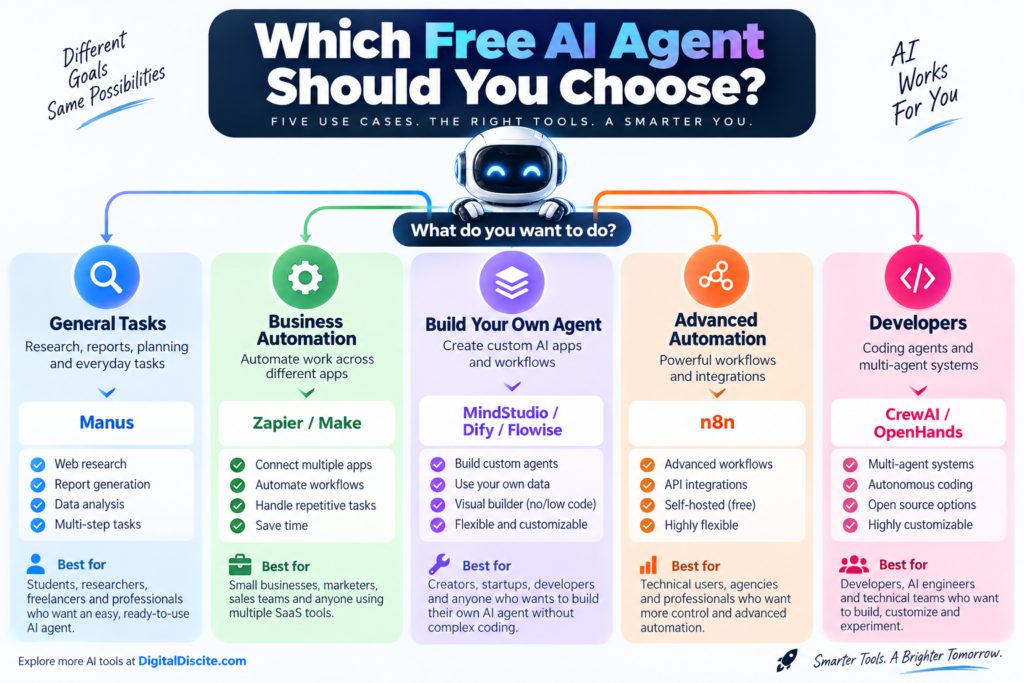
If you simply want an AI agent that can take a task and work through it without building anything yourself, Manus is one of the easiest starting points.
For automating everyday business applications, Zapier Agents and Make are easier choices.
People who want to build their own agent without becoming full-time developers should look at MindStudio, Dify, or Flowise.
More technical users who want control over complex automation should investigate n8n.
Developers interested in multi-agent systems can experiment with CrewAI, while programmers specifically interested in autonomous software development can explore OpenHands.
The important point is that these tools solve different problems. The “best” agent for writing code is unlikely to be the best one for automating a sales workflow.
Free Hosted AI Agents vs Open-Source AI Agents
There are two very different meanings of “free” in the AI-agent market.
Hosted Free Plans
Tools such as Manus, Zapier Agents, Make, MindStudio, Dify, and Flowise provide hosted infrastructure.
You create an account and start using the platform.
The advantage is simplicity.
The disadvantage is usage limits.
You may receive only a certain number of:
- Credits
- Activities
- Runs
- Predictions
- Messages
- Tasks
per month or day.
Open-Source Agents
Platforms and frameworks such as n8n Community Edition, CrewAI, and OpenHands give you much more control.
But you may need to provide the infrastructure yourself.
Your costs can therefore include:
Hosting + AI API usage + storage + maintenance
This distinction is important.
An open-source AI agent can have a $0 software licence while still costing money to operate.
Are Free AI Agents Actually Useful?
Yes, but their biggest value is experimentation.
Free tiers are excellent for learning:
- How agents work
- Which tasks are worth automating
- How many agent actions your workflow needs
- Which AI models perform best
- Whether automation actually saves time
You should test your real workflow before paying.
For example, do not create a simple “Hello World” agent and immediately purchase an annual subscription.
Give it a realistic task.
If you run a website, you might ask an agent to:
- Find five competitors.
- Collect their article titles.
- Group the titles by search intent.
- Identify missing topics.
- Produce a content-gap table.
You will quickly discover whether the agent is genuinely useful and how much of the free allowance a real task consumes.
What to Check Before Choosing a Free AI Agent
1. Free-Plan Limit
Do not stop at seeing “Free.”
Check exactly what is limited.
A provider might offer 1,000 credits, but one complicated workflow could consume many credits.
2. Integrations
An agent becomes much more useful when it can interact with the software you already use.
Look for integrations with tools such as:
- Gmail
- Google Drive
- Google Sheets
- Slack
- Notion
- CRMs
- Databases
- WordPress
- APIs
3. Model Costs
Some agent builders require you to provide an API key from an AI-model provider.
That means the agent platform might be free while the underlying AI usage is not.
4. Privacy
Think carefully before allowing an agent to access:
- Customer information
- Private documents
- Financial information
- Company databases
- Proprietary code
Review the provider’s current privacy and data-retention policies first.
5. Human Approval
For important business processes, use human approval before an agent performs an irreversible external action.
An AI agent can still misunderstand instructions or use incorrect information.
Automation should reduce repetitive work—not remove sensible oversight.
Are AI Agents Better Than Chatbots?
Not necessarily.
They serve different purposes.
| Feature | AI Chatbot | AI Agent |
|---|---|---|
| Answers questions | Yes | Yes |
| Generates text | Yes | Yes |
| Uses tools | Sometimes | Usually |
| Performs multi-step tasks | Limited | Yes |
| Makes workflow decisions | Limited | Yes |
| Connects with business apps | Sometimes | Often |
| Works autonomously | Limited | Core feature |
| Best for | Conversation | Completing tasks |
If you only need help writing an email or explaining a topic, a chatbot may be enough.
If you want AI to do something across multiple steps or tools, an agent becomes much more useful.
Why AI Agents Are Becoming Popular in 2026
The first wave of generative AI focused on answers.
The next wave is increasingly focused on actions.
Instead of asking:
“How should I research my competitors?”
people increasingly want to say:
“Research my competitors and prepare the report.”
That difference explains much of the excitement around agentic AI.
Agents can potentially reduce repetitive digital work in areas such as marketing, software development, research, customer support, sales, and administration.
However, 2026’s agent market is still changing quickly.
Pricing changes.
Credit systems change.
Models improve.
Products appear and disappear.
That is why users should avoid choosing a platform based purely on hype.
Start with the free tier and test it using the exact workflow you eventually want to automate.
Frequently Asked Questions
What are the best free AI agents in 2026?
Popular options include Manus, Zapier Agents, Make, MindStudio, Dify, Flowise, n8n, CrewAI, Relevance AI, and OpenHands. They serve different purposes, ranging from general research to business automation and coding.
Are there completely free AI agents?
Yes, some agent software is available free or open source. However, self-hosted agents may still require server resources or paid AI-model APIs. Hosted free plans normally impose usage limits.
What is the easiest free AI agent for beginners?
A ready-made general-purpose agent such as Manus is easier for beginners because you can give it instructions in natural language without constructing an automation workflow.
What is the best free AI agent for business automation?
Zapier Agents and Make are strong options for business automation because they connect AI with large ecosystems of business applications.
What is the best free AI agent builder?
MindStudio, Dify, and Flowise are worth considering if you want to create customized AI agents without building the entire system from scratch.
What is the best free open-source AI agent?
It depends on the task. n8n is useful for automation, CrewAI focuses on multi-agent systems, and OpenHands is designed around software-development agents.
Can I use free AI agents for my business?
Many platforms can be used for business workflows, but you should verify the provider’s current licence, privacy policy, usage restrictions, and commercial terms before processing customer or confidential company data.
Do AI agents require coding?
Not always.
Manus, Zapier Agents, Make, and MindStudio can be used with little or no coding. Frameworks such as CrewAI and developer-oriented tools such as OpenHands require more technical knowledge.
Can an AI agent build a website?
Some AI agents and coding agents can generate website files, applications, layouts, or code. The quality varies considerably, so generated code should be tested for functionality, security, responsiveness, and accessibility before publication.
Are AI agents safe?
AI agents can make mistakes just like other generative AI systems. The risk becomes more important when an agent can perform actions rather than merely generate text. Use permissions carefully and require human approval for sensitive or irreversible actions.
Final Thoughts
The best free AI agents in 2026 are no longer simple experimental chatbots.
They can research information, automate workflows, interact with applications, build customized AI systems, and even work on software projects.
For beginners, Manus provides an easy introduction to autonomous AI tasks.
For business automation, Zapier Agents and Make provide accessible visual options.
For building customized agents, MindStudio, Dify, and Flowise provide useful starting points.
Technical users can go much further with n8n, CrewAI, and OpenHands.
The most important rule is simple: test before you pay.
Use the free allowance to run a real task from your everyday workflow. Measure how much time it saves, how reliable the results are, and how quickly it consumes the free allowance.
Then decide whether upgrading actually makes financial sense.
Pricing and free-plan limits were checked in September 2026. AI platforms frequently change credits, limits, features, and pricing, so verify the provider’s current plan before relying on a free allowance.